GPS lagging iPhone x?
My iPhone GPS had been lagging since iOS 11. Gotten me lost a lot. Anyone else? Have seen this a lot on other forums.
About privacy and Location Services in iOS 8 and laterHow your iOS device uses Location Services
With your permission, Location Services allows apps and websites (including Maps, Camera, Weather, and other apps) to use information from cellular1, Wi-Fi2, Global Positioning System (GPS)3 networks, and Bluetooth4 to determine your approximate location5.
Apps that can show your location on the screen, including Maps, show your current (approximate) location using a blue marker. If your location can't be determined precisely, you'll see a blue circle around the marker. The size of the circle shows how precisely your location can be determined—the smaller the circle, the greater the precision.
When Location Services is active, a black or white arrow icon appears in the status bar.
Maps, directions, and location-based apps depend on data services. These data services are subject to change and might not be available in all geographic areas, resulting in maps, directions, or location-based information that might be unavailable, inaccurate, or incomplete. Compare the information provided on the device to your surroundings and defer to posted signs to resolve any discrepancies.
Learn more about how Apple and third-party apps use Location Services.
Improve GPS accuracy
GPS accuracy depends on the number of visible GPS satellites. Locating all visible satellites can take several minutes, with accuracy gradually increasing over time. To improve GPS accuracy:
- Make sure that you've set the date, time, and time zone correctly on the device in Settings > General > Date & Time. If possible, use Set Automatically.
- Keep a clear view in several directions. Walls, vehicle roofs, tall buildings, mountains, and other obstructions can block line of sight to GPS satellites. When this happens, your device uses Wi-Fi or cellular networks to determine your position until the GPS satellites are visible again.
Reset or disable Location Services
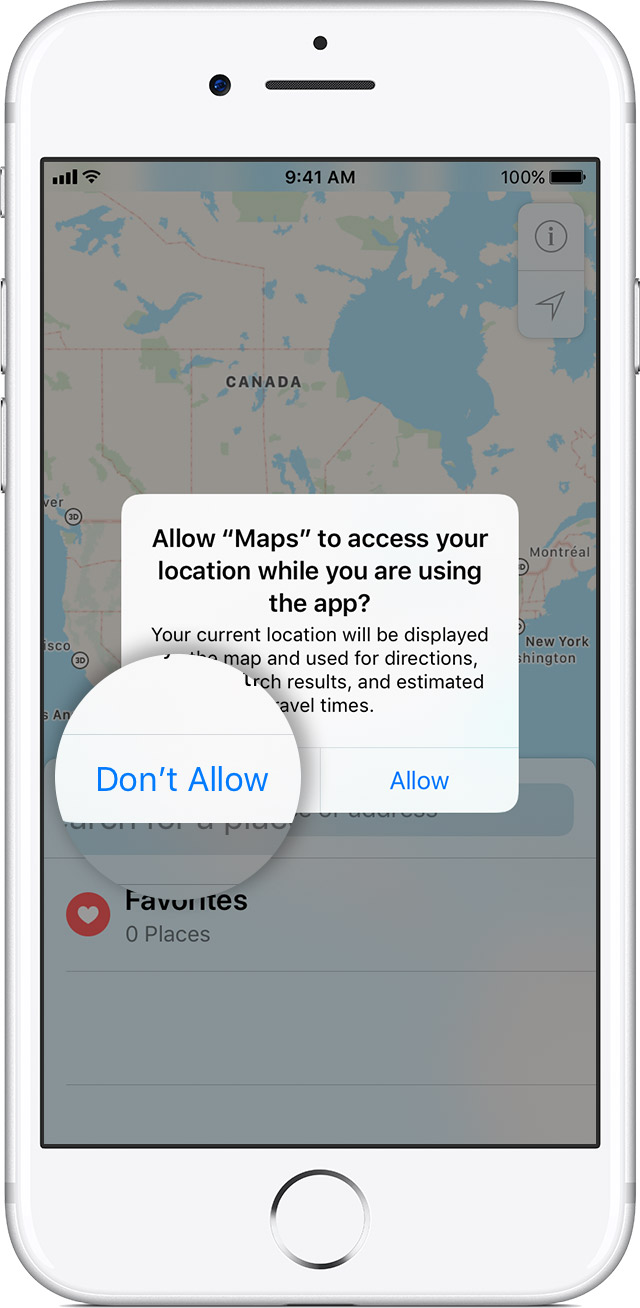
Location warnings are the requests that apps (such as Camera, Compass, and Maps as well as location-based third-party apps) make to use Location Services with those apps. An app will ask for permission the first time it needs to access Location Services data. Tapping Allow will give that app permission to use Location Services as needed. Tapping Don't Allow will prevent an app from accessing Location Services data. Apps won't use your location until they have asked for your permission and you grant permission.
If you would like to reset all of your location settings to the factory default, go to Settings > General > Reset and tap Reset Location & Privacy. When your location and privacy settings are reset, apps will stop using your location until you grant them permission.
About privacy and Location Services in iOS 8 and laterHow your iOS device uses Location Services
With your permission, Location Services allows apps and websites (including Maps, Camera, Weather, and other apps) to use information from cellular1, Wi-Fi2, Global Positioning System (GPS)3 networks, and Bluetooth4 to determine your approximate location5.
Apps that can show your location on the screen, including Maps, show your current (approximate) location using a blue marker. If your location can't be determined precisely, you'll see a blue circle around the marker. The size of the circle shows how precisely your location can be determined—the smaller the circle, the greater the precision.
When Location Services is active, a black or white arrow icon appears in the status bar.
Maps, directions, and location-based apps depend on data services. These data services are subject to change and might not be available in all geographic areas, resulting in maps, directions, or location-based information that might be unavailable, inaccurate, or incomplete. Compare the information provided on the device to your surroundings and defer to posted signs to resolve any discrepancies.
Learn more about how Apple and third-party apps use Location Services.
Improve GPS accuracy
GPS accuracy depends on the number of visible GPS satellites. Locating all visible satellites can take several minutes, with accuracy gradually increasing over time. To improve GPS accuracy:
- Make sure that you've set the date, time, and time zone correctly on the device in Settings > General > Date & Time. If possible, use Set Automatically.
- Keep a clear view in several directions. Walls, vehicle roofs, tall buildings, mountains, and other obstructions can block line of sight to GPS satellites. When this happens, your device uses Wi-Fi or cellular networks to determine your position until the GPS satellites are visible again.
Reset or disable Location Services
Location warnings are the requests that apps (such as Camera, Compass, and Maps as well as location-based third-party apps) make to use Location Services with those apps. An app will ask for permission the first time it needs to access Location Services data. Tapping Allow will give that app permission to use Location Services as needed. Tapping Don't Allow will prevent an app from accessing Location Services data. Apps won't use your location until they have asked for your permission and you grant permission.
If you would like to reset all of your location settings to the factory default, go to Settings > General > Reset and tap Reset Location & Privacy. When your location and privacy settings are reset, apps will stop using your location until you grant them permission.
It is NOT GPS hardware issue, it is with iOS 11. Why do I know this?
We have 2 iPhone 6, one upgraded to iOS 11 and one never got upgraded since 10. The one with iOS 10 there is no issue with google maps at all. The one with iOS 11 not only google maps lags by one minute which is complete useless but power drains out 3x faster than the other one. It is very obvious when the write iOS 11 a big screw up was made and they won’t admit it.
Using Apple’s own map there seems to be no lags though, but the turn by turn navigation is so stupid and inferior to google map. The fact they are continuously denying the problem maybe they are trying to drive google map competition away. Just saying.
I believe it is a poor quality gps chip and Apple is ignoring it and calling it a software issue to avoid a gigantic problem of replacing phones with this terrible chip. It is simply unreliable. The more you use it the less it works. I have screen recordings of this behavior. I also have other devices that are not new that work just fine using the same version of iOS but a different gps chip. It is the chip 100%. I am on my fourth iPhone X and hopefully before my warranty expires they will have a better chip in the newer models. My gps is virtually unusable and it is embarrassing on Apple’s part to not even acknowledge the mistake. I have a $1200 phone that cannot do one of the major things I use it for. This is by far the worst iPhone I have ever used. Don’t even get me started on the gyroscope issue when you tilt the phone to hit the back button in messages and it starts to record a blank audio message. Until a ton of people start making noise this will be silenced like the battery issue in previous models.
This is ridiculous. I paid $1600 for a X which has a gps which is virtually unusable. I’m taking the phone back to apple on Saturday and I suggest that everyone else who has the same problem dies the same thing. What really annoys me is the time I’ve wasted trying to fix the issue when apple must know full well that there is s serious problem with their hardware
Thank you, but I know all that & have tried to reset things repeatedly. This problem started with ios11, on my old 6S plus on AT&T, then on my brand new X on the same provider. Even switched to Verizon - same issue. All I've read online says lots of people are having this issue and nothing they've tried works. It would be nice if Apple actually acknowledged the problem, let alone fix it. I've had Apple products for years and I love the company, but this is REALLY frustrating.
I wish Apple would stop ignoring this! I've read a lot about it & there's no reliable fix. It could be a maps database issue, since it's crossed different iOs's, devices, AND carriers for me. I just want them to admit it's an issue & TRY something - anything! 😡
Im having this problem too. Specifically with my golf gps app. My 6s+ and 5 had great and reliable gps locations/distances but no with X it is very unreliable and inaccurate. What to do? Note, im with at&t.
I am experiencing the same issue, and started when I got my iPhone X, didn’t have this issue with my iPhone 6. It’s so frustrating. I’m soo angry cuz I’ve Lost my route several times since I got this iPhone X. Hate it so much.
I am having the same issue. Strava app is not following GPS correctly. My Apple Watch follows it just fine in the same app. Disappointing Apple that my $1200 phone is less advanced as my $400 watch. smh
Having the same issue since upgrading to the X. This is way beyond frustrating especially while driving in NYC. Never had this issue with any other iPhone. It either really lags or it tells me I’m there 5 minutes before I get there. This is not what I expect to apple and in all honesty my GPS is very important to me and it’s almost worth switching to Samsung just for the maps. I don’t pay premium money to apple to have something like the GPS what to make me through my phone out the window. This needs to be priority and I don’t understand why apple has allowed this to go on as long as it has. Steve Jobs is rolling in his grave.
Im having the same problem. App doesnt keep up with the vehicle at all. My iphone 5s had no problem here.
I thought I was the only one that was better off on my 5s. I upgraded to a 6 and have had iPhone maps accuracy issues since. I've considered downgrading b/c I use GPS a lot.
GPS lagging iPhone x?