apple error message "messages agent"
This message keeps coming up and won't go away until I enter my password.
What does it mean? Can I turn it off?
Mary Lou
MacBook, OS 10.11.6
This message keeps coming up and won't go away until I enter my password.
What does it mean? Can I turn it off?
Mary Lou
MacBook, OS 10.11.6
Welcome to the Apple Support Communities!
I understand you are being asked to enter your computer admin password for the login keychain when using the Messages app. The resource below provides steps to resolve this specific issue.
If your Mac keeps asking for the login keychain password
The password of your macOS user account might not match the password of your login keychain. Either create a new login keychain or update it with your new password.
After you or your Mac administrator resets the password of your macOS user account, your Mac might ask you to update your keychain password or enter the password of your login keychain. It might also tell you that the system was unable to unlock your login keychain. That's because your login keychain is still using your old password.
If you don't know your old password
If you don't know your old password, the solution is to create a new login keychain.
If you know your old password
If you know your old password, use that password to update your existing login keychain:
- Open the Keychain Access app, which is in the the Utilities folder of your Applications folder.
- From the list of keychains on the left side of the window, select "login."
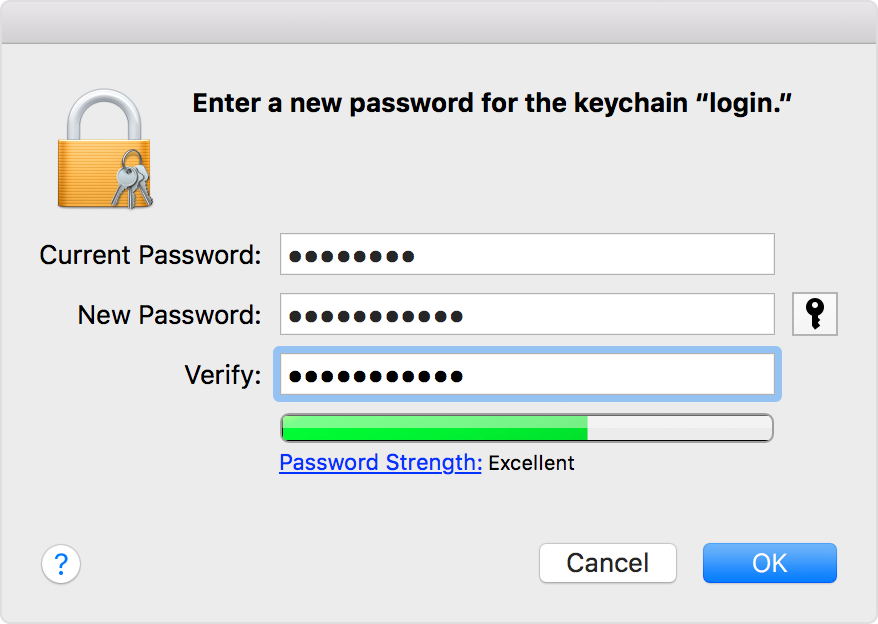
- From the Edit menu in the menu bar, choose “Change Password for Keychain 'login.'”
- Enter the old password of your user account in the Current Password field. This is the password you were using before the password was reset.
- Enter the new password of your user account in the New Password field. This is the password you're now using to log in to your Mac. Enter the same password in the Verify field.
- Click OK when done, then quit Keychain Access.
Take care.
Welcome to the Apple Support Communities!
I understand you are being asked to enter your computer admin password for the login keychain when using the Messages app. The resource below provides steps to resolve this specific issue.
If your Mac keeps asking for the login keychain password
The password of your macOS user account might not match the password of your login keychain. Either create a new login keychain or update it with your new password.
After you or your Mac administrator resets the password of your macOS user account, your Mac might ask you to update your keychain password or enter the password of your login keychain. It might also tell you that the system was unable to unlock your login keychain. That's because your login keychain is still using your old password.
If you don't know your old password
If you don't know your old password, the solution is to create a new login keychain.
If you know your old password
If you know your old password, use that password to update your existing login keychain:
- Open the Keychain Access app, which is in the the Utilities folder of your Applications folder.
- From the list of keychains on the left side of the window, select "login."
- From the Edit menu in the menu bar, choose “Change Password for Keychain 'login.'”
- Enter the old password of your user account in the Current Password field. This is the password you were using before the password was reset.
- Enter the new password of your user account in the New Password field. This is the password you're now using to log in to your Mac. Enter the same password in the Verify field.
- Click OK when done, then quit Keychain Access.
Take care.
Hi,
You need the Keychain.
The Mac will not function without it.
It is possible your system is asking for the password because you have lost the ability to Read and Write to the Keychain.
Open a Finder Window.
Use the Go Menu whilst holding down the ALT/Option Key
This displays your Library in the the Menu
Select the Library and then Navigate to Keychains.
In here should be the Login one.
Highlight it.
Use the CMD and i keys together (Get Info)
In the Info Panel that appears scroll to the Bottom.
Highlight the line that states your Shortname for your account on the computer.
Next Unlock the padlock.
Then use the little cogwheel type icon under the List.
IF you Own the file then the phrase (Make yourshortname (me) the owner) should be greyed out.
You should also have Read and Write Permissions in the List.
This pic is of a different file but shows the info:-
Whilst in theory this losing or Permissions and Ownership should not happen, it does.
Most times it can appear to be one file and can be really frustrating when it is one that is used all the time.
You might want to consider reading this Apple Document. https://support.apple.com/en-gb/HT203538
8:22 pm Sunday; March 25, 2018
Source: Change or reset the password of a macOS user account
- Open Keychain Access, which is in the Utilities folder of your Applications folder.
- Choose Preferences from the Keychain Access menu, then click the Reset My Default Keychain button in the preferences window. After you enter your new password, Keychain Access creates an empty login keychain with no password. Click OK to confirm.
If you don't see a Reset My Default keychain button, close the preferences window and select the “login” keychain from the left side of the Keychain Access window. Press the Delete key, then click Delete References.
- Choose Log Out from the Apple menu to return to the login screen.
- Log in to your account using your current computer admin password. Your account password and login keychain password should now match again.
Keychain Issues - Resolve see post by Kappy
I know my password for access to my computer. It has never been changed. Why should II have to chage it now?
In the past, I was never getting this error message. Can I just delete the keychain access app? I don't want it to constantly ask for my password. It makes me think that someone has hacked into my computer. I have never been asked for the password unless I was installing or deleting an application.
Can I turn this off, or can I delete this app?
Thanks for your help.
Mary Lou
I do not see a "Library" choice when I hold down the alt/option key and click the "Go" menu as you suggest. Could this be related to the fact that this problem as occurred on an older iMac running OS 10.6.8?
Mary Lou
HI,
You may be right as I have a computer running OS X 10.5.8 next to this iMac and it does not do it either.
It seems it was later in the OS X versions that Apple Hid the Library in the Home Folder.
If you open you Home Folder (the Little House icon one) do you see the Library listed ?
Another way is to use the Go Menu and then the Go to Folder and enter ~/Library in the dialogue box.
The ~/ stops you having to write out Hard Drive Name/Users/yourShortName/Library in full.
Joseph has another way of doing the same thing.
7:44 pm Monday; March 26, 2018
I have followed your directions, but now I get constantly asked for my keychain password every time I go to Mac Mail. I evidently either lost the keychain or have inadvertently turned it off.
When I try to click to have it remembered, it won't accept my password. If I leave that line blank, it accepts the password but won't remember it.
What have I done?
Mary Lou
I followed the link but can't see that it answers my question. Why can't the keychain remember my password? I continuously have to reenter it. When I don't ask it to remember it, it accepts my password, so I obviously have the correct password.
Mary Lou
apple error message "messages agent"