Stuck at Download and Install

I've been trying to update my iPad air 16GB from iOS 9.3.4 to iOS 11. I looked for online help an I saw that I need to have at least 2GB free space, but when I checked the free space it was 4.1GB. I tried to restart and force restart but it does not do anything at all. I doubt it would be my internet because it has been for like 8 hours. I'll be posting a picture for reference. Hope to hear a favourable response.


User uploaded file

iPad Air Wi-Fi, iOS 9.3.4, null

Posted on Apr 12, 2018 4:54 PM

Reply
Question marked as Top-ranking reply

Posted on Apr 17, 2018 6:21 AM

Hey hajharil,

If I understand correctly, you are trying to update iOS on your iPad over the air, but it is stuck at Download and Install. There are a few different reasons why this could be happening, but another thing you could do is use the first article to troubleshoot. If you are still not able to, the second article explains how you can update using iTunes.


If the download takes a long time

You need an Internet connection to update iOS. The time it takes to download the update varies according to the size of the update and your Internet speed. You can use your device normally while downloading the iOS update, and iOS will notify you when you can install it. To improve the speed of the download, avoid downloading other content or use a Wi-Fi network if you can.

Get help with over-the-air iOS updates


Update your device using iTunes

If you can’t update wirelessly on your iOS device, you can update manually using iTunes on a computer that you trust. If your computer is using Personal Hotspot on the iOS device that you’re updating, connect your computer to a different Wi-Fi or Ethernet network before you update.

  1. Install the latest version of iTunes on your computer.
  2. Connect your device to your computer.
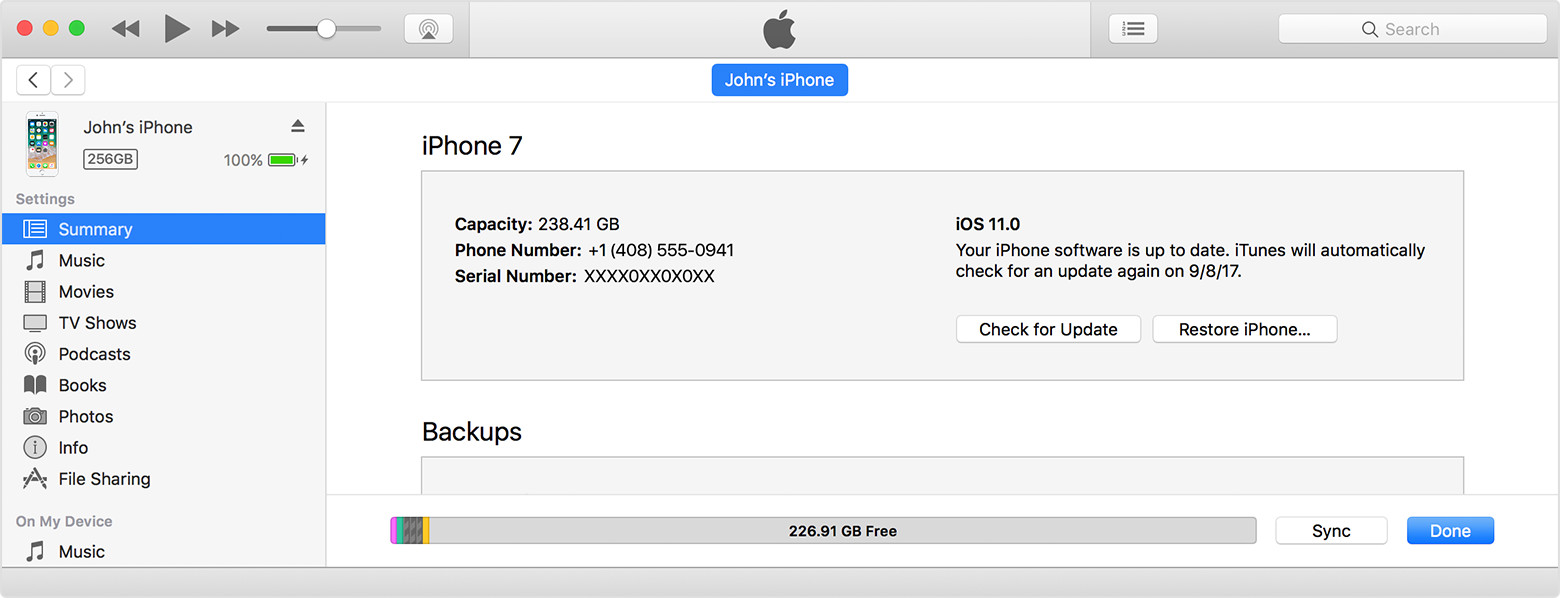
  3. Open iTunes and select your device.
  4. Click Summary, then click Check for Update.
    User uploaded file
  5. Click Download and Update.
  6. If asked, enter your passcode. If you don't know your passcode, learn what to do.

If you see error messages in iTunes or need more space to update

Get help if you see error messages while updating your device with iTunes. Or if you need more space for an update, you can delete content from your device manually.

Update your iPhone, iPad, or iPod touch


Thank you for using Apple Support Communities. Have a good one.

1 reply
Question marked as Top-ranking reply

Apr 17, 2018 6:21 AM in response to hajharil

Hey hajharil,

If I understand correctly, you are trying to update iOS on your iPad over the air, but it is stuck at Download and Install. There are a few different reasons why this could be happening, but another thing you could do is use the first article to troubleshoot. If you are still not able to, the second article explains how you can update using iTunes.


If the download takes a long time

You need an Internet connection to update iOS. The time it takes to download the update varies according to the size of the update and your Internet speed. You can use your device normally while downloading the iOS update, and iOS will notify you when you can install it. To improve the speed of the download, avoid downloading other content or use a Wi-Fi network if you can.

Get help with over-the-air iOS updates


Update your device using iTunes

If you can’t update wirelessly on your iOS device, you can update manually using iTunes on a computer that you trust. If your computer is using Personal Hotspot on the iOS device that you’re updating, connect your computer to a different Wi-Fi or Ethernet network before you update.

  1. Install the latest version of iTunes on your computer.
  2. Connect your device to your computer.
  3. Open iTunes and select your device.
  4. Click Summary, then click Check for Update.
    User uploaded file
  5. Click Download and Update.
  6. If asked, enter your passcode. If you don't know your passcode, learn what to do.

If you see error messages in iTunes or need more space to update

Get help if you see error messages while updating your device with iTunes. Or if you need more space for an update, you can delete content from your device manually.

Update your iPhone, iPad, or iPod touch


Thank you for using Apple Support Communities. Have a good one.

This thread has been closed by the system or the community team. You may vote for any posts you find helpful, or search the Community for additional answers.

Stuck at Download and Install

Welcome to Apple Support Community
A forum where Apple customers help each other with their products. Get started with your Apple Account.