How do I change email on Apple music for collage student?

So i applied for Apple Music as a collage student but I put my wrong collage email. How do I change the current collage email. I’ve tried restart the app and phone but it keeps that same email and i don’t know how to change it

Posted on May 12, 2018 3:03 PM

Reply
Question marked as Top-ranking reply

Posted on May 13, 2018 4:01 PM

Good afternoon Esegueyyy,

Welcome to the Apple Support Communities!

I understand you applied for a Student Membership for Apple Music, but used the wrong email address. Since the email address would validated by UNiDAYS, you would need to contact them for verification of the new Apple ID.
Get an Apple Music Student subscription

Get help with your UNiDAYS account

If you need help with your UNiDAYS account, contact UNiDAYS Support.


Verify your eligibility

Near the end of each year that you have an Apple Music Student subscription, you'll be asked to verify your student status. The steps are slightly different depending on if you're using an iOS device or an Android phone.

On an iOS device

During the verification period, you might see a message in the Music app that asks you to verify your status. To verify your status:

  1. Tap Verify Eligibility.
  2. Tap "Go to Website."
  3. Sign in to your institution's portal.

After you sign in to your institution’s portal, you’ll be directed back to Apple Music and see a confirmation screen.

You can also verify your student status at any time through Settings on your iOS device:

  1. Go to Settings > [your name] > iTunes & App Store.
  2. Tap your Apple ID, then tap View Apple ID. You might need to authenticate your Apple ID.
  3. Tap Subscriptions. If you have more than one subscription, tap Apple Music Membership.
  4. Tap "Verify your student status." You'll be redirected to a website at which you'll confirm your student status with UNiDAYS, a student verification service.
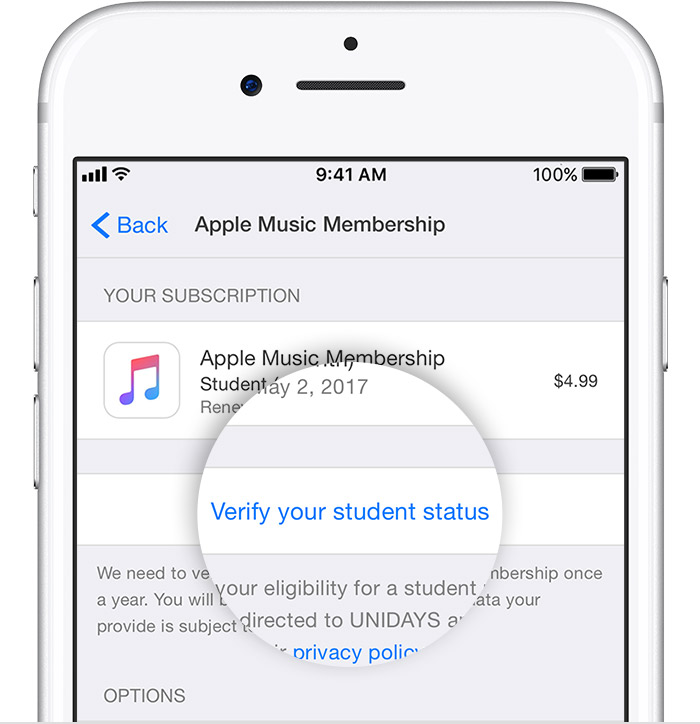
    User uploaded file
  5. Follow the prompts to verify your eligibility. If the verification is successful, you'll automatically return to Apple Music and continue your Apple Music Student subscription.

If you're no longer a student or if you complete 48 months of a Student subscription, your subscription automatically becomes an Apple Music Individual subscription. If you're prompted to verify your student status after launching Apple Music, but you are no longer a student or have completed 48 months of a subscription, tap I'm No Longer A Student. You won't be asked to verify again.

Take care.

1 reply
Question marked as Top-ranking reply

May 13, 2018 4:01 PM in response to Esegueyyy

Good afternoon Esegueyyy,

Welcome to the Apple Support Communities!

I understand you applied for a Student Membership for Apple Music, but used the wrong email address. Since the email address would validated by UNiDAYS, you would need to contact them for verification of the new Apple ID.
Get an Apple Music Student subscription

Get help with your UNiDAYS account

If you need help with your UNiDAYS account, contact UNiDAYS Support.


Verify your eligibility

Near the end of each year that you have an Apple Music Student subscription, you'll be asked to verify your student status. The steps are slightly different depending on if you're using an iOS device or an Android phone.

On an iOS device

During the verification period, you might see a message in the Music app that asks you to verify your status. To verify your status:

  1. Tap Verify Eligibility.
  2. Tap "Go to Website."
  3. Sign in to your institution's portal.

After you sign in to your institution’s portal, you’ll be directed back to Apple Music and see a confirmation screen.

You can also verify your student status at any time through Settings on your iOS device:

  1. Go to Settings > [your name] > iTunes & App Store.
  2. Tap your Apple ID, then tap View Apple ID. You might need to authenticate your Apple ID.
  3. Tap Subscriptions. If you have more than one subscription, tap Apple Music Membership.
  4. Tap "Verify your student status." You'll be redirected to a website at which you'll confirm your student status with UNiDAYS, a student verification service.

    User uploaded file
  5. Follow the prompts to verify your eligibility. If the verification is successful, you'll automatically return to Apple Music and continue your Apple Music Student subscription.

If you're no longer a student or if you complete 48 months of a Student subscription, your subscription automatically becomes an Apple Music Individual subscription. If you're prompted to verify your student status after launching Apple Music, but you are no longer a student or have completed 48 months of a subscription, tap I'm No Longer A Student. You won't be asked to verify again.

Take care.

This thread has been closed by the system or the community team. You may vote for any posts you find helpful, or search the Community for additional answers.

How do I change email on Apple music for collage student?

Welcome to Apple Support Community
A forum where Apple customers help each other with their products. Get started with your Apple Account.