How do I get started with IPad Pencil?
how do I begin using my new Pencil with IPad Pro?
iPad Pro Wi-Fi, iOS 11.2.6, Add pencil
how do I begin using my new Pencil with IPad Pro?
iPad Pro Wi-Fi, iOS 11.2.6, Add pencil
There is no button to turn on the Pencil. It's always turned on.
Here's the link again: Use Apple Pencil with iPad Pro and iPad (6th generation) - Apple Support
All you need to do is plug the Apple Pencil into the Lightning port on the iPad. It should show a pairing request on the iPad a couple of seconds after its been plugged in. Just tap on the "Pair" to complete the process.
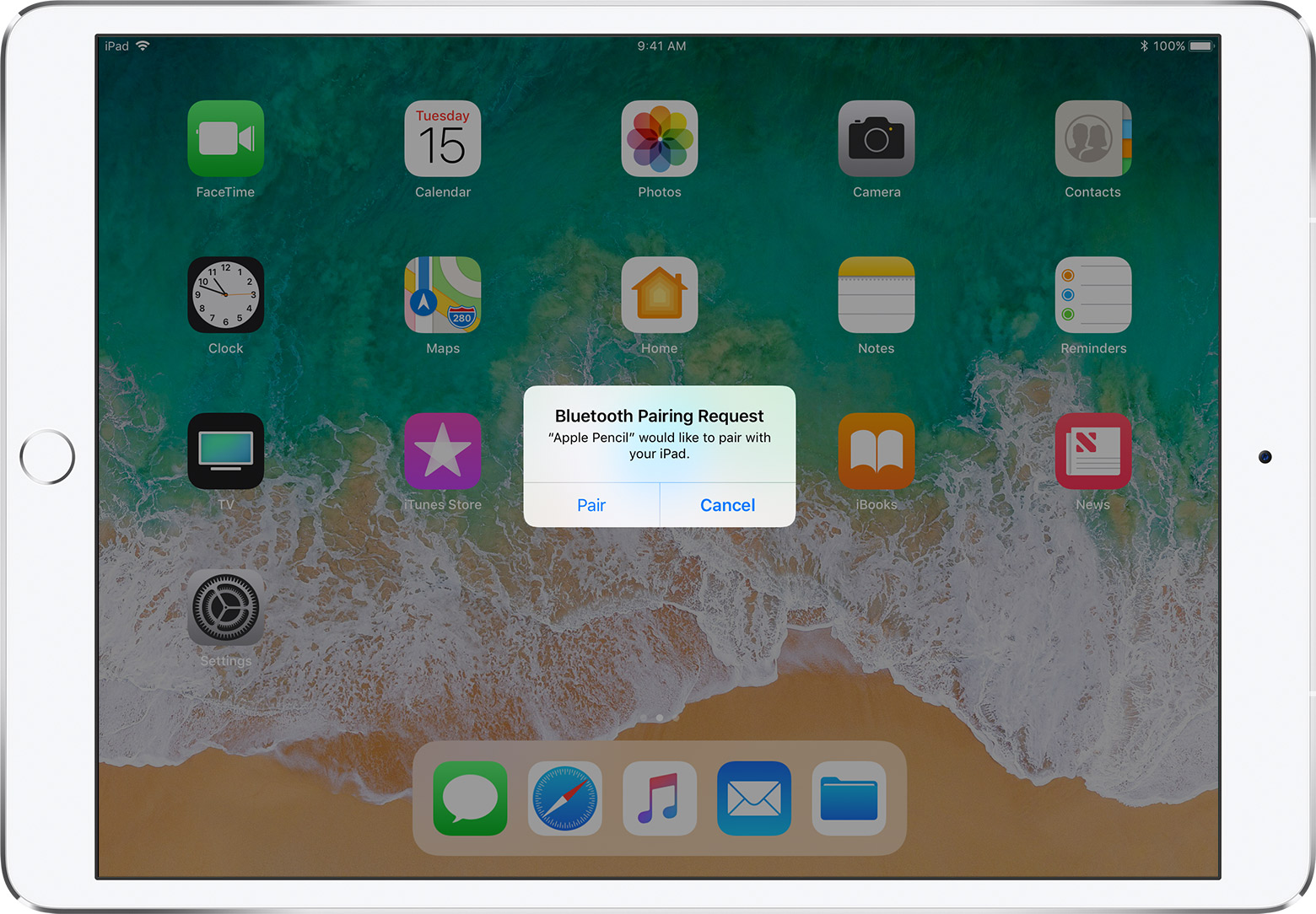
You don't really need to do anything in the Bluetooth settings screen on the iPad.
If it still won't pair, look in Settings->General->About->Model, and post the model number here.
Also, to take advantage of all of what the Apple Pencil can do, you need to seek out Apple Pencil compatible apps in the iOS App Store.
Do a search in the store for Apple Pencil apps AND Apple Pencil compatible apps.
Also, to maintain the battery integrity of your new Apple Pencil, ALWAYS maintain and keep a sufficient charge (10% or greater ) in your Apple Pencil at all times, even when not using the Apple Pencil for prolonged periods of time.
What do you want your new Apple Pencil to do?
If after you tap "Pair" it brings up a message that says "Not Connected" or does so in Bluetooth Settings, then there's something wrong with the Apple Pencil.
What happens if you try to use the Pencil after tapping the "Pair" button? Try opening say Notes, or some other App that supports it, and try using it.
If it does not work, then the issue is with the pencil, and you may need to take it to an Apple Store for diagnostics and replacement if necessary.
The model number confirms its a 6th Generation iPad, and should work with the Pencil.
Do you not get the Pairing Request screen after you plug the pencil into the iPad?
Or what exactly happens?
Sorry I didn't get the link from you but I have followed the steps provided by "pairing 6th generation iPad with Aple pencil". I have even taken off "Forget this device" and even restart iPad, all failed. It gives a message saying that make sure that pencil is near to iPad and that it is turned on, but i cannot see any button that turns on Apple Pencil.
Thank you so much for your suggestions. I look forward to using the Pencil.
Hi there
I cannot pair Apple Pencil with my New 6th generation iPad. I have tried everything it just wont pair. Can anyone let me know what I can do next...
Define "everything".
What exactly have you done?
What happens when you plug the Apple Pencil into the iPad's Lightning port?
Have you read and followed the steps in the link provided above by pjir96?
I have done all as per link provided by you above but no success. Model number for iPad is - MR7F2X/A, Thanks
Pairing screen does come up and I did hit "pair" but it shows that its not connected. It comes up with message that make sure that device is nearby and its turned on, regards
Yes I have double checked and it is, regards
Hi,
Try this:
Turn Bluetooth off and then turn Bluetooth On again.
Disconnected Apple Pencil from iPad and re-docked
Then a pop-up screen will show up:
Bluetooth link request
Apple Pencil wants to connect with your iPad.
Tap: OK
Have you made sure the tip of the Apple Pencil is screwed on securely and not loose?
How do I get started with IPad Pencil?