iPhone problems in Aruba

Hello all.

On vacation in Aruba and my iPhone 8+ decides to restart every time I go to use it.

i am on straight talks plan back in the states which I believe is with AT&T and not available on the island.

once we got here, it looks like I received an update (not sure if I did or not). Using the hotel wifi I am able to access my iPhone about once every 3 attempts - I turn it on, get the multi language "hellos", am asked about which wifi I want to use, then it either attempts to connect and gives me a failed SIM card message or says I'm good to go and the "lets get started" message appears and the phone works with the wifi for 5-10 minutes before suddenly going to the "hello" screen again. I then need to turn off the device and restart the process at least two more times to get it to work again.

can anyone explain this?

will it self-correct once we return the the US?

thanks

iPad, Windows 7

Posted on Jul 22, 2018 4:43 AM

Reply

Similar questions

1 reply

Jul 23, 2018 6:15 AM in response to davidade

Hello and welcome to Apple Support Communities, davidade!

I understand you've experienced continuous restarts with your iPhone 8 Plus after going on vacation. I can understand how frustrating it may be, especially when trying to use your iPhone to explore Aruba. I'd be happy to provide information that may help you out.

If you have access to a computer, try the following steps: Update your iPhone, iPad, or iPod touch

Update your device wirelessly

If a message says that an update is available, tap Install Now. You can also follow these steps:

  1. Plug your device into power and connect to the Internet with Wi-Fi.
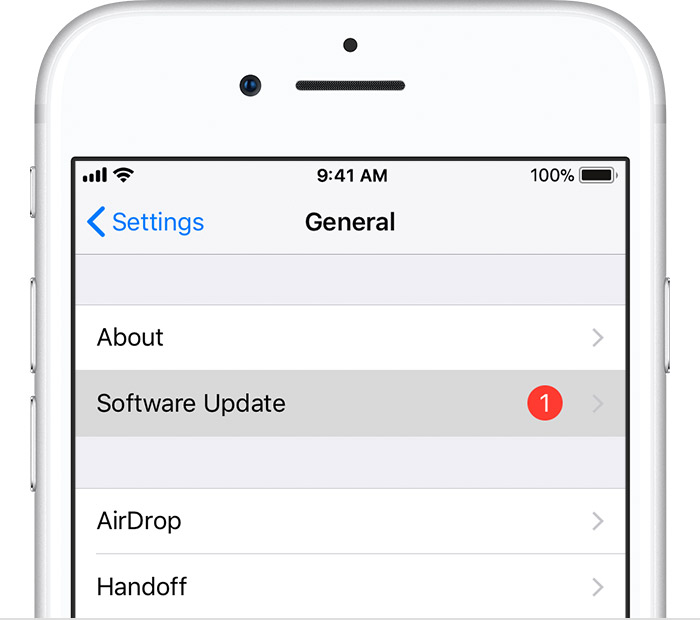
  2. Tap Settings > General > Software Update.
    User uploaded file
  3. Tap Download and Install. If a message asks to temporarily remove apps because iOS needs more space for the update, tap Continue or Cancel. Later, iOS will reinstall apps that it removed. If you tap Cancel, learn what to do next.
  4. To update now, tap Install. Or you can tap Later and choose Install Tonight or Remind Me Later. If you tap Install Tonight, just plug your iOS device into power before you go to sleep. Your device will update automatically overnight.
  5. If asked, enter your passcode. If you don't know your passcode, learn what to do.


However, if you're unable to do this, please reach out to Apple Support for further assistance.

Thank you for using Apple Support Communities.
Have a great week ahead!

This thread has been closed by the system or the community team. You may vote for any posts you find helpful, or search the Community for additional answers.

iPhone problems in Aruba

Welcome to Apple Support Community
A forum where Apple customers help each other with their products. Get started with your Apple Account.