Screen rotation stopped working
my screen stopped rotating, and yes I have screen lock off. iPhone 6s Plus running iOS 11.4.2
my screen stopped rotating, and yes I have screen lock off. iPhone 6s Plus running iOS 11.4.2
Welcome to the Apple Support Communities!
I understand your iPhone 6s Plus is not changing orientation with the lock turned off. I would suggest quitting the app that is not rotating, and then restarting your iPhone. The most recent iOS is 11.4.1. Is that what you meant, or are you working with Beta software?
How to force an app to close on your iPhone, iPad, or iPod touch
If the issue persists, follow the instructions below to force restart the device, and install a fresh update of the operating system. This will not affect the data on your iPhone, but always be sure to back up your device before making changes to it.
If your iPhone, iPad, or iPod touch won't turn on or is frozen
Connect your device to a computer and open iTunes. If you don't have a computer, try to borrow one, or go to an Apple Store or Apple Authorized Service Provider for help.
- While your device is connected, force it to restart.
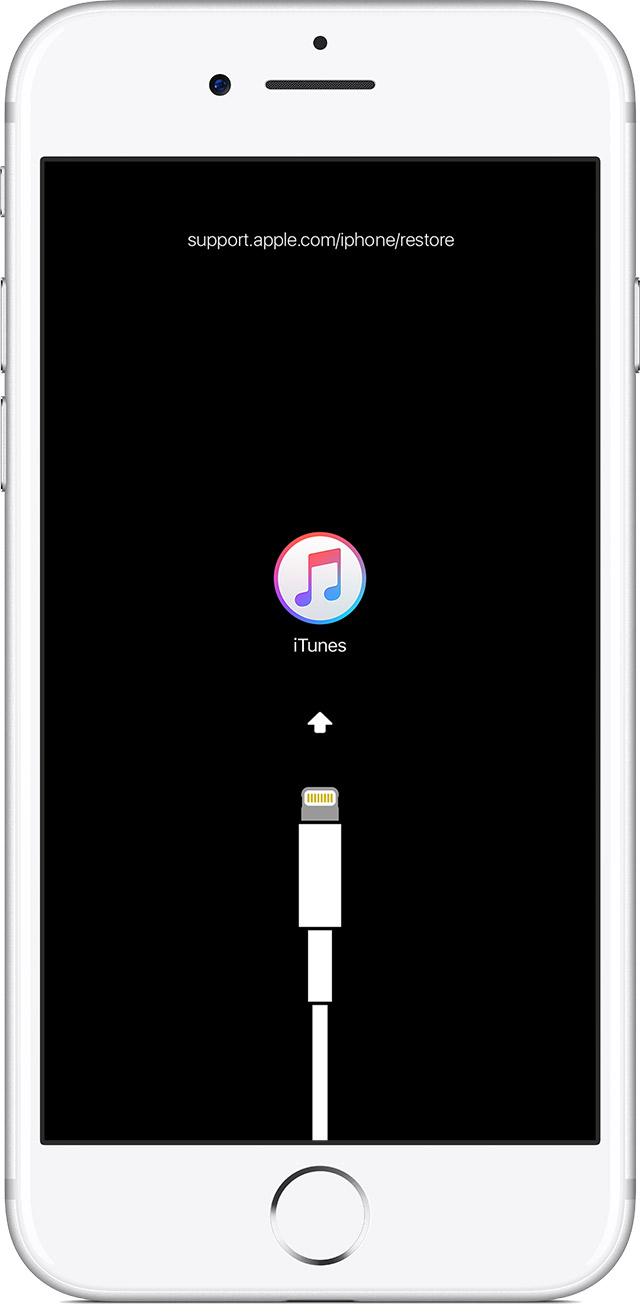
On an iPhone 6s and earlier, iPad, or iPod touch: Press and hold both the Home and the Top (or Side) buttons at the same time. Keep holding them until you see the recovery-mode screen.
- Don't release the buttons when you see the Apple logo. Keep holding until you see the recovery mode screen.
- When you get the option to restore or update, choose Update. iTunes will try to reinstall iOS without erasing your data.
iTunes will download the software for your device. If it takes more than 15 minutes, your device will exit recovery mode and you'll need to repeat steps 2 and 3.
Take care.
Welcome to the Apple Support Communities!
I understand your iPhone 6s Plus is not changing orientation with the lock turned off. I would suggest quitting the app that is not rotating, and then restarting your iPhone. The most recent iOS is 11.4.1. Is that what you meant, or are you working with Beta software?
How to force an app to close on your iPhone, iPad, or iPod touch
If the issue persists, follow the instructions below to force restart the device, and install a fresh update of the operating system. This will not affect the data on your iPhone, but always be sure to back up your device before making changes to it.
If your iPhone, iPad, or iPod touch won't turn on or is frozen
Connect your device to a computer and open iTunes. If you don't have a computer, try to borrow one, or go to an Apple Store or Apple Authorized Service Provider for help.
- While your device is connected, force it to restart.
On an iPhone 6s and earlier, iPad, or iPod touch: Press and hold both the Home and the Top (or Side) buttons at the same time. Keep holding them until you see the recovery-mode screen.
- Don't release the buttons when you see the Apple logo. Keep holding until you see the recovery mode screen.
- When you get the option to restore or update, choose Update. iTunes will try to reinstall iOS without erasing your data.
iTunes will download the software for your device. If it takes more than 15 minutes, your device will exit recovery mode and you'll need to repeat steps 2 and 3.
Take care.
You cannot remove it. If you think it is a hardware error make a Genius Bar appointment or click on the Contact Support link on the upper right of this page. Keep in mind that the X does not do a landscape home screen.
I have tried everything, it does it in all apps and at this point I believe it is a hardware failure
Perhaps the rotation lock is on in the control centre. Try this link for a information of the functions in the control centre.
Use and customize Control Center on your iPhone, iPad, and iPod touch - Apple Support
I didn’t mean to mark this as the answer an don’t know how to remove it as the answer
Screen rotation stopped working