Won't play multiple songs on slideshow imported from iPhoto

I have created slideshows in iPhoto. Some had enough pictures for multiple songs to be played as background. I created a playlist in iTunes and then selected the playlist in iPhoto when creating slideshow.

I can play it out of iPhoto and it works like a charm.

However, when I send it to iDVD and play it, only the first song is present from the playlist. The slideshow continues on in silence for the remainder of the photos.

1) Is this a bug in iPhoto sending the file to iDVD, or a bug in iDVD playing a slideshow imported from iPhoto?

2) Is there any way to send multiple songs along with a slideshow to iDVD from iPhoto?

Thanks!

PowerMac G5, Mac OS X (10.4.8)

Posted on Feb 12, 2007 12:37 AM

Reply
13 replies

Feb 12, 2007 6:40 AM in response to ADE2006

First, you will need to make a CD of the songs you want to use in iPhoto. You can get the songs you rip from your CD to export into iTunes by the following:

1. iTunes - Pref - Advanced - Import. Change import using to MP3.
Now all new songs you rip from CD will export with iPhoto

To correct those songs already in iTunes so they will export, do the following:
1. highlight song in iTunes Library
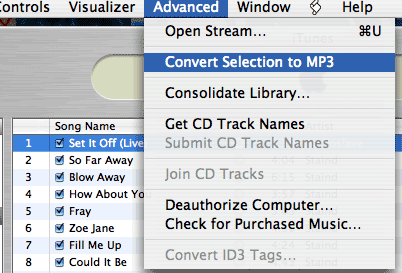
2. Toolbar go to Advanced - Click Convert Selection to MP3
3.Now you will have a duplicate of that song in your library. The one just added that you converted, add MP3 to title
4.Use MP3 song in your slide show.
5. Audio should export with photos.

Post back and let me know if this works for you. It does for me. You cannot change songs imported from iTunes this way; it will only work on songs from your CD.

Sue

Mar 8, 2007 1:57 PM in response to SDIllini

SUE: THANKS for bearing with me on this. Due to a stroke of LUCK (not Genius on my part) I was able to get music into my slideshows, but I'm still confused about this MP3 thing. I was going to ADVANCED in iTunes preferences and not to ADVANCED from the bar MENU. However when I go to ADVANCED in the pull down menu, still no "CONVERT TO MP3", only "CONVERT SELECTION TO AAC.
Thanks for showing me what it should look like.
As you can ascertain, I'm not too well informed as per music files!

Jack

imac g5 Mac OS X (10.3.9)

Mar 8, 2007 3:45 PM in response to jack w

OK-I am an idiot...I have had my head screwed on backwards all day.

Excuse-I have too many macs with too many versions.

iTunes 7 does NOT have what I showed you. You are right.

You can workaround the music problem by burning your songs on an Audio CD (not data or mp3) and re-import them to iTunes.
Choose 'Join CD Tracks' from the Advanced menu in the menu bar and iTunes will combine all of the songs from the CD into one song.

Then use that 'one song' in your dvd.

Again, I truly apologize for misdirecting you earlier!

Sue

This thread has been closed by the system or the community team. You may vote for any posts you find helpful, or search the Community for additional answers.

Won't play multiple songs on slideshow imported from iPhoto

Welcome to Apple Support Community
A forum where Apple customers help each other with their products. Get started with your Apple Account.