disabled iPad not showing up on itunes

My iPad was disabled due to incorrect password. I tried connecting it to iTunes , but the device doesn't show up for me to restore it. 😟 Help.

iPad Pro Wi-Fi, iOS 11.4

Posted on Sep 3, 2018 9:33 AM

Reply
Question marked as Top-ranking reply

Posted on Sep 4, 2018 8:03 AM

Hello Rnair24,

Thank you for using Apple Support Communities! I understand that your iPad Pro is disabled and not appearing in iTunes to restore it. I would be happy to help provide some steps to take next.

With iTunes open, let's start by trying to place your iPad in recovery mode while it is connected to your computer. The following resource will walk you through that process:

If you forgot the passcode for your iPhone, iPad, or iPod touch, or your device is disabled - Apple Support

Specifically, follow the steps in this section:

Erase your device with recovery mode to remove your passcode

If you've never synced with iTunes, you'll need to use recovery mode to restore your device. This will erase the device and its passcode.

  1. Connect your iOS device to your computer and open iTunes. If you don't have a computer, borrow one from a friend, or go to an Apple Retail Store or Apple Authorized Service Provider.
  2. While your device is connected, force restart it:

    On an iPhone 6s and earlier, iPad, or iPod touch: Press and hold both the Home and the Top (or Side) buttons at the same time. Keep holding them until you see the recovery-mode screen.

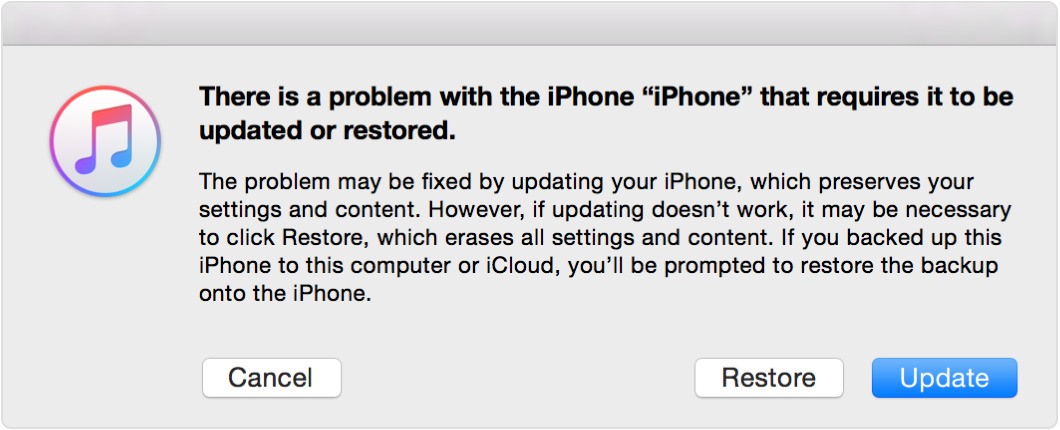
  3. When you see the option to Restore or Update, choose Restore. User uploaded file

    iTunes will download software for your device. If it takes more than 15 minutes, your device will exit recovery mode and you'll need to repeat steps 2 and 3.
  4. Wait for the process to finish. Then you can set up and use your device.

Be sure to hold down both the Home and the Top (or Side) buttons while the iPad restarts, displays the Apple logo, then release the buttons only when you see the connect to iTunes screen. If your iPad still does not appear in iTunes to complete the restore while in recovery mode, the following support article provides some additional steps to take next:

If iTunes doesn't recognize your iPhone, iPad, or iPod - Apple Support

Keep us posted with what happens from here.

Cheers!
1 reply
Question marked as Top-ranking reply

Sep 4, 2018 8:03 AM in response to Rnair24

Hello Rnair24,

Thank you for using Apple Support Communities! I understand that your iPad Pro is disabled and not appearing in iTunes to restore it. I would be happy to help provide some steps to take next.

With iTunes open, let's start by trying to place your iPad in recovery mode while it is connected to your computer. The following resource will walk you through that process:

If you forgot the passcode for your iPhone, iPad, or iPod touch, or your device is disabled - Apple Support

Specifically, follow the steps in this section:

Erase your device with recovery mode to remove your passcode

If you've never synced with iTunes, you'll need to use recovery mode to restore your device. This will erase the device and its passcode.

  1. Connect your iOS device to your computer and open iTunes. If you don't have a computer, borrow one from a friend, or go to an Apple Retail Store or Apple Authorized Service Provider.
  2. While your device is connected, force restart it:

    On an iPhone 6s and earlier, iPad, or iPod touch: Press and hold both the Home and the Top (or Side) buttons at the same time. Keep holding them until you see the recovery-mode screen.

  3. When you see the option to Restore or Update, choose Restore. User uploaded file

    iTunes will download software for your device. If it takes more than 15 minutes, your device will exit recovery mode and you'll need to repeat steps 2 and 3.
  4. Wait for the process to finish. Then you can set up and use your device.

Be sure to hold down both the Home and the Top (or Side) buttons while the iPad restarts, displays the Apple logo, then release the buttons only when you see the connect to iTunes screen. If your iPad still does not appear in iTunes to complete the restore while in recovery mode, the following support article provides some additional steps to take next:

If iTunes doesn't recognize your iPhone, iPad, or iPod - Apple Support

Keep us posted with what happens from here.

Cheers!

This thread has been closed by the system or the community team. You may vote for any posts you find helpful, or search the Community for additional answers.

disabled iPad not showing up on itunes

Welcome to Apple Support Community
A forum where Apple customers help each other with their products. Get started with your Apple Account.