I WANT TO TURN OFF TWO FACTOR VERIFICATION!!!!! It is a total pain in the butt and I want the option to turn it off. Help!!!!! How can apple not allow us to turn this time-suck feature off? I want to register my frustration.

I WANT TO TURN OFF TWO FACTOR VERIFICATION!!!!! It is a total pain in the butt and I want the option to turn it off. Help!!!!! How can apple not allow us to turn this time-suck feature off? I want to register my frustration. Anyone know how to turn this off???

MacBook Pro (13-inch Mid 2012), iOS 11.4.1

Posted on Sep 10, 2018 4:31 PM

Reply
Question marked as Top-ranking reply

Posted on Sep 10, 2018 4:45 PM

Once you've had two-factor authentication for more than two weeks, you cannot turn it off.


Can I turn off two-factor authentication after I’ve turned it on?

If you already use two-factor authentication, you can no longer turn it off. Certain features in the latest versions of iOS and macOS require this extra level of security, which is designed to protect your information. If you recently updated your account, however, you can unenroll for a period of two weeks. Just open your enrollment confirmation email and click the link to return to your previous security settings. Keep in mind, this makes your account less secure and means that you can't use features that require a higher level of security.

Two-factor authentication for Apple ID - Apple Support


Perhaps if you explain what problems you're having with it, someone can help you. What are you doing that you're interacting with it more than very rarely?


This is a user-to-user forum. If you want to let Apple know how you feel, use the feedback page:


Product Feedback - Apple

276 replies

Jan 18, 2019 1:53 PM in response to MartyLoftus

Apple will not allow you to turn off the two-factor authentication, reguradless of how unnecessary or anoying it is. God forbid the customer is right. Someday when Apple is number 2, then 3 or likely not at all they may finally wakeup and stop their arrogant ways.

Apparently, you don't know much about Apple. They have a long and storied history (going back to the days when they weren't number 2 or even number 3) of providing the customer with what the think the customer needs rather than what the customer says they want. I don't expect them to change anytime soon.

Jan 20, 2019 7:02 AM in response to Lawrence Finch

I'm

not the IRS, and I'm certainly not Jenifer Lawrence. Bullying people into doing

something whether you're Apple or Google just takes away my rights to choose

how I'd like to use a service I'm paying for. So I guess the only obvious choice

is to not use their services. Honestly, the way that they have developed 2

factor authentication creates more issues than it solves. These guys are

supposed to be smart you’d think they could come up with a better solution. One

that isn't so archaic, and it certainly isn't full proof.

Jan 26, 2019 10:23 AM in response to Flightrider

If you asked, I am sure "most" people don't want speed limits on highways, helmet laws for motorcycle riders and many other possibly inconvenient ways companies and governments have worked towards keeping the population safe.


You are free to exercise your right to use a different mobile phone platform where your online/account safety is not as integral to the operation system as iOS provides.


Feb 7, 2019 9:16 AM in response to John R W

See https://support.apple.com/en-us/HT204915


What if I use two-factor authentication on a device running older software?

If you use two-factor authentication with devices running older OS versions—like an Apple TV (2nd or 3rd generation)—you might be asked to add your six-digit verification code to the end of your password when signing in. Get your verification code from a trusted device running iOS 9 and later or OS X El Capitan and later, or have it sent to your trusted phone number. Then type your password followed by the six-digit verification code directly into the password field.”

Feb 7, 2019 9:19 AM in response to janeonjane

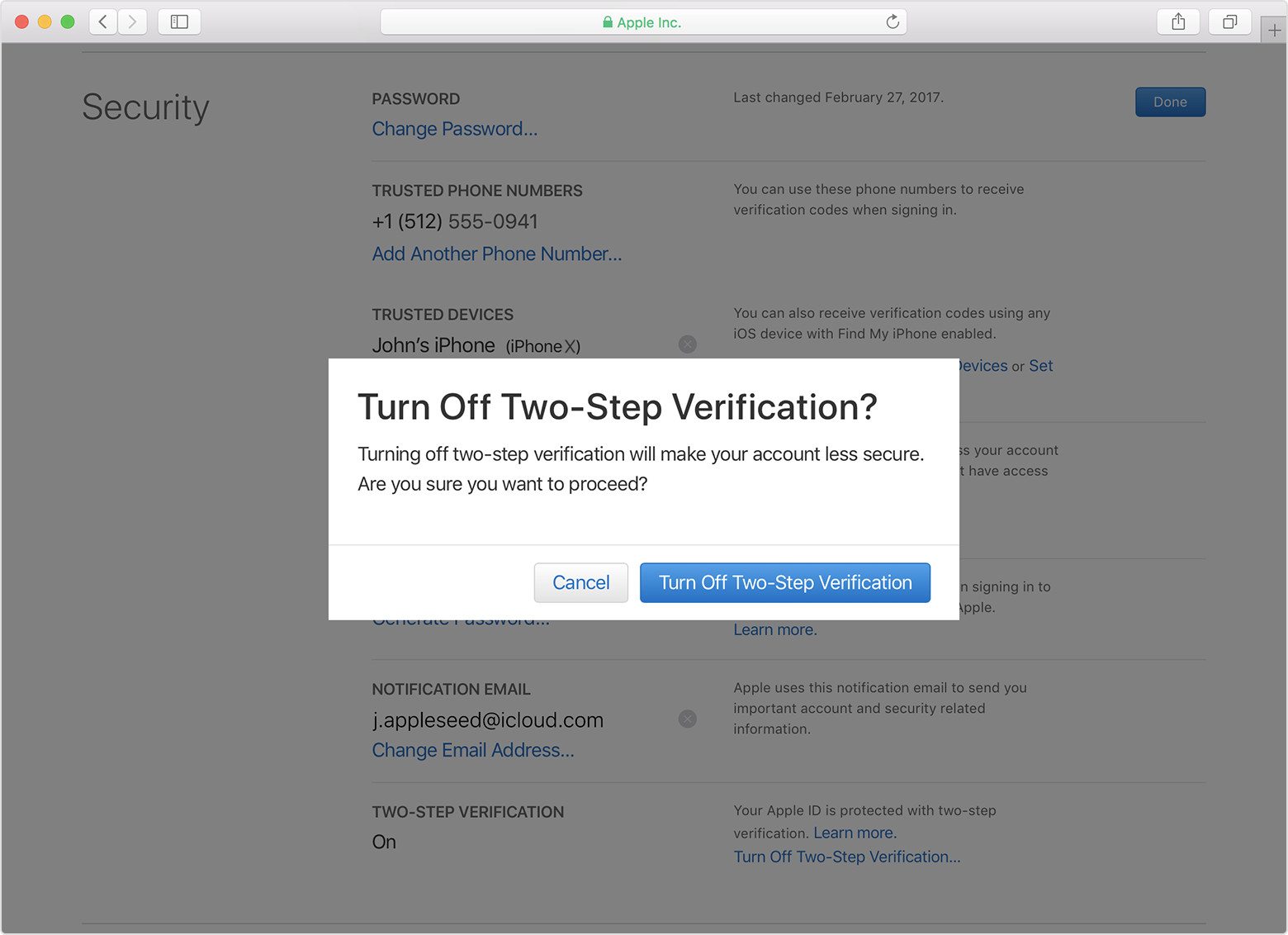
Turn off two-step verification

Before you can turn on two-factor authentication, you need to turn off two-step verification. Use these steps: 

  1. Sign in to your Apple ID account page.
  2. In the Security section, click Edit.
  3. Click Turn Off Two-Step Verification. Click again to confirm.

  4. Create new security questions and verify your date of birth. You'll get an email confirming that two-step verification for your Apple ID is off.
  5. Remember to make sure that you're still signed in to iCloud. You might be asked for your Apple ID password. 

If you log in to your Mac with your Apple ID, you need to change your Mac login password before setting up two-factor authentication. 

Feb 7, 2019 3:24 PM in response to Kurt Nelson1

Can I turn off two-factor authentication after I’ve turned it on?

If you already use two-factor authentication, you can no longer turn it off. Certain features in the latest versions of iOS and macOS require this extra level of security, which is designed to protect your information. If you recently updated your account, you can unenroll for two weeks. Just open your enrollment confirmation email and click the link to return to your previous security settings. Keep in mind, this makes your account less secure and means that you can't use features that require higher security


folks are correct it’s only for two weeks on the new systems. I know it’s a hassle sometimes but it’s better to be safe than sorry.

thanks folks.

Feb 24, 2019 5:57 PM in response to Mini Mac User

the era of "control" than supporting the independence and creativity of the Mac user.

It's pronounced "security".


Apple's behaviour would be far worse if they did not enforce account security. Possibly actionable.


Sadly the online world has changed greatly since the first unit hit the market.


As for the tone of the website. I believe it typically reflects the TLDR mindset that comes here to rant, rave and demand change from those of us who can't affect change.


May 31, 2019 7:50 AM in response to gi_jon0131

The 2FA is written in Gray with no hyperlink to turn it off as well.

To add onto that - I have contacted Apple Support TWICE and talked with two different specialists on the phone who both told me they are unable to turn 2FA off on the newly created accounts.

Apple support advisors have never been able to turn off 2FA in any scenario. Users disable it themselves.


Your option to turn it off may be the result of using an Apple service that requires it.


Homepod, Messages in iCloud, HJomeKit are examples of services that rely on 2FA and if used, prevent you from disabling 2FA.


Oct 10, 2019 9:56 PM in response to janeonjane

I have had apple devices for ever one of my family members for 10 years. I am so frustrated with TWO FACTOR VERIFICATION I dont even want an Apple device any more..


Its all ok, When Jobs is not in charge the company it has to Crash that is the history... TWO factor Verification will be the death of this company. I have spent 2 hours trying to add a shared reminders list to a Phone with this feature turned on. It sends the invite to the email, then I get a log in screen, type in the apple id and the password. then the phone pops up with a someone is trying to access your account, click allow and then get a 6 digit code, as i should then i get this message


"Can't Join"

"missing information in order to join"


I know what missing. NO PLACE TO ENTER THE 6 digit code!!!!!


HUGH TIME SUCK.. Maybe its time to uses Google products again like i did before iCloud let me share, until its time to get a new phone and try a different brand.


Last time apple was not easy to use JOBs was not in charge of the company. ONCE agin JOBS not in charge and products SUCK.. COOK best KEEP IT EASY. or we are going to stop paying the APPLE TAX.


Apple tax = the cost of the apple product instead of Dell, or samsung..


WE PAY IT FOR EASY USE. not to look cool.


MAKE IT WORK.. let me turn it off.


Oct 26, 2019 12:13 AM in response to sylviefromsaint-lambert

Sylvie,

If you turned it less than two weeks ago you can still turn it off. There is an email Apple sent you with a link that lets you do this. You will have to change your Apple ID password but that's a small price to pay for opting out. Hopefully Apple will improve the system by the time you need to buy a new computer or some other device that mandates two-factor authentication.

Oct 28, 2019 5:42 AM in response to elijahfromcorsicana

”...and personally i'd rather have my account hacked then it be impossible to turn off’


Yet it has nothing about what you want nor are willing to accept in terms of account security compromises. It has to do with Apple, the steward of your data, limiting their liability for any poor security choices you do make (sharing your Appleid, picking a simple password, using that password on multiple sites or on public, unsecured wifi, etc).


Your choice is not to use any Apple services and thus not put any of your personal information or data into Apple’s online systems. If that’s your choice, then I am sure Apple could not care less how you feel about online account security or what choices you make with the services you do choose to use.


But as long as you choose to put your information into Apple’s systems, they have every right, and even responsibility, to ensure that some reasonable level of security of that information is maintained. The whole reason 2FA has come about is because of the admission of the fundamental flaw of password only secured accounts (and the problems with security questions as a backup to passwords), and the immensely poor choices many people make with passwords and how they use and share information.

Dec 24, 2019 6:15 PM in response to racquetbal

If your icloud storage is full, the only way to stop the nags is to delete material in icloud. Just as Windows or MacOS will constantly nag you if your hard drive is full, Apple’s cloud system nags you constantly until you you either subscribe for more space, or reduce the amount of material you have stored in iCloud.


When your icloud storage is full or very nearly so you risk getting corrupted backups, not receiving icloud email, missing messages, having documents corrupted, etc.


And your AppleID and Apple 2 factor authentication for your AppleID actually have nothing to do with the material on your device itself. It is entirely about what you have stored online with Apple’s various cloud based service offerings - that material is stored in Apple’s online systems, not your device.

This thread has been closed by the system or the community team. You may vote for any posts you find helpful, or search the Community for additional answers.

I WANT TO TURN OFF TWO FACTOR VERIFICATION!!!!! It is a total pain in the butt and I want the option to turn it off. Help!!!!! How can apple not allow us to turn this time-suck feature off? I want to register my frustration.

Welcome to Apple Support Community
A forum where Apple customers help each other with their products. Get started with your Apple Account.