I WANT TO TURN OFF TWO FACTOR VERIFICATION!!!!! It is a total pain in the butt and I want the option to turn it off. Help!!!!! How can apple not allow us to turn this time-suck feature off? I want to register my frustration.

I WANT TO TURN OFF TWO FACTOR VERIFICATION!!!!! It is a total pain in the butt and I want the option to turn it off. Help!!!!! How can apple not allow us to turn this time-suck feature off? I want to register my frustration. Anyone know how to turn this off???

MacBook Pro (13-inch Mid 2012), iOS 11.4.1

Posted on Sep 10, 2018 4:31 PM

Reply
Question marked as Top-ranking reply

Posted on Sep 10, 2018 4:45 PM

Once you've had two-factor authentication for more than two weeks, you cannot turn it off.


Can I turn off two-factor authentication after I’ve turned it on?

If you already use two-factor authentication, you can no longer turn it off. Certain features in the latest versions of iOS and macOS require this extra level of security, which is designed to protect your information. If you recently updated your account, however, you can unenroll for a period of two weeks. Just open your enrollment confirmation email and click the link to return to your previous security settings. Keep in mind, this makes your account less secure and means that you can't use features that require a higher level of security.

Two-factor authentication for Apple ID - Apple Support


Perhaps if you explain what problems you're having with it, someone can help you. What are you doing that you're interacting with it more than very rarely?


This is a user-to-user forum. If you want to let Apple know how you feel, use the feedback page:


Product Feedback - Apple

276 replies

Nov 16, 2018 6:48 PM in response to IdrisSeabright

It's annoying. My location services and Find my Mac and find my iPhone are always on. I live alone and every time I log in while I'm at home, I don't understand why this is necessary. You know I'm home and my devices are registering that they are at the same location. I could see if I was logging onto either my laptop or desktop, but my phone was showing it was in a completely different location and then you send the verification code as a precaution.

Nov 28, 2018 5:14 PM in response to gail from maine

GB,


I just updated to Mojave on this MacBook Pro and was prompted to turn on 2 factor verification. It did not say I could never turn it off. Now I can't. that is Orwellian.


My wife and I share the same appleid and travel. She just has her iPad with her and does not use a SIM card. No way to communicate....... Nice job!!!


And if I'm not home and she's at the library with this Macbook? Sorry, this was easily foreseeable.....

Nov 28, 2018 5:37 PM in response to Lawrence Finch

Lawrence Finch wrote:


And throw in one or more voice numbers.

People really should do this. I got to work one day, couldn't find my phone and need to log in to Find My iPhone from my Windows computer at work. Fortunately, my work phone number is one of my trusted numbers. It took less than 15 seconds to get my code. And, my phone was still at home where I'd left it.

Nov 29, 2018 12:57 AM in response to Lawrence Finch

Ok I’ve got an even weirder one than that. I sent my mum an invite to my calendar but when she clicked on the link on her ipad a verification code popped up on same iPad but nowhere to enter it on this iPad. We’ve kept going round in circles on this one. Have told her to take it to Genius Bar.


I also had a lot of bother when adding my iCloud account to another iMac. Went round in circles with verification codes for awhile until it took. ~ 2hrs 🙄. I thought may be it was because I had both my laptop and iPhone on the desk in front of me 🏻♀


Anyway it is a bit of a pain.

Jan 7, 2019 10:38 AM in response to anton69_1

hmm.. my post dissappeared..wonder why?

Because whatever you posted apparently violated the terms of use of these forums or was in response to a post that was deleted for violation. If it was your post that was deleted for cause, you will have received an email from the Hosts explaining why. If your post was, as it were, collateral damage, you won't receive any email.

Jan 7, 2019 8:33 PM in response to janeonjane

Trusted devices
A trusted device is an iPhone, iPad, or iPod touch with iOS 9 and later,
or a Mac with OS X El Capitan and later that you've already signed in to
using two-factor authentication. It’s a device we know is yours and
that can be used to verify your identity by displaying a verification
code from Apple when you sign in on a different device or browser.

You will still get 6 digit code on the screen to enter

Jan 20, 2019 8:42 AM in response to MartyLoftus

Bullying people into doing
something whether you're Apple or Google just takes away my rights to choose
how I'd like to use a service I'm paying for. So I guess the only obvious choice
is to not use their services.

Apple provides a service. As long as they remain with the bounds of local laws, they are free to structure that service anyway they want. You, as a customer are free to chose whether or not to use that service. No one is forcing you or "bullying" you. Such hyperbole is silly.

Jan 20, 2019 9:53 AM in response to IdrisSeabright

I see two problems with the current program. One, they don't really explain it when they offer it. Let us know that when we chose this, there isn't an option to change it, so be careful with how you want your notifications. I'm not super tech savvy and I had NO idea where that "notification" was going. I use my mini iPad a lot, but I don't need the verification for that. I access my iCloud from my PC, which is when it's needed. I'd try to sign in and they'd say they sent a code. Well I had no idea where it went or how to get it! I even called Apple, explaining I was having problems. He never figured out my basic question and the simple answer: Turn on your iPad and it will show on the main screen. I assumed like a bank or other accounts, it would be a phone call to my land line or an email to my account.


The other problem is obviously not allowing us to cancel it. Even now, as I signed in I forgot it may ask me for this. Sometimes my PC saves my password, other times it doesn't. I know there are changes with IP address which probably account for that. But honest, when I sit down to my PC, the last thing I think of is going into a different room, finding my iPad and turning it on.


Lack of communication and options are the problems.

Jan 20, 2019 5:38 PM in response to janeonjane

I'm in the same boat as many of you. I can't stand this 2 step authentication thing. So, first issue is that the system asks for a code EVERY.SINGLE.TIME. I try to login. Doesn't matter whether its on my old macbook pro or new one i just got. Or on my iphone. Or on any one of our several apple tvs. Or on any of our ipads. Every time we login to just about anything it prompts us to enter the verification code. I've clicked "trust this browser" or whatever it says more times than i can count and it still continues to prompt for a code. I understand it asking ONCE. But every single time?!

2nd issue is that when it says its sending a code it doesnt typically send anything or is sending a code to who knows where. Nothing gets sent to my phone. I double checked my cell from the trusted number and it is. The only way to get a code is to click "i didnt get a code" and then force it to send to my phone.


The main issue is that for some reason the "trusted" part isnt getting saved (sorry don't know the technical wording for it). And we have one older apple tv that wont sign on no matter how many times we put in the code.


Does anyone know if this issue is possibly linked to IP addresses? I wondered if maybe because we use Comcast and i think the IP address changes that was the issue?? I'm grasping at straws here trying to get it to work.

Jan 20, 2019 8:53 PM in response to JG1309

I'm in the same boat as many of you. I can't stand this 2 step authentication thing. So, first issue is that the system asks for a code EVERY.SINGLE.TIME. I try to login. Doesn't matter whether its on my old macbook pro or new one i just got. Or on my iphone. Or on any one of our several apple tvs. Or on any of our ipads. Every time we login to just about anything it prompts us to enter the verification code. I've clicked "trust this browser" or whatever it says more times than i can count and it still continues to prompt for a code. I understand it asking ONCE. But every single time?!
2nd issue is that when it says its sending a code it doesnt typically send anything or is sending a code to who knows where. Nothing gets sent to my phone. I double checked my cell from the trusted number and it is. The only way to get a code is to click "i didnt get a code" and then force it to send to my phone.

The main issue is that for some reason the "trusted" part isnt getting saved (sorry don't know the technical wording for it). And we have one older apple tv that wont sign on no matter how many times we put in the code.

Does anyone know if this issue is possibly linked to IP addresses? I wondered if maybe because we use Comcast and i think the IP address changes that was the issue?? I'm grasping at straws here trying to get it to work.


Can you clarify the following:


  1. What are you trying to sign into? When you sign into your Apple Account, you have to provide the code every single time, for example.
  2. If you are trying to sign into iCloud, are you referring to iCloud.com?
  3. When you indicate that you have told it to "Trust this Browser" do you mean you have clicked on "Trust" on this pop-up:
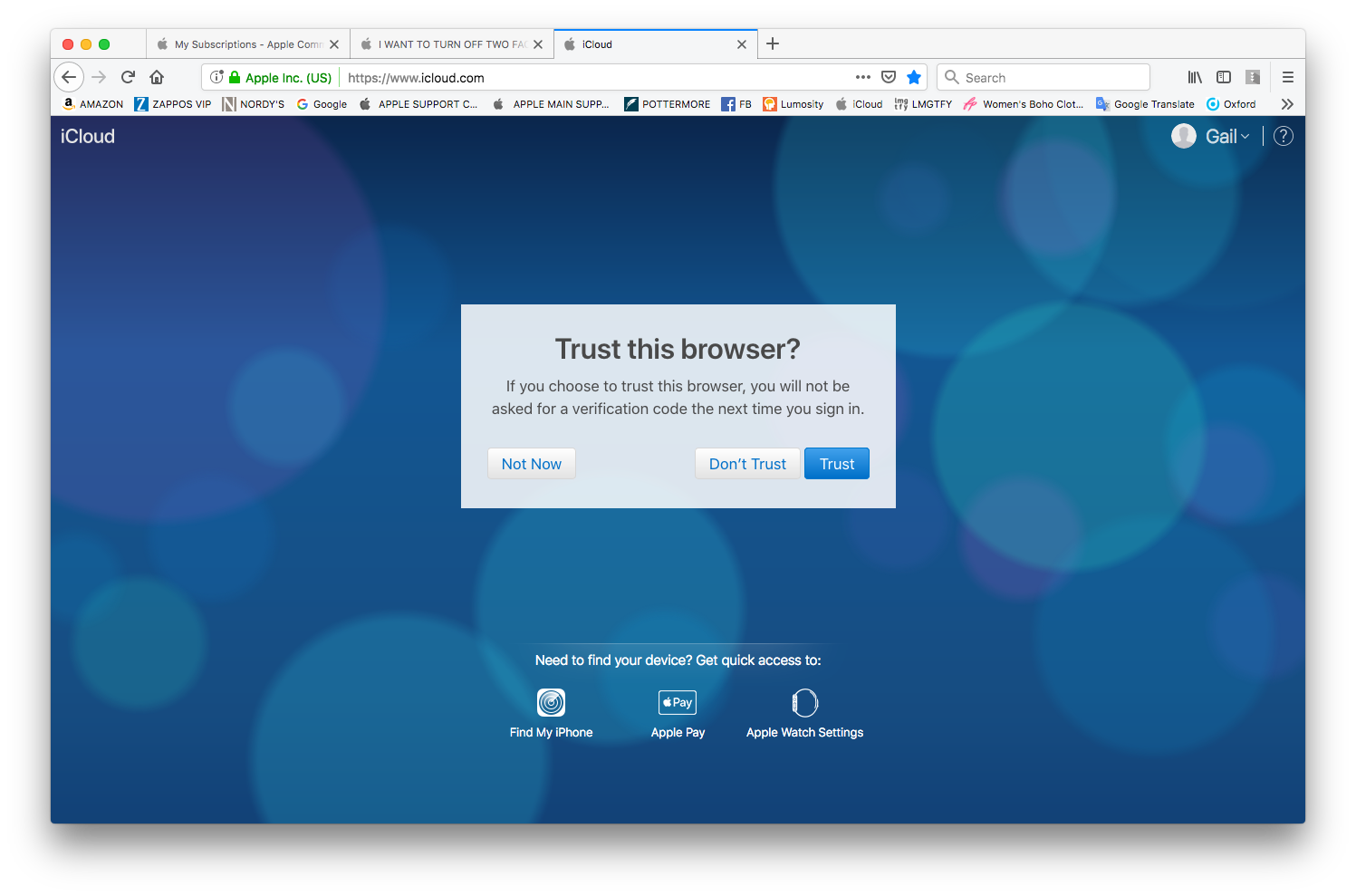

Are you meeting all of the following criteria when you are performing your sign-in:


Once signed in, you won’t be asked for a verification code on that

device again unless you sign out completely, erase the device, or need

to change your password for security reasons. When you sign in on the

web, you can choose to trust your browser, so you won’t be asked for a

verification code the next time you sign in from that computer.


Have you read this support article: Two-factor authentication for Apple ID - Apple Support


Best,


GB



This thread has been closed by the system or the community team. You may vote for any posts you find helpful, or search the Community for additional answers.

I WANT TO TURN OFF TWO FACTOR VERIFICATION!!!!! It is a total pain in the butt and I want the option to turn it off. Help!!!!! How can apple not allow us to turn this time-suck feature off? I want to register my frustration.

Welcome to Apple Support Community
A forum where Apple customers help each other with their products. Get started with your Apple Account.


