
The “old” voice memo allowed me to pause. In IOS12, when I tap the record button, it end the current memo and tap again, it starts a new one.
Can I pause recording in a voice memo in iOS 12?
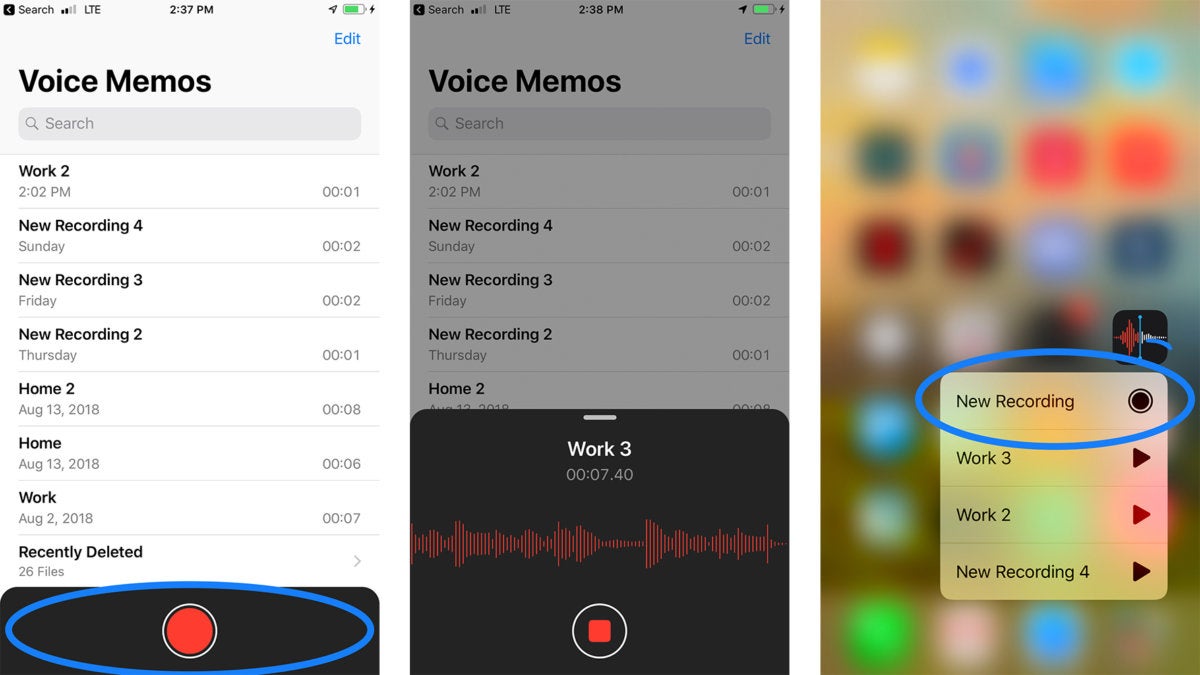
Ok ... I figured it out. I just tap inside the area around the record button and it brings up a pause button 😬
Ok ... I figured it out. I just tap inside the area around the record button and it brings up a pause button 😬
I am unsure why it did not work for you. I just tapped the dark area around the record button and it opened up and allowed me to pause and resume. Keep in mind, I am speaking of the bottom part of the screen, not necessarily anywhere in the dark area around the record button. Plus (and I am unsure on this), the recording must have already begun. I hope this helps!
This is different from what I originally posted. I couldn’t find any pause, but your dituation
Sky Singer is right. If left on pause while on break from a lecture the pause feature ends on its own accord and saves the recording as a “new recording.” It might be okay for 5 minutes on pause, but our breaks are 15 minutes and when I return the recording has been auto saved. The result being that I now have to start a new recording when returning from break. The old version would just remain on pause indefinitely until the user interfaced with the app. IMHO the app is now broken and worthless. There’s no settings option either to adjust this. I echo Sky Singer’s gratitude to Apple.
Glad that worked for you. sorry that did not work for me. Real problem for me in grad school starting and stopping for lecture. I gave up and bought another app that WORKS. Nice job breaking something that actually never needed fixing, Apple.
Sorry 😐 I hit reply too soon. My situation had to do with any pause button at all. Your situation is different and I agree with you concerning how it times out while in pause mode. I don’t use it in that way but I completely agree! Thanks for clarifying ☝
The “old” voice memo allowed me to pause. In IOS12, when I tap the record button, it end the current memo and tap again, it starts a new one.