iPhone Live/perspective wallpaper bug

I have verified this with both my x and xs max.


If you set a live wallpaper as the lock screen and the same live wallpaper as a perspective on the home screen, the perspective does not work. Changing to a different wallpaper it works fine.


Interesting note, on my x which got an in place ios 12 update and hade the blue liquid live wallpaper as its lock screen, the first time i set up that same wallpaper asy home screen perspective worked. However after switching the lock screen to another live wallpaper and then back, perspective stopped for that wallpaper.


So it seems the bug is same live wallpaper used as a live wallpaper on the lock screen will not show perspective if set on the home screen. Also interesting is that perspective does work when previewing the wallpaper, just not on the actual home screen.


Can any else verify?

Posted on Sep 24, 2018 8:20 AM

Reply
2 replies

Sep 25, 2018 8:19 AM in response to i_rina

Thank you for responding. That is not quite what I meant though. I am aware live wallpaper does not work on the home screen.


The problem I am seeing is that if you select a live wallpaper for the lock screen and then choose that same wallpaper and make it perspective for the home screen, the perspective feature does not work. It will show perspective movement when previewing the wallpaper, but not on the actual home screen once it is set.


I have verified this on 3 phones, a X, and XS, and an XS max.


It seems that if you use a live wallpaper on the lock screen, you cannot get that same wallpaper to behave as a perspective wallpaper on the home screen.

Sep 25, 2018 8:03 AM in response to curlyjive

Hello curlyjive,

Thanks for choosing Apple Support Communities!
I understand from your post that the live wallpaper works with the Lock screen but does not work on the Home screen. This is normal behavior.

Change your iPhone wallpaper

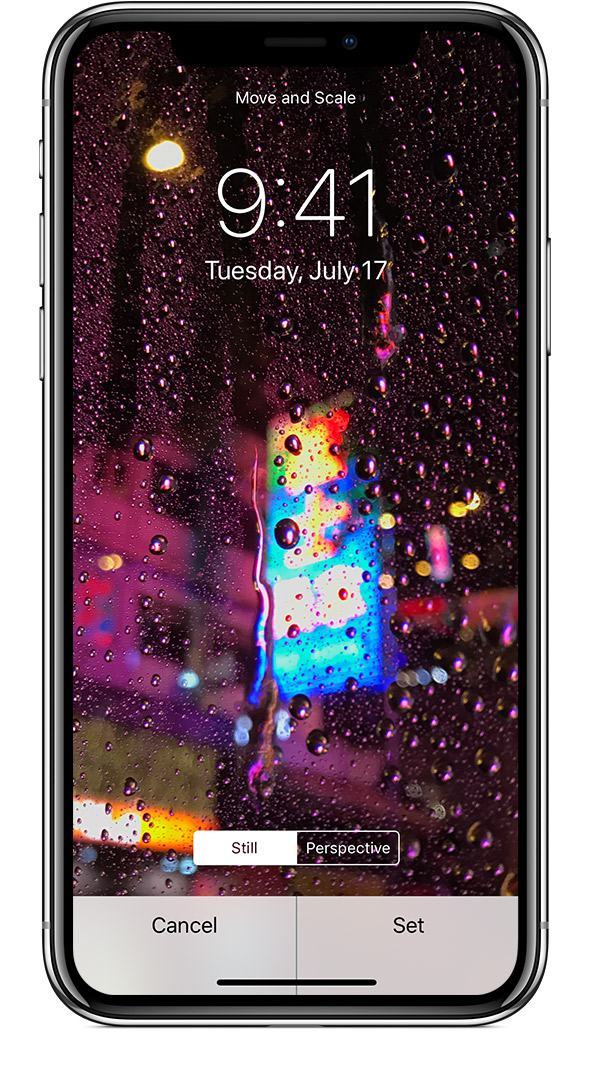
Move the image and choose a display option

Drag to move the image. Or pinch to zoom in and out, so the image fits the screen.

Some images might not move and scale.

You can choose Perspective, so the wallpaper moves as you tilt your screen. Or you can choose Still, so the wallpaper doesn't move. The Perspective display option isn't available when Reduce Motion is on or when Low Power Mode is on.

If you have iPhone 6s or later and you used a Live Photo, you can choose Live. When you press firmly on the screen, the Lock screen wallpaper animates.

You need an iPhone 6s or later to use Live Photo and Live wallpaper.

User uploaded file

Let me know if you have any questions.
Cheers!

This thread has been closed by the system or the community team. You may vote for any posts you find helpful, or search the Community for additional answers.

iPhone Live/perspective wallpaper bug

Welcome to Apple Support Community
A forum where Apple customers help each other with their products. Get started with your Apple Account.