Text Forwarding not working on iPhone XS Max

I have been trying to get my text messages (not iMessages) forwarded to my iPad, and it just doesn’t seem to work for me. When I had my iPhone 7 Plus, as soon as I enabled text message forwarding, I received some type of verification. With the new phone, that never pops in either the iPad or iPhone. Has anyone experienced similar issue? If so, how did you resolve it?


The same issue with enabling WiFi calling on other devices. I’m able to use my iPad to make calls when my iPhone is close to it, but there is another feature with WiFi calling which doesn’t require the iPhone to be nearby to make it work. Any idea what the issue might be?

iPhone XS Max, iOS 12, null

Posted on Sep 30, 2018 1:44 PM

Reply
Question marked as Top-ranking reply

Posted on Oct 1, 2018 1:23 PM

Hello Almarhoonhh,

Thank you for using Apple Support Communities.

I see that you have an issue with not receiving text messages on your other devices (iPad, computer) in addition to your iPhone. This sound like Continuity needs to be set up on your devices. Take a look at the following support article for more information on Continuity:

Use Continuity to connect your Mac, iPhone, iPad, iPod touch, and Apple Watch

This section specifically addresses text messages:

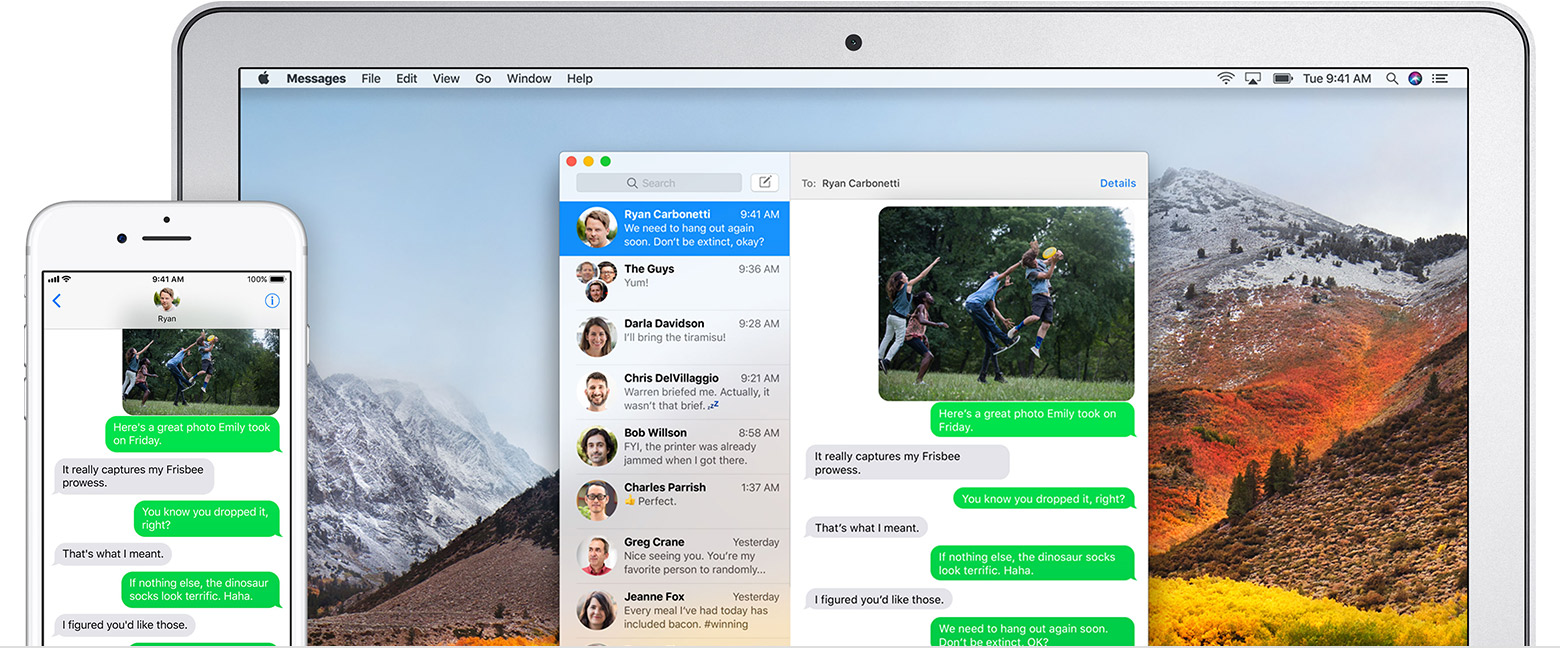
If you have an iPhone, the text messages that you send and receive on your iPhone can appear on your Mac, iPad, and iPod touch as well. You can then continue the conversation from whichever device is closest to you.

Set up SMS and MMS messaging

Use this feature with any Mac, iPhone, iPad, or iPod touch that meets the Continuity system requirements. Make sure that your devices are set up as follows:

  • Each device is signed in to iCloud with the same Apple ID.
  • On iPhone, go to Settings > Messages > Send & Receive. Make sure that the Apple ID at the top of the screen is the same Apple ID that you're using for iMessage on your other devices. Add a check to your phone number and email address, so that you can be reached by iMessage at both. Do the same on your iPad or iPod touch.
  • On iPhone, go to Settings > Messages > Text Message Forwarding, then choose which devices to allow to send and receive text messages from this iPhone. If you're not using two-factor authentication for your Apple ID, a verification code appears on each of your other devices: enter that code on your iPhone.
  • On Mac, open Messages, then choose Messages > Preferences. Click Accounts, then select your iMessage account. Make sure that the Apple ID shown here is the same Apple ID that you're using on your other devices. Add a check to your phone number and email address.

Use SMS and MMS messaging

User uploaded file

To use this feature, just start conversations as normal in the Messages app on any of your devices. You can also start a conversation by clicking a phone number in Safari, Contacts, Calendar, or other apps that detect phone numbers. All of your incoming and outgoing messages appear on all of your devices. Learn more about forwarding SMS/MMS messages from your iPhone to an iPad, iPod touch, or Mac.

User uploaded file


With Instant Hotspot, the Personal Hotspot on your iPhone or iPad (Wi-Fi + Cellular) can provide Internet access to a Mac, iPhone, iPad, or iPod touch without requiring you to enter the password on those devices.

Best regards.

51 replies
Question marked as Top-ranking reply

Oct 1, 2018 1:23 PM in response to Almarhoonhh

Hello Almarhoonhh,

Thank you for using Apple Support Communities.

I see that you have an issue with not receiving text messages on your other devices (iPad, computer) in addition to your iPhone. This sound like Continuity needs to be set up on your devices. Take a look at the following support article for more information on Continuity:

Use Continuity to connect your Mac, iPhone, iPad, iPod touch, and Apple Watch

This section specifically addresses text messages:

If you have an iPhone, the text messages that you send and receive on your iPhone can appear on your Mac, iPad, and iPod touch as well. You can then continue the conversation from whichever device is closest to you.

Set up SMS and MMS messaging

Use this feature with any Mac, iPhone, iPad, or iPod touch that meets the Continuity system requirements. Make sure that your devices are set up as follows:

  • Each device is signed in to iCloud with the same Apple ID.
  • On iPhone, go to Settings > Messages > Send & Receive. Make sure that the Apple ID at the top of the screen is the same Apple ID that you're using for iMessage on your other devices. Add a check to your phone number and email address, so that you can be reached by iMessage at both. Do the same on your iPad or iPod touch.
  • On iPhone, go to Settings > Messages > Text Message Forwarding, then choose which devices to allow to send and receive text messages from this iPhone. If you're not using two-factor authentication for your Apple ID, a verification code appears on each of your other devices: enter that code on your iPhone.
  • On Mac, open Messages, then choose Messages > Preferences. Click Accounts, then select your iMessage account. Make sure that the Apple ID shown here is the same Apple ID that you're using on your other devices. Add a check to your phone number and email address.

Use SMS and MMS messaging

User uploaded file

To use this feature, just start conversations as normal in the Messages app on any of your devices. You can also start a conversation by clicking a phone number in Safari, Contacts, Calendar, or other apps that detect phone numbers. All of your incoming and outgoing messages appear on all of your devices. Learn more about forwarding SMS/MMS messages from your iPhone to an iPad, iPod touch, or Mac.

User uploaded file


With Instant Hotspot, the Personal Hotspot on your iPhone or iPad (Wi-Fi + Cellular) can provide Internet access to a Mac, iPhone, iPad, or iPod touch without requiring you to enter the password on those devices.

Best regards.

Oct 24, 2018 11:40 AM in response to Almarhoonhh

So I finally figured it out, at least for me. In my case (as I'm sure is the case for most people) you upgraded to a new phone, and restored from back up of your old phone. Well, in order for this to work correctly for me, I needed to click on my apple ID on my iphone in Settings, and there you see a list of your devices. If you have both your new current device there, as well as your old device that you replaced, you need to remove the old device from your account. If you do that, then you can turn off imessage on all your devices, restart your devices, turn iMessage back on and then finally on your new phone turn text message forwarding back on, and voila. That fixed the issue for me. Hope this helps someone else too.

Oct 25, 2018 2:24 PM in response to d00d_in_IT

Strange, no such problems with my XS Max passing SMS/MMS to my iPad and iMac, all on latest software.


There have been some iCloud oddities lately, with Apple having a massive server problem the other day. Have you tried these specific steps?

  1. Turn off Text Message Forwarding on iPhone.
  2. Sign out of your Apple ID on iPhone (sign out of your Apple ID entirely, top of Settings).
  3. Restart each device (just for kicks).
  4. Sign back into your ID on your iPhone.
  5. Turn Text Message Forwarding back on.
  6. Look for prompts on other devices to connect.

Nov 2, 2018 7:17 AM in response to erikdonohoo

THIS FIXED IT FOR ME!!!! 🙂🙂🙂🙂🙂🙂🙂🙂🙂🙂🙂🙂🙂🙂🙂🙂🙂🙂


  • Log into your iCloud and go to settings
  • Click Manage under Apple ID
  • Remove the old device or any devices that should not be there.
  • Sign out of iMessage on any device that is not your iPhone
  • Validate that the devices are no longer listed in Text Message Forwarding

    Settings / General / Messages / Text Message Forwarding

  • Wait a min or so, and sign back into iMessaging on the devices other than your iPhone
  • They should appear in a short time on the iPhone.

Jan 14, 2019 12:39 PM in response to Yordy22

I tried many suggestions from apple and users and none of them worked to enable text message forwarding on my iPad and Mac. I finally tried something that did not make sense to me, but it worked. My phone did not show the "text message forwarding" option in Messages, but under "Send and Receive" it showed I was using my cell #, and it asked "sign in if you want to use your appleid for iMessages". But that sounded like if I did that, it would no longer use my cell # to receive iMessages, so I did not want that. But I tried it after a couple weeks of failure, and in fact that was the only way to make "text message forwarding" appear as an option. Apple should fix this to make it more clear that not only does one need to sign into icloud on all devices, but one also needs to "use my appleid for imessage", or better yet re-phrase that since I am still using my cell #, but the appleids also work. Too confusing apple, make this simpler please.

Oct 15, 2018 7:45 PM in response to Almarhoonhh

UPDATE


So I scheduled a call with Apple Support on October 10th for this issue. After speaking with 2 customer care agents who performed the usual checks (sign out of iCloud and sign back in, turn off Message forwarding and turn back on etc), I was finally transferred to a "Senior Advisor".


This senior advisor asked me to screen share my MacBook, iPad, and iPhone, to verify the problem. During the screen share, I showed him that text messages are only being received on the iPhone and not forwarded anywhere else. He performed several checks on my Macbook (like hold opt + cmd + P + R and power button, etc). I think these were the PRAM and SMC reset. Ultimately, neither helped.


On the iPad and iPhone, he asked me to sign out of iCloud, restart device several times and many other checks (some of which the customer care agents had already performed earlier). Nothing there either.


Finally, he said he would forward the case to "Apple Engineers" and would contact me back with a solution as soon as they have one available. This was on October 10th, and no news since then.


On 13th, he says he wants to do another call to "get more information requested by Apple Engineers" and asks me to let him know when I have the iPhone and all other "affected devices" ready. I send him an email right away saying "I'm available now", and I waited for his call all day, and yet, NOTHING. I send several follow up e-mails asking if he even plans to call up that day and NO RESPONSE. Not even a courtesy email saying that he can't make it today.


Apple - is this the expected behavior when your customers purchase a $1500 iPhone and these problems creep up within the very first week?


Oct 7, 2018 1:44 PM in response to Almarhoonhh

I too have this issue on my iPhone XS Max. I have tried the iOS 12.1 public beta 2 and it didn’t fix the issue. I have done a complete wipe of my iPhone, signed out of iCloud my Mac and iPad and back in, nothing seems to work. Also if I send an SMS from my iPad/Mac it sends and the person gets it, but then I get an error saying “not delivered”. Additionally if I try to turn off Messages iCloud syncing on my phone I get an error message saying that “Message have not been fully downloaded to this iPhone”.


Everything worked perfectly with my iPhone 7 Plus a few weeks ago.

Oct 12, 2018 12:40 PM in response to Almarhoonhh

just throwing myself into the pool of ppl with this same issue.


have done everything as well. sign out, sign in, on both computer and phone in varying orders, reset phone, reset computer.


a twist is that i can send texts from my computer, and they will go through to the recipient, and also appear on my phone. however, after a short while, they appear as "not delivered !" in imessage on the computer, as if they did not go through. but they did. and the phone is displaying everything normally/downloading them once i send from the computer.


however, nothing comes through to the computer the other way. not messages i type on the phone, and not messages from folks that are coming through normally on the phone.


tried turning on icloud messages on both the phone and the computer, and that seemed to temporarily fix the issue, or at least update the computer with some of the current messages. but not media. and the problem quickly returned. so strange.

This thread has been closed by the system or the community team. You may vote for any posts you find helpful, or search the Community for additional answers.

Text Forwarding not working on iPhone XS Max

Welcome to Apple Support Community
A forum where Apple customers help each other with their products. Get started with your Apple Account.