Live Photo’s on iPhone X lock screen zooming in when viewed

As I mentioned in the title. I am trying to use a Live Photo on my lock screen. The photo when still looks great but however when I click on it to view the motion, it zoom in and looks bad. What am I doing wrong here? Any suggestions?

Posted on Oct 3, 2018 10:06 AM

Reply
Question marked as Top-ranking reply

Posted on Oct 4, 2018 12:48 PM

Hi Adam Therrien,

Thank you for posting in the Apple Support Communities. I see that you're encountering an issue with a Live Photo set as your Lock screen.

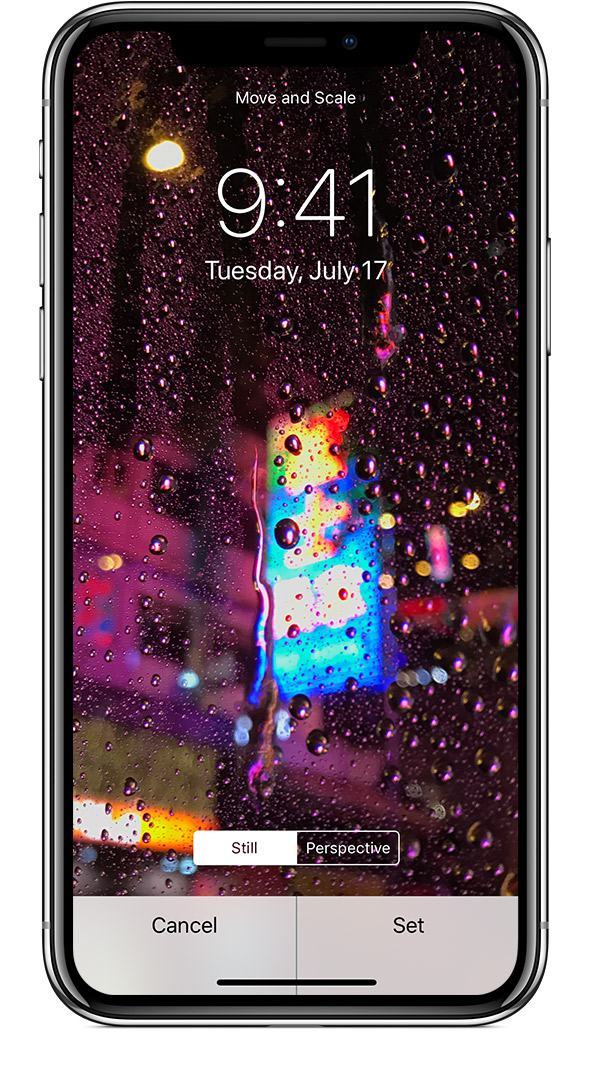
When you set the Live Photo as your Lock screen, by any chance are you zooming in by pinching as shown in the article titled Change your iPhone wallpaper ?

Move the image and choose a display option

Drag to move the image. Or pinch to zoom in and out, so the image fits the screen.

Some images might not move and scale.

You can choose Perspective, so the wallpaper moves as you tilt your screen. Or you can choose Still, so the wallpaper doesn't move. The Perspective display option isn't available when Reduce Motion is on or when Low Power Mode is on.

If you have iPhone 6s or later and you used a Live Photo, you can choose Live. When you press firmly on the screen, the Lock screen wallpaper animates.

You need an iPhone 6s or later to use Live Photo and Live wallpaper.

User uploaded file


If you take a new Live Photo and set it as your Lock Screen photo, does the same thing happen? This would help rule out issues with the specific photo, or the display options set when the photo was selected as wallpaper.

To approach it from a different perspective, do you find your iPhone X zooms in any other circumstances? It may be worth checking out your Zoom settings, found by tapping Settings > General > Accessibility > Zoom.

I hope this is helpful.

Kindest regards.

1 reply
Question marked as Top-ranking reply

Oct 4, 2018 12:48 PM in response to Adam Therrien

Hi Adam Therrien,

Thank you for posting in the Apple Support Communities. I see that you're encountering an issue with a Live Photo set as your Lock screen.

When you set the Live Photo as your Lock screen, by any chance are you zooming in by pinching as shown in the article titled Change your iPhone wallpaper ?

Move the image and choose a display option

Drag to move the image. Or pinch to zoom in and out, so the image fits the screen.

Some images might not move and scale.

You can choose Perspective, so the wallpaper moves as you tilt your screen. Or you can choose Still, so the wallpaper doesn't move. The Perspective display option isn't available when Reduce Motion is on or when Low Power Mode is on.

If you have iPhone 6s or later and you used a Live Photo, you can choose Live. When you press firmly on the screen, the Lock screen wallpaper animates.

You need an iPhone 6s or later to use Live Photo and Live wallpaper.


User uploaded file


If you take a new Live Photo and set it as your Lock Screen photo, does the same thing happen? This would help rule out issues with the specific photo, or the display options set when the photo was selected as wallpaper.

To approach it from a different perspective, do you find your iPhone X zooms in any other circumstances? It may be worth checking out your Zoom settings, found by tapping Settings > General > Accessibility > Zoom.

I hope this is helpful.

Kindest regards.

This thread has been closed by the system or the community team. You may vote for any posts you find helpful, or search the Community for additional answers.

Live Photo’s on iPhone X lock screen zooming in when viewed

Welcome to Apple Support Community
A forum where Apple customers help each other with their products. Get started with your Apple Account.