
how can download an ios ipdate on an older iphone
Broke my 6. Had to use my 5 again. Need some newer iOS update to use some of my apps.
An iPhone 5 or 5c can't be updated past 10.3.3. If yours is using a version older than that, run the Software Update function or update it from iTunes on a computer.
An iPhone 5s can run 12.0.1.
(165106)
An iPhone 5 or 5c can't be updated past 10.3.3. If yours is using a version older than that, run the Software Update function or update it from iTunes on a computer.
An iPhone 5s can run 12.0.1.
(165106)
An iPhone 5 cannot update beyond iOS 10.3.3
What iOS version is yours currently running?
What happens when you go to Settings->General->Software Update?
More details here: Update your iPhone, iPad, or iPod touch - Apple Support
Check Settings > General > About > Model on the iPhone and report the result here. Someone will be able to tell you which iPhone you have and the latest iOS version it can run from that information.
Go to Settings->General->About, and tell us what you see in Version and Model.
Version is the iOS version the iPhone is running, and Model tells us what model exactly it is.
If its showing iOS 12 as a potential update, then its not an iPhone 5. Might be an iPhone 5s.
You will also need to tell us what computer you are running and what OS it has. Mac or PC? etc...
This software area is not my strong point so I'm not sure where to look to find out what iOS level it is. It has update for iOS 12 but I couldn't get the computer to cooperate. This phone has been in a dresser drawer for 18 months so I'm sure it need a few updates. I know it won't operate like my 6 but some of my apps say the phone needs updated. Thanks for any help
jeromeyfromfrostburg wrote:
It says jeromeys iPhone.
It certainly does not say this at Settings > General > About > Model!!
It probably says this at Settings > General > About > Name.
Settings > General > About > Version tells you the current iOS version.
Version is 8.3(12F70)
Model #. ME332LL/A
Is this an issue that my cellular provider can fix at the store. The computer is my wife's laptop n I no nothing about it. I downloaded iTunes on it Got to correct screen but it never offered the option I needed. Thanks again for the help
To add to Phil0124's response, you must have a current version of iTunes on your computer. Doing so requires a reasonably current operating system.
If iTunes has trouble recognizing your iPhone, that is likely the reason.
It says jeromeys iPhone. I know it's a 5s. Is there a line that tells the current iOS soft
Thanks I will give it a try.
That model # corresponds to an iPhone 5S, not a 5. It can be updated to iOS 12.
Since its running quite an old iOS version, you do need iTunes on a computer.
Your cellular provider may be able to update it, but its unlikely they'll want to, since its not really a cellular issue.
If you've downloaded iTunes to the computer, follow the steps in the support document linked to above. Here it is again: Update your iPhone, iPad, or iPod touch - Apple Support
You can also try going to an Apple Store and they can help you update.
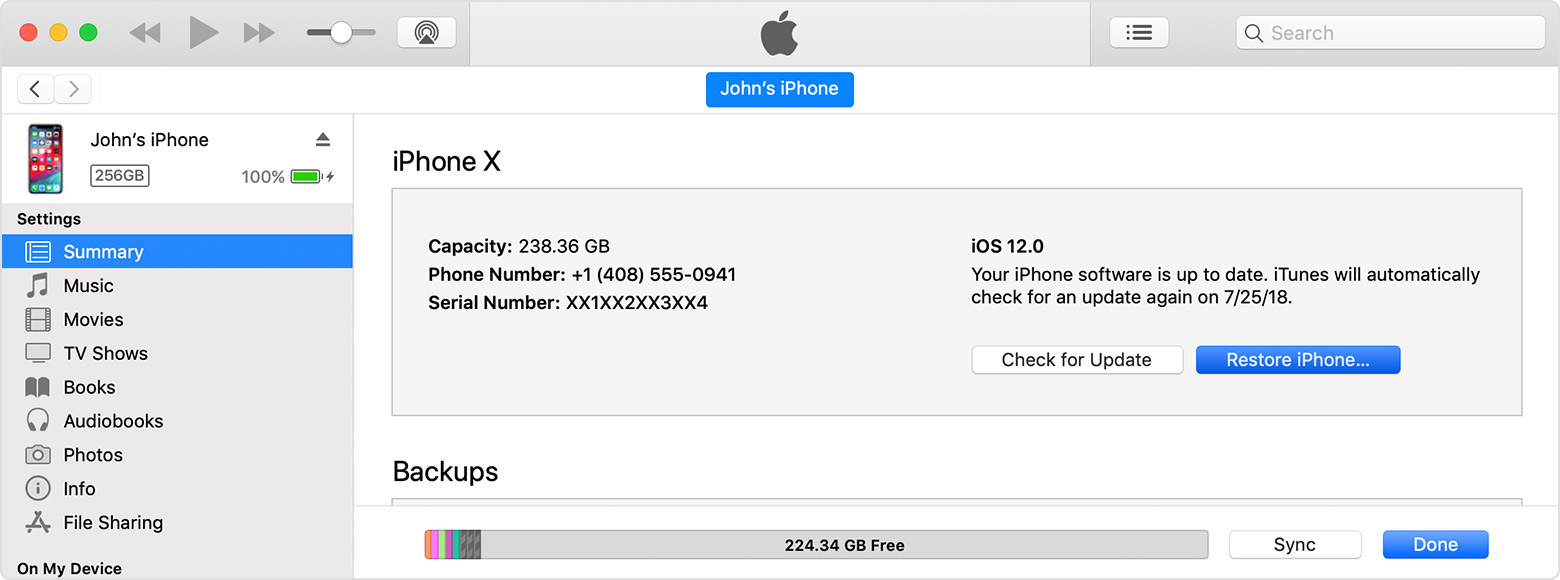
When connected the iPhone should appear in iTunes, and you can click on the small iPhone icon at the top left, and it will show you a summary tab, with the option to update:
then, click on Check for Update:
how can download an ios ipdate on an older iphone


