Why does an apple music ad pop up when I try to play my song?

When I try to play a song that I have synced from my iTunes library on my computer, an apple music ad pops up. I have never had a problem with this before until I decided to use the one month trail of apple music. Now that my trail had ended any song that I played using apple music doesn't play even if I have them synced from my iTunes library. It is getting annoying that when I try to play my music that it says I need apple music even though before it never said anything about apple music when I played the song synced from my computer.

iPhone 6s, iOS 12.0.1

Posted on Oct 27, 2018 2:43 PM

Reply
Question marked as Top-ranking reply

Posted on Oct 28, 2018 11:59 AM

Hi Anoop905,

Welcome to the Apple Support Communities. I see you're running into an issue with music playback since your Apple Music trial ended.

A good test is to try playing one of these songs directly from your computer using iTunes. If you do this, are you able to play it without being prompted to sign in to Apple Music?

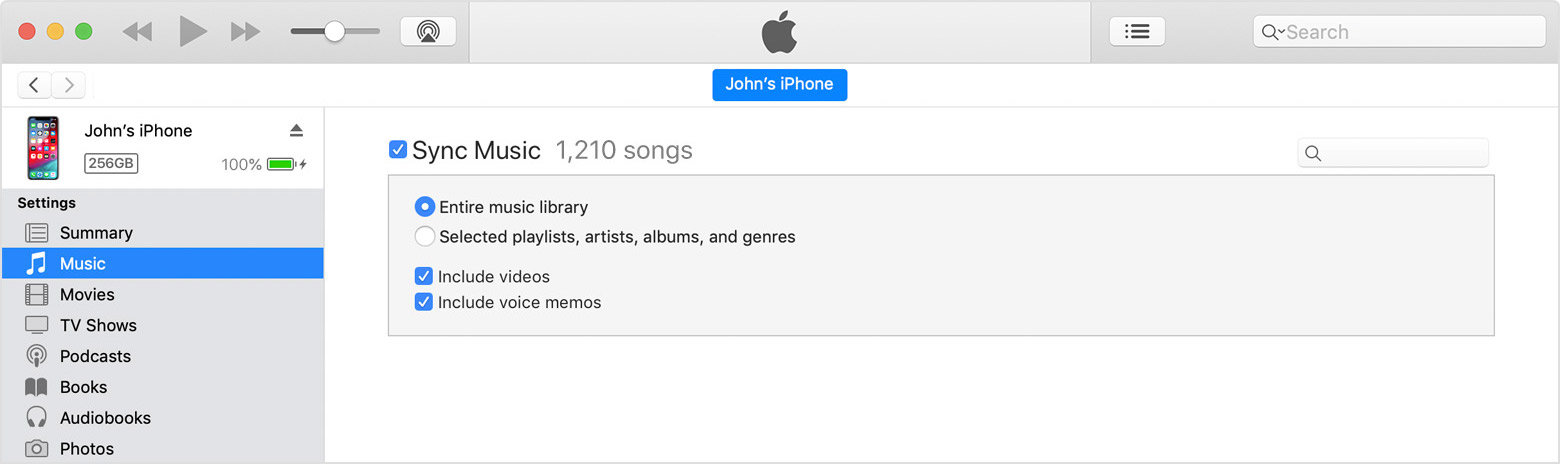
If so, try re-syncing your iPhone with your iTunes library. You'll want to remove all synced music, and then re-add it. You can Sync your iPhone, iPad, or iPod using iTunes on your computer as shown here:

Sync or remove content using iTunes

  1. Open iTunes and connect your device to your computer with a USB cable.
  2. Click the device icon in the upper-left corner of the iTunes window. Learn what to do if you don't see the icon.
    User uploaded file
  3. From the list under Settings on the left side of the iTunes window, click the type of content that you want to sync or remove.1 To turn syncing on for a content type, select the checkbox next to Sync.

    User uploaded file
  4. Select the checkbox next to each item that you want to sync.
  5. Click the Apply button in the lower-right corner of the screen. If syncing doesn't start automatically, click the Sync button.


When you click your device icon as shown above, click "Music" in the Summary column. Then, uncheck the "Sync Music" box and click Apply in the lower right corner of iTunes. Once the sync process completes, try re-syncing a few songs and then test it out.

I hope these steps help.

Take care.

Similar questions

2 replies
Question marked as Top-ranking reply

Oct 28, 2018 11:59 AM in response to Anoop905

Hi Anoop905,

Welcome to the Apple Support Communities. I see you're running into an issue with music playback since your Apple Music trial ended.

A good test is to try playing one of these songs directly from your computer using iTunes. If you do this, are you able to play it without being prompted to sign in to Apple Music?

If so, try re-syncing your iPhone with your iTunes library. You'll want to remove all synced music, and then re-add it. You can Sync your iPhone, iPad, or iPod using iTunes on your computer as shown here:

Sync or remove content using iTunes

  1. Open iTunes and connect your device to your computer with a USB cable.
  2. Click the device icon in the upper-left corner of the iTunes window. Learn what to do if you don't see the icon.
    User uploaded file
  3. From the list under Settings on the left side of the iTunes window, click the type of content that you want to sync or remove.1 To turn syncing on for a content type, select the checkbox next to Sync.

    User uploaded file
  4. Select the checkbox next to each item that you want to sync.
  5. Click the Apply button in the lower-right corner of the screen. If syncing doesn't start automatically, click the Sync button.


When you click your device icon as shown above, click "Music" in the Summary column. Then, uncheck the "Sync Music" box and click Apply in the lower right corner of iTunes. Once the sync process completes, try re-syncing a few songs and then test it out.

I hope these steps help.

Take care.

This thread has been closed by the system or the community team. You may vote for any posts you find helpful, or search the Community for additional answers.

Why does an apple music ad pop up when I try to play my song?

Welcome to Apple Support Community
A forum where Apple customers help each other with their products. Get started with your Apple Account.