How to convert Excel Time to Numbers Time?

I am looking for an easy way to convert Excel Time format to Numbers Time format. As you know in Excel Time is formatted as hh:mm:ss. I would like to convert hh:mm:ss to 00h 00m 00s (the format Numbers uses).

Posted on Oct 31, 2018 8:18 PM

Reply
Question marked as Top-ranking reply

Posted on Nov 5, 2018 3:55 AM

Hi again, Jed,


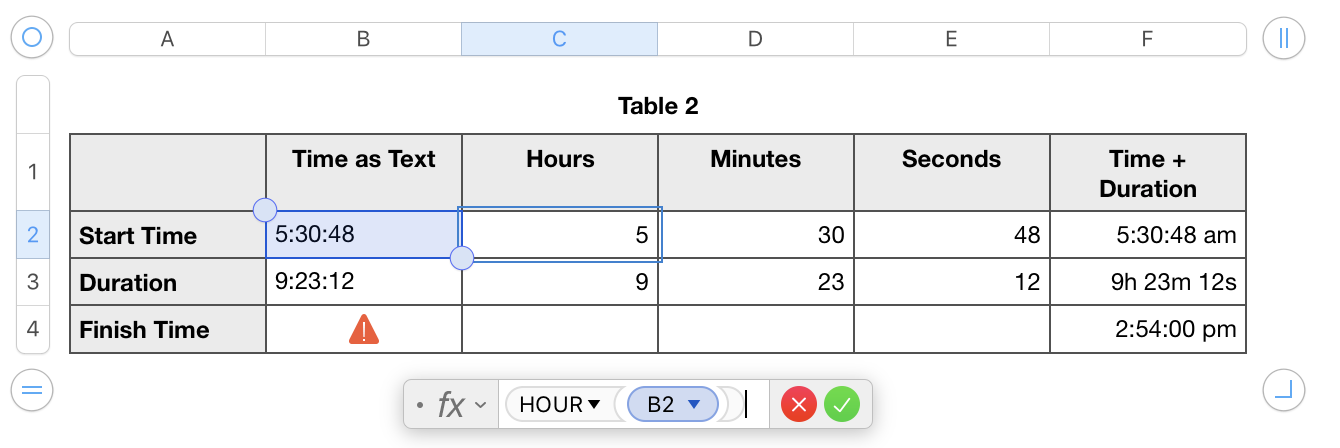
I suspect that Numbers is importing the Excel "Time" as Text. If I am wrong and Numbers accepts a time of day, this method will still work.
User uploaded file

Formula in C2 =HOUR(B2)

Formula in D2 =MINUTE(B2)

Formula in E2 =SECOND(B2)


Formula in F2 =TIME(C2,D2,E2)

Formula in F3 = DURATION(,,C3,D3,E3,)

(The extra commas are "Placeholders" for weeks, days and milliseconds that we don't need.)


Confusion may arise from the Cell Data Formats for Duration, h m s
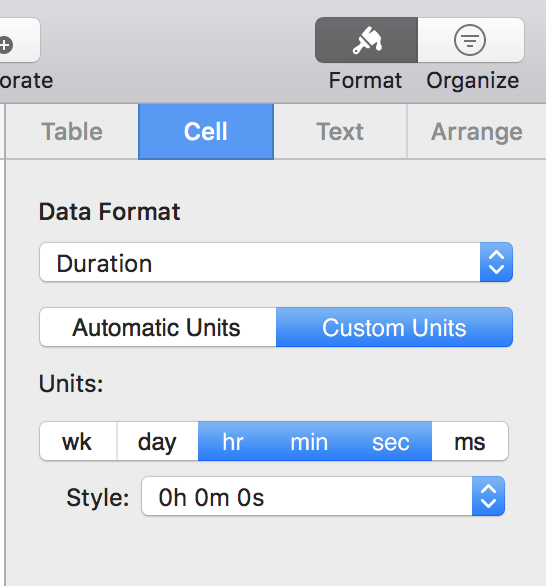
User uploaded file


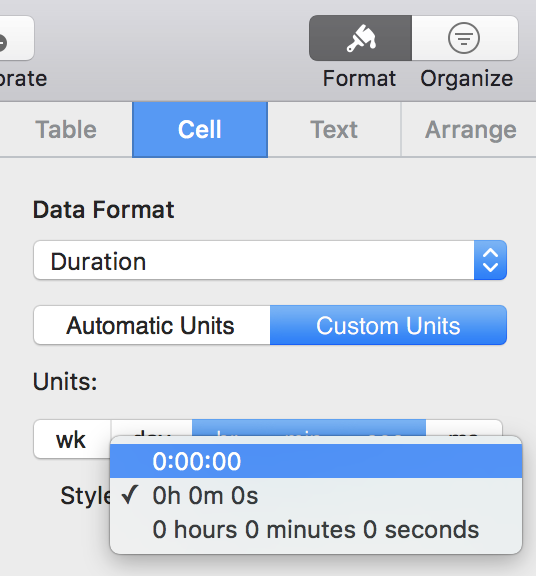
and 0:00:00

User uploaded file


That looks like a Time, but it isn't!


Also, please consider tt2's suggestion of decimal time.


Tested in Numbers for Mac version 5.2 under macOS High Sierra. Screen shots may not match what you see in iOS.


Regards,

Ian.

6 replies
Question marked as Top-ranking reply

Nov 5, 2018 3:55 AM in response to Yellowbox

Hi again, Jed,


I suspect that Numbers is importing the Excel "Time" as Text. If I am wrong and Numbers accepts a time of day, this method will still work.

User uploaded file

Formula in C2 =HOUR(B2)

Formula in D2 =MINUTE(B2)

Formula in E2 =SECOND(B2)


Formula in F2 =TIME(C2,D2,E2)

Formula in F3 = DURATION(,,C3,D3,E3,)

(The extra commas are "Placeholders" for weeks, days and milliseconds that we don't need.)


Confusion may arise from the Cell Data Formats for Duration, h m s

User uploaded file


and 0:00:00

User uploaded file


That looks like a Time, but it isn't!


Also, please consider tt2's suggestion of decimal time.


Tested in Numbers for Mac version 5.2 under macOS High Sierra. Screen shots may not match what you see in iOS.


Regards,

Ian.

Nov 5, 2018 3:37 AM in response to Jed Raybould

Hi Jed,


It looks as if

  • the Total formula is trying (and failing) to add two times of day. (In Numbers, that makes no more sense than adding today and tomorrow.) or
  • the Total formula is trying (and failing) to add two Text values.


In Numbers, you can

  • add one or more Durations together, or
  • add one or more Durations to a starting Time (or a Date).


Select the cell containing 5:30:48 and/or 9:23:12

What is the Cell Data Format?

Automatic? Date & Time? Duration?

I doubt that either "Time" is a Duration. AFAIK, Excel does not use Duration format.


You can extract the Hours, Minutes and Seconds and then reconstruct them into a Time or a Duration


Posting now before the Time-Out. More to come.


Regards,

Ian.

Nov 4, 2018 11:56 PM in response to Yellowbox

I made or converted an Excel spreadsheet into a Numbers spreadsheet and in Excel I used hh:mm:ss format then in Numbers I got a red triangle with an exclamation point. I have attached a screenshot of a test spreadsheet and you can see the red triangle. Here is the text from the triangle “The formula’s arguments can only include one date value.” So, I printed the 8 page spreadsheet and just converted the Excel time (hh:mm:ss), to Numbers time (0h 0m 0s) by hand. Just wanted to know if there was an easier way to do the conversion.User uploaded file

This thread has been closed by the system or the community team. You may vote for any posts you find helpful, or search the Community for additional answers.

How to convert Excel Time to Numbers Time?

Welcome to Apple Support Community
A forum where Apple customers help each other with their products. Get started with your Apple Account.