How can I get #images back in my messages?

After the recent update, in the messages app, I no longer can send gifs through the built-in selection using the User uploaded filebutton > #images on the bottom of the screen.


becky_s22's response is not correct. There is no User uploaded file button in the lower-left corner. Please help.


Mike

iOS 12.1

Posted on Nov 14, 2018 4:21 PM

Reply
Question marked as Top-ranking reply

Posted on Dec 31, 2018 4:56 PM

Go to the text message and tap the 3 dots on the app drawer (strip) A second page comes up...tap edit at the top right and scroll down to find #images Tap on the green plus sign beside #images and it goes to the drawer

8 replies

Nov 23, 2018 8:42 AM in response to majermike

Hi majermike,

Thank you for confirming that you're in a supported region for #images. Next, I'd suggest that you create a current backup: How to back up your iPhone, iPad, and iPod touch

Then, use the steps below to reinstall the iOS software to your device. This process erases the software currently installed and replaces it with a fresh copy, so be sure to closely follow step four and choose to "Update" in order to prevent data loss:
  1. Make sure that you're using the latest version of iTunes.
  2. If iTunes is already open, close it. Connect your device to your computer and open iTunes. If you don't have a computer, borrow one from a friend or go to an Apple Retail Store or Apple Authorized Service Provider for help.
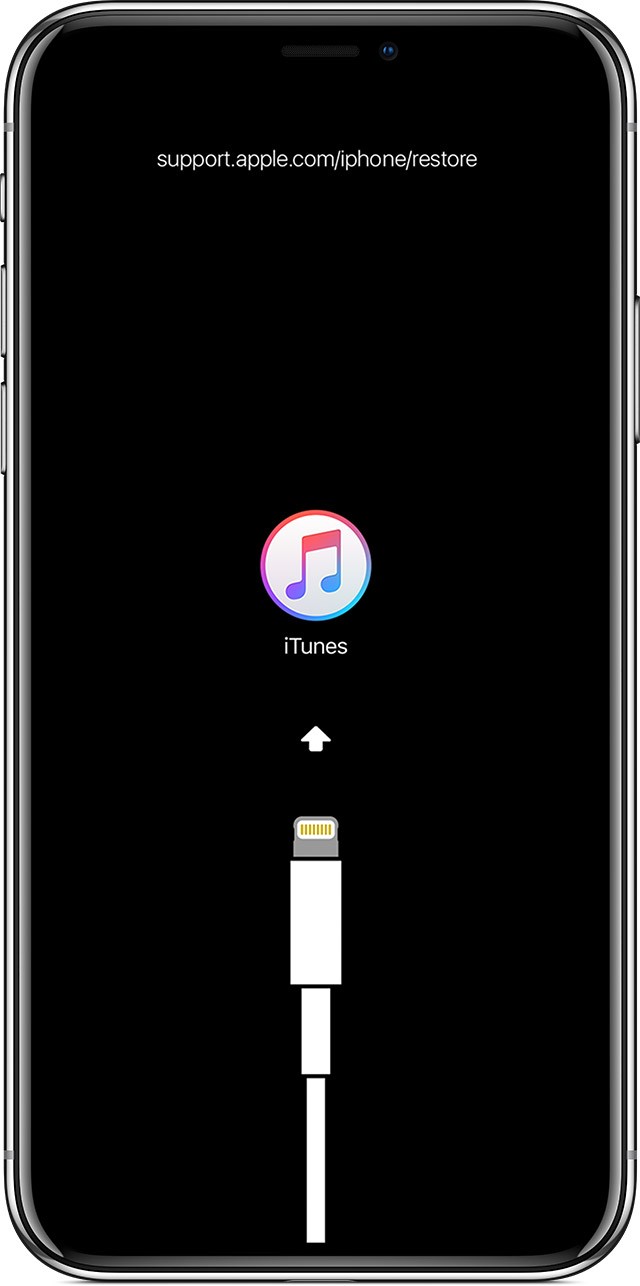
  3. While your device is connected, force restart it with these steps, but don't release the buttons when you see the Apple logo, wait until the connect to iTunes screen appears:
    • On an iPad Pro 11-inch or iPad Pro 12.9-inch: Press and quickly release the Volume Up button. Press and quickly release the Volume Down button. Press and hold the Top button until your device begins to restart. Continue holding the Top button until your device goes into Recovery Mode.
    • On iPhone 8 and later: Press and quickly release the Volume Up button. Press and quickly release the Volume Down button. Then, press and hold the Side button until you see the connect to iTunes screen.
    • On an iPhone 7 or iPhone 7 Plus: Press and hold the Side and Volume Down buttons at the same time. Keep holding them until you see connect to iTunes screen.
    • On an iPhone 6s and earlier, iPad, or iPod touch: Press and hold both the Home and the Top (or Side) buttons at the same time. Keep holding them until you see the connect to iTunes screen.
      User uploaded file
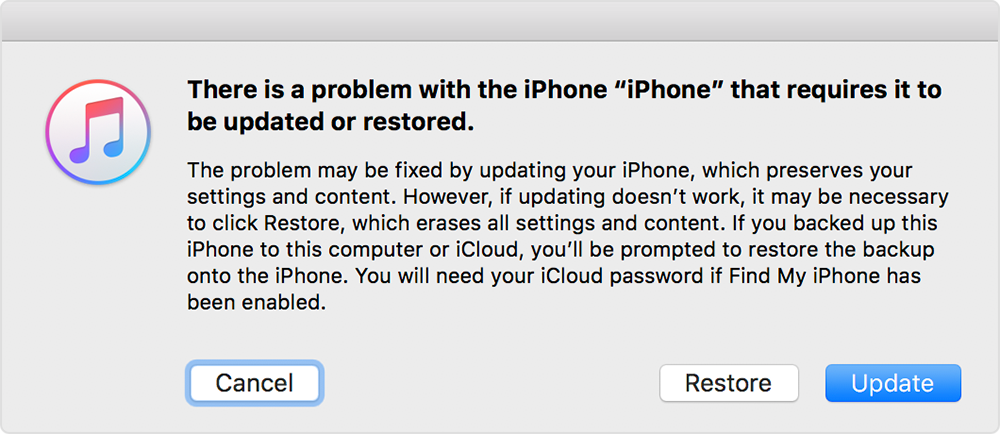
  4. When you see the option to Restore or Update, choose Update. iTunes will try to reinstall iOS without erasing your data. Wait while iTunes downloads the software for your device. If the download takes more than 15 minutes and your device exits the connect to iTunes screen, let the download finish, then repeat step 3.
    User uploaded file
  5. After the Update or Restore completes, set up your device.
If you can't update or restore your iPhone, iPad, or iPod touch

After you've completed these steps let me know if you're able to see and use #images in the Messages app again.


Best Regards.

Nov 16, 2018 9:51 AM in response to majermike

Hi majermike,

Thank you for taking the time to work through those steps. Although you've mentioned that you've used the #images app before, can you confirm you're located in one of the countries listed below?

The #images app is available in the United States, United Kingdom, Canada, Australia, New Zealand, Ireland, India, Singapore, Philippines, and Japan.

Send and save GIFs on your iPhone, iPad, or iPod touch


Best Regards.

Nov 15, 2018 6:01 PM in response to majermike

Hi majermike,

Thanks for reaching out in Apple Support Communities. I understand that since updating your iOS you aren't seeing #images in the app drawer in Messages. I know this is an important app to be able to use in Messages; I'd like to help. First, if you haven't already, I'd suggest using the steps in the following article to close the Messages app, then restart your iPhone and look to see if it is available:

If not, use the steps below to see if you're able to download #images or if you can re-enable it through managing iMessage apps:

*#images and Apple Pay aren't available in all countries or regions. If you find an issue or have a concern with content found in #images, you can report the content or remove the #images app.

User uploaded file

User uploaded file

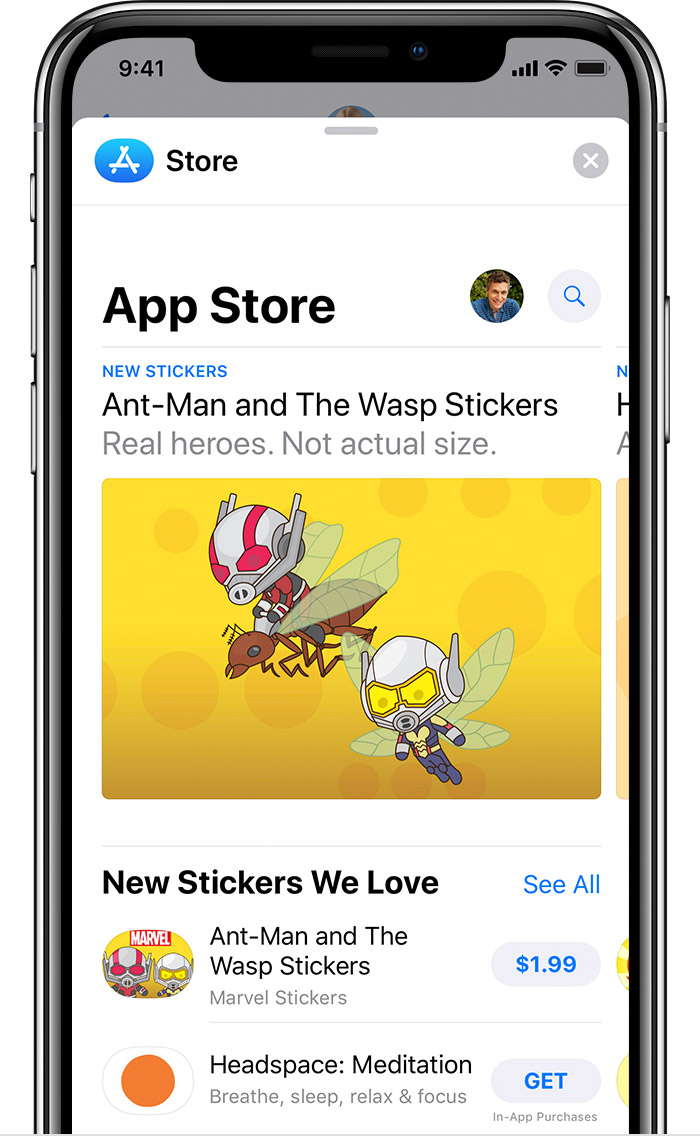
Download iMessage apps

You can find and download apps to use with iMessage in the App Store for iMessage. Here's how:

  1. To go to the App Store for iMessage, tap User uploaded file.
  2. Tap User uploaded file or the price icon next to the app, then tap Install. You might need to enter your Apple ID password to complete the purchase.
  3. Tap User uploaded file to return to your message.

After the app downloads, you can find it in your app drawer.

Some apps let you make additional purchases within the app. If you set up Family Sharing, you can use Ask to Buy to help control app downloads and in-app purchases. Learn more about in-app purchases.

User uploaded file

User uploaded file

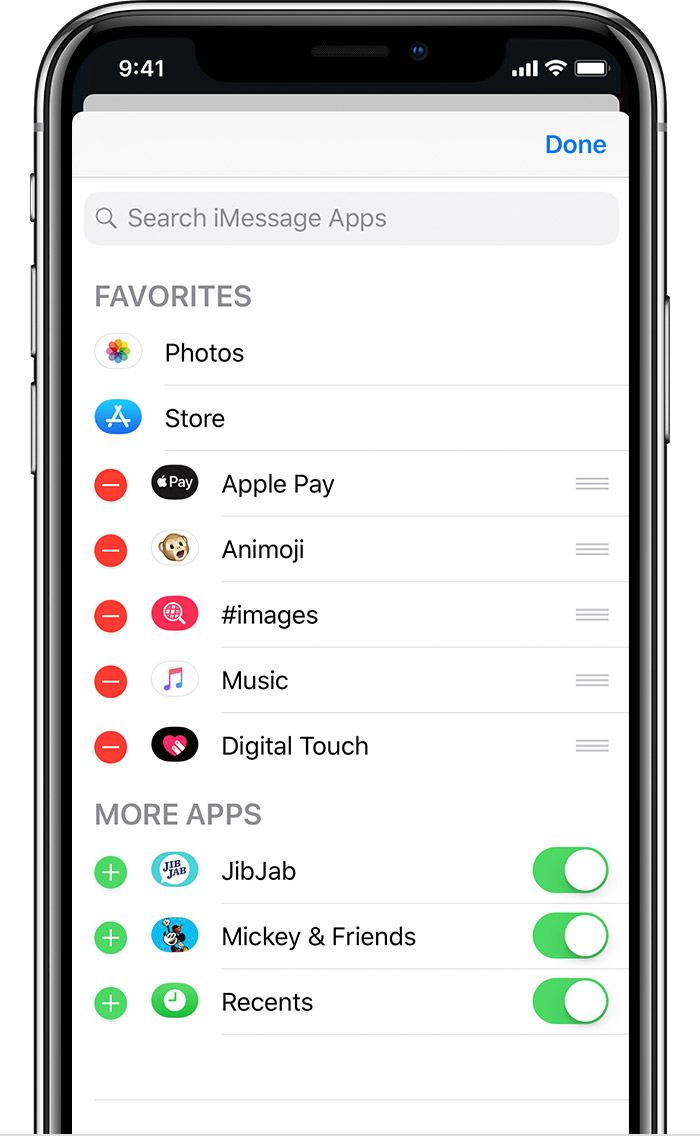
Manage iMessage apps

You can add apps to your Favorites so you have quick access to them in the app drawer. You can also reorder apps in the app drawer, remove the ones you don’t want, and more. Here’s how:

  1. From the app drawer, swipe left and tap User uploaded file.
  2. Tap Edit in the upper-right corner to do the following:
    • To add an app to your Favorites, tap User uploaded file.
    • To remove an app from Favorites, tap User uploaded file, then tap Remove from Favorites.
    • To reorder apps in the app drawer, touch and hold User uploaded file, then move the apps in the order that you want.
    • To hide an app, turn it off.
  3. Tap Done.
Use iMessage apps on your iPhone, iPad, and iPod touch

Let me know what you find.


Best Regards.

This thread has been closed by the system or the community team. You may vote for any posts you find helpful, or search the Community for additional answers.

How can I get #images back in my messages?

Welcome to Apple Support Community
A forum where Apple customers help each other with their products. Get started with your Apple Account.