My Apple Music subscription keeps saying I need to verify my student eligibility?
I have already verified my student status on unidays.com. Yet, Apple Music is saying I need to still re-verify it.
I have already verified my student status on unidays.com. Yet, Apple Music is saying I need to still re-verify it.
On an iOS device
During the verification period, you might see a message in the Music app that asks you to verify your status. To verify your status:
- Tap Verify Eligibility.
- Tap "Go to Website."
- Sign in to your institution's portal.
After you sign in to your institution’s portal, you’ll be directed back to Apple Music and see a confirmation screen.
You can also verify your student status at any time through Settings on your iOS device:
- Go to Settings > [your name] > iTunes & App Store.
- Tap your Apple ID, then tap View Apple ID. You might need to authenticate your Apple ID.
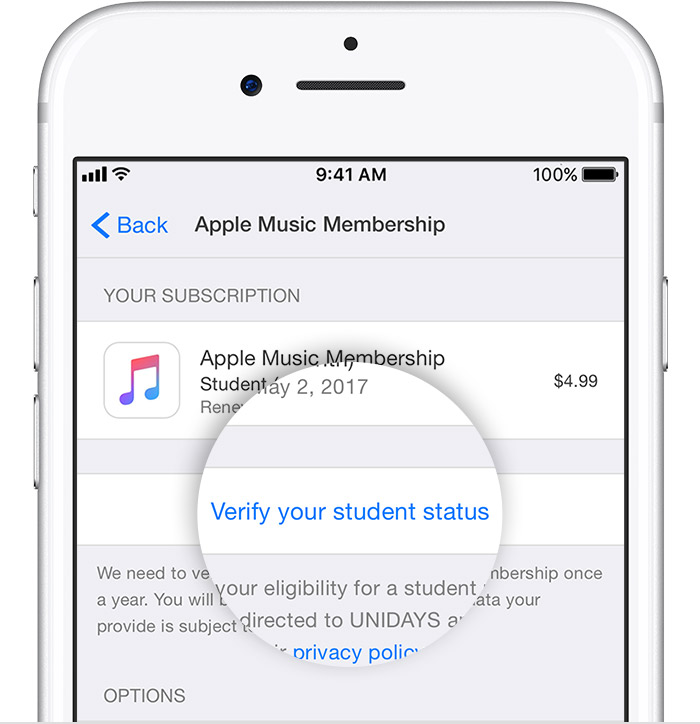
- Tap Subscriptions. If you have more than one subscription, tap Apple Music Membership.
- Tap "Verify your student status." You'll be redirected to a website at which you'll confirm your student status with UNiDAYS, a student verification service.
- Follow the prompts to verify your eligibility. If the verification is successful, you'll automatically return to Apple Music and continue your Apple Music Student subscription.
If you're no longer a student or if you complete 48 months of a Student subscription, your subscription automatically becomes an Apple Music Individual subscription. If you're prompted to verify your student status after launching Apple Music, but you are no longer a student or have completed 48 months of a subscription, tap I'm No Longer A Student. You won't be asked to verify again.
My Apple Music subscription keeps saying I need to verify my student eligibility?