
My safari won’t work without WiFi but I have unlimited data what do I do to fix it

I can’t use my safari unless I have WiFi but what I don’t understand why I need WiFi if I have data

Posted on Nov 27, 2018 4:49 PM

Reply
Question marked as Top-ranking reply

Posted on Nov 29, 2018 6:49 AM

Hi djs16,

Thank you for posting in the Apple Support Communities. I understand you're running into a Safari issue.

Are you experiencing issues with any other apps, or with making or receiving calls and texts, when you're using just cellular data? If so, this might change the best troubleshooting steps for the issue.

What exactly happens when you try using Safari on cellular data?

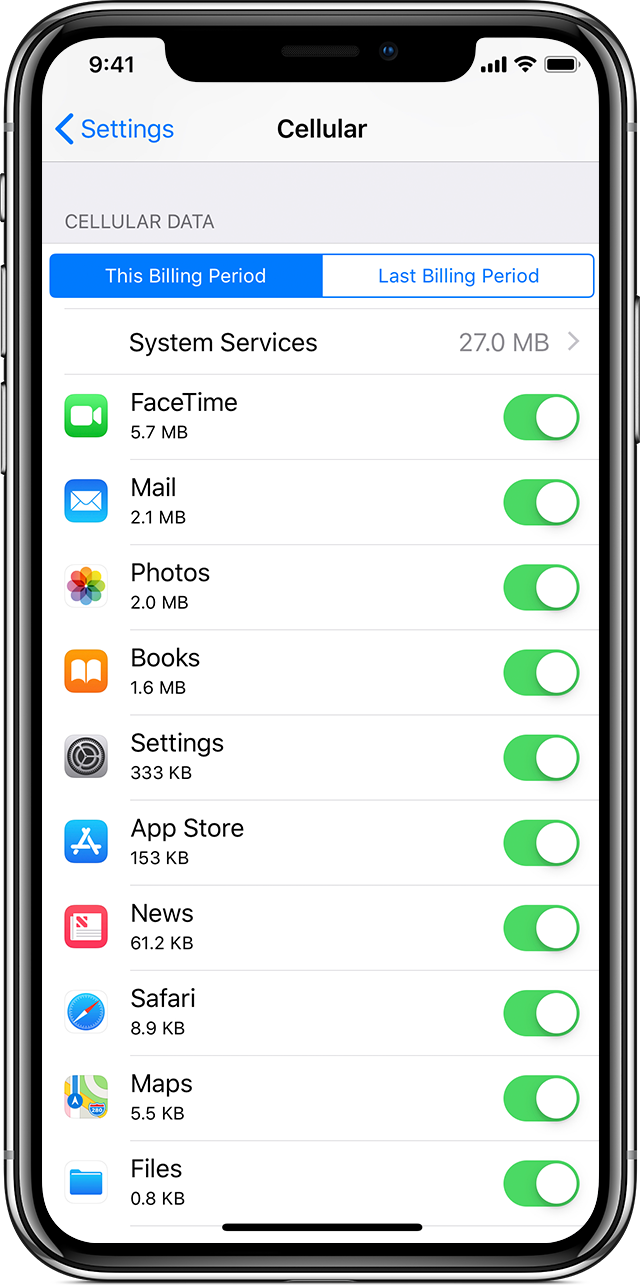
To get started, I recommend checking out your cellular data settings. Check the cellular data usage on your iPhone and iPad :

User uploaded file

View how much data you're using

To see how much cellular data that you've used, go to Settings > Cellular or Settings > Mobile Data. If you're using an iPad, you might see Settings > Cellular Data instead.

Scroll down to find which apps are using cellular data. If you don't want an app to use cellular data, you can turn it off for that app. When cellular data is off, apps will only use Wi-Fi for data.


Using the steps above as a guide, you'll want to tap Settings > Cellular, and then scroll down to make sure Safari is switched on.
I hope this helps you get started.

Take care.
1 reply
Question marked as Top-ranking reply

Nov 29, 2018 6:49 AM in response to djs16

Hi djs16,

Thank you for posting in the Apple Support Communities. I understand you're running into a Safari issue.

Are you experiencing issues with any other apps, or with making or receiving calls and texts, when you're using just cellular data? If so, this might change the best troubleshooting steps for the issue.

What exactly happens when you try using Safari on cellular data?

To get started, I recommend checking out your cellular data settings. Check the cellular data usage on your iPhone and iPad :

User uploaded file

View how much data you're using

To see how much cellular data that you've used, go to Settings > Cellular or Settings > Mobile Data. If you're using an iPad, you might see Settings > Cellular Data instead.

Scroll down to find which apps are using cellular data. If you don't want an app to use cellular data, you can turn it off for that app. When cellular data is off, apps will only use Wi-Fi for data.


Using the steps above as a guide, you'll want to tap Settings > Cellular, and then scroll down to make sure Safari is switched on.

I hope this helps you get started.

Take care.

This thread has been closed by the system or the community team. You may vote for any posts you find helpful, or search the Community for additional answers.

My safari won’t work without WiFi but I have unlimited data what do I do to fix it

Welcome to Apple Support Community
A forum where Apple customers help each other with their products. Get started with your Apple Account.