sending mail with mail or postfix

Hi!

Where do I set SMTP server to make mail or postfix working for sending mail?

I'm a newbie CVS administrator and want my CVS repository to send emails upon committments. According to the CVS manual, this is done in CVSROOT/notify scriptfile with the mail command:
<pre>ALL mail %s -s "CVS Notification"</pre>
But in order to make this work, I need to set SMTP-server somewhere. Where do I that? Assume my ISP's SMTP hostname is smtp.myisp.com.

====

In addition, I have set HOSTNAME=myserver.homeip.com in /etc/hostconfig because I'm linking my dynamic IP to a DynDNS address. There is an option in the DynDNS registering process to set the MX field of the DNS record for myserver.homeip.com. I'm newbie here, too, but the question is can I use this feature (MX-field) to automate the configuring process, and set it to smtp.mysip.com somehow?

====

In another scenario, I've tried to run mail from a PHP-script. On M$ Windows, you can set php.ini's SMTP variable to the SMTP host. But this does not work on Mac OS X.

Fortunately, PEARs Net::Mail or SMTP package provides a easy interface for sending mail with an existing SMTP hostname. In fact, because mail is so hard to understand, and postfix so cumberstone to configure, I'm thinking about replacing mail or postfix with a simple phpSendMail.php-script... 🙂

Mac Mini Intel Core Dual Mac OS X (10.4.9)

Posted on Apr 23, 2007 1:30 PM

Reply
6 replies

Apr 23, 2007 10:40 PM in response to roggan

I think there are several lines of stuff that you'd need to change in /etc/postfix/main. Not exactly sure which ones. You could take the easy (and inexpensive) way out, like I did, and get Postfix Enabler or MailServe from cutedgesystems.com. They are a GUI to Mac's built-in postfix (and configures a pop and/or imap server for you, too, if you'd like)

Or, you could wait for a little bit for somebody who knows this stuff inside-out to post....


(If you find that my post solves your problem, or is actually helpful towards arriving at a solution to your problem, please consider clicking on either the "helpful" or "solved" buttons in the header of my post. Thank you.)

Apr 27, 2007 1:30 PM in response to roggan

I'm assuming you want your local Postfix to relay mail through your ISP?

If that's the case, then you need to set the relayhost option in main.cf. If your ISP requires SMTP Auth, you'll also need:

smtp sasl_authenable = yes
smtp sasl_securityoptions =
smtp sasl_passwordmaps = hash:/etc/postfix/sasl_passwd
smtp sasltype = cyrus

Your account and password for your ISP is in /etc/postfix/sasl_password. Complete instructions are at

http://www.postfix.org/SASL_README.html

May 15, 2007 6:28 AM in response to j.v.

I think there are several lines of stuff that you'd
need to change in /etc/postfix/main. Not exactly sure
which ones. You could take the easy (and inexpensive)
way out, like I did, and get Postfix Enabler or
MailServe from cutedgesystems.com.


I'm still finding it hard to set up postfix for outgoing mail, even using Postfix Enabler. (there was a trial edition that I could test with.)

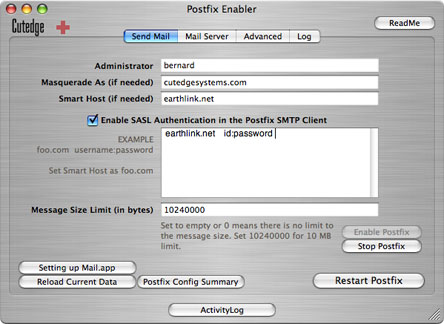
In Mail.app, I simply write my ISP SMTP server when configuring outgoing mail. But where do I do this in Postfix enabler? This screen is the tab to configure outgoing mails:
http://www.cutedgesystems.com/software/PostfixEnabler/images/PFEPanel1.jpg

====
Instead of fiddling around with postfix, I created a php script for sending mail. You need PEAR's Mail and Net::SMTP package.<pre>sudo pear install Mail Net_SMTP</pre>
This is the nifty php script that sends mails <pre><?php
# File: phpMail.php - simple send mail script
require_once 'Mail.php';

$params = array(
'host' => 'smtp.myisp.com' # change this
);

$smtp = Mail::factory("smtp", $params);
if (PEAR::isError($smtp)) {
echo $smtp->getMessage()."\n";
exit(1);
}

# Send message
$recipients = 'my@email.com'; # change this
$headers = array(
'Subject' => 'This is the subject', # change this
'From' => 'daemon@email.com' # change this
);
$body = 'This is the message text'; # change this
$status = $smtp->send($recipients, $headers, $body);
if (PEAR::isError($status)) {
echo $status->getMessage()."\n";
exit(0);
}
</pre>


mac mini Mac OS X (10.4.8)

May 15, 2007 6:43 AM in response to Jeff Breitner

Thanks for the help so far, Jeff and JV!
I'm assuming you want your local Postfix to relay
mail through your ISP?

No, I want to send mail with the sendmail or mail terminal command.

Is this equivalent to having my "local postfix server relay mail throguh my ISP"?

If that's the case, then you need to set the
relayhost option in main.cf. If your ISP requires
SMTP Auth, you'll also need:

smtp sasl_authenable = yes
smtp sasl_securityoptions =
smtp sasl_passwordmaps =
hash:/etc/postfix/sasl_passwd
smtp sasltype = cyrus


My ISP have no authentication. The only restriction is that I send mail from inside their network.

With what variable do I set my ISP's SMTP server address, say smtp.myisp.com? Don't I need to set it?

smtp sasl_authenable = no
smtp_something = smtp.myisp.com

May 16, 2007 12:42 PM in response to roggan

But your ISP might be blocking port 25 traffic from its clientele that is destined for any smtp server other than its own.

You may need to set up a "smart host" relay where you relay your personal mail server's outbound traffic through their's.

I don't remember whether Postfix Enabler has a "smart host" capability or not. cutedgesystems' "big brother" version of PFE, MailServe, certainly does.

If you try to do it yourself in unix/postfix, as a minimum, you will need to specify relayhost=whatever. What else you might need, I don't know.

May 16, 2007 10:34 PM in response to roggan

>> I'm assuming you want your local Postfix to relay
mail through your ISP?

No, I want to send mail with the sendmail or mail terminal command.


That's exactly how it works.

The command-line mail will submit the message to the local postfix mail server running on your machine. That mail server will try to deliver it.
If you want/need to relay that through your ISP's mail server then relayhost is the postfix directive you want.

Edit /etc/postfix/main.cf and add a line:

<pre class=command>relayhost = smtp.myisp.com</pre>

Then start the mail server via:

<pre class=command>sudo launchctl start org.postfix.master</pre>

Now your mail server is ready to go - accept incoming mail from your system and send it on up to your ISP for delivery.

This thread has been closed by the system or the community team. You may vote for any posts you find helpful, or search the Community for additional answers.

sending mail with mail or postfix

Welcome to Apple Support Community
A forum where Apple customers help each other with their products. Get started with your Apple Account.