Making 2 movies from same video clips

This is my first attempt at making a movie with iMovie HD v5.0.2. After having imported almost 3 hours of video into iMovieHD, I started the editing process, figuring things out as I went. I now realize that I will need to make at least two versions of my movie.
What happened to the clips that I drag-and-dropped into my timeline and then edited? Do the original clips still exist somewhere on my computer, or to make another version of my movie will I need to go back and reimport all, or some of the video again? What is the best way to make another version of my movie? Should/can I just control click my iMovie file and then select “duplicate” and rename the duplicate file and continue on? When I work in something like PhotoShop with photos, the first thing I always do is make a duplicate file and put away the original, only ever working on the copy. Is there a way to do the same in iMovieHD, or would that take up too much HD space?

iMac G5 Mac OS X (10.4.8)

Posted on May 10, 2007 1:57 PM

Reply
6 replies

May 10, 2007 7:12 PM in response to James Press1

Hello, James Press1,
You have posted in the iMovie HD forum, which is for version 5, so I am assuming that you are using that version.

iMovie started using nondestructive editing with v5, so what happens to the rest of your deleted clips is that iMovie saves the entire clip in its files. If you have a 2 minute clip and use only 10 seconds of it, the entire 2 minutes is still saved.

You can use this feature to do just what you are wanting to do. In iMovie 6 you can have more than one iMovie open at a time, but not in your version.
You can certainly 'duplicate' your iMovie and open the second one and delete the clips you are using in the first movie, and then open the first movie and delete the clips that are in the second movie.

You can also do it by the copy/paste method to get just the clips you want into the second movie. You will need to have your movie (let's call it Movie A) in the clips view of the time line and select the clips you want in your second movie (call it Movie B) so that they are highlighted. Then 'copy' and go to 'File->New' to create a new iMovie(Movie B). Then, click on 'paste' and those clips from Movie A will be copied into Movie B. Now, the best thing is that you can click on one of those previously edited clips and go to 'Advanced->Revert to Original' and the entire clip will be restored.

Don't forget to go back to Movie A and delete the clips of Movie B.

If you want to have a duplicate movie while you work on a copy, you certainly can, but the edits you make on the movie will not be changed on the saved duplicate unless you keep making duplicates and deleting the older ones. It is easier to save often!

May 10, 2007 11:32 PM in response to James Press1

.. This is my first attempt..

wow, woow, woooow... and a 3h project with two versions ...
okay.... 😉

iMv5 does NOT allow to keep open two projects simultanously, that is one of the huge improvements of v6 .. (copy/paste from one project to another...). in your version, you have to constantly open/close the two projects you like to swap files with... less convenient...

considering, this is your first project, I would mostly avoid any 'tricks&workarounds'... doing the same project twice is a good exercise.. imho.

plus, I'm not aware of any clever method to reduce file sizes...

so, what I would do:
finish your project, version A. playout to tape, so, connected to a TV, you have a an easy 'reference' for version B...

import your 3h again.. do the 'final cut' B ...


Plan B)
for sure, you can duplicate in Finder an iM project.. be sure, you don't get confused with original and copy .. ;))
I do NOT recommend that procedure; depending on complexity of your (first...) project, the 'correction' could take more time, than doing a complete new edit.. and I'm pretty sure, the 2nd one goes faster PLUS you'll realize some new ideas to improve your project(s) ...

have fun with iMovie! 😀

May 11, 2007 1:52 PM in response to James Press1

Thanks for the feedback. I was hoping that the original 3hrs imported would stay intact, and I could use it at a later date without having to reimport, which sounds to be the case.
So if I’m understanding this right, as I am editing a movie, as I cut out portions of a clip, I won’t be gaining HD space, as the original clips are still intact somewhere on my HD. So are all the clips in the iMovie I’m making really just “pointers” to the actual files that were imported? And if I just Control-click>duplicate my movie file, I won’t be doubling the size of the space taken up by the originally imported files? (I hope that makes sense!) I tried some copy/paste “tests”. The “Advanced>Revert clip to original works great! Thank you much.
Oh, and one more thing. Once the movies are completed, how/where are all the original files? Once completed, I’d like to move them over to an external HD to free up the space on my computers HD.

iMac G5 Mac OS X (10.4.8)

May 11, 2007 4:13 PM in response to James Press1

1. I was hoping that the original 3hrs imported would stay intact, and I could use it at a later date without having to reimport
If you have enough space on your hard drive, you can 'Share' the original 3 hours as a QuickTime Full Quality and save that. It will be one long clip and will take a while for it to be finished to save. It will be approx the same size as the original footage. You can also save this QuickTime movie to an external drive. (See more explanation of this below in #5....Karl's).

2. as I cut out portions of a clip, I won’t be gaining HD space, as the original clips are still intact somewhere on my HD. So are all the clips in the iMovie I’m making really just “pointers” to the actual files that were imported?

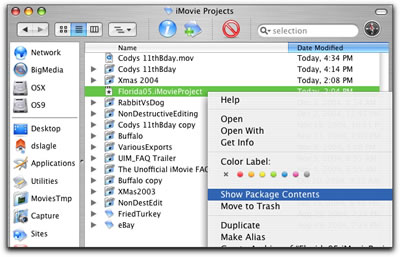
Sort of.... Your iMovie files are in its package. You can view this package, but don't do anything with it unless you are positive that you know what you are doing 🙂 To access your iMovie's package, Control click on the iMovie's icon and select 'Show Package Contents.' See this for a view of it (Courtesy of Dan Slagle, iMovie FAQ expert): view iMovie package


3. nd if I just Control-click>duplicate my movie file, I won’t be doubling the size of the space taken up by the originally imported files?

Actually, you will....the entire project is duplicated into a new project. Here is a link to more information about archiving clips: Karl Peterson's explanation


4. Once the movies are completed, how/where are all the original files?
The original files are in the package, as explaned above. They are there from the moment you begin your project.

5. Once completed, I’d like to move them over to an external HD to free up the space on my computers HD.

An external drive is a great idea....do you have one now? It should be Firewire, and Mac formatted, and as large as you can afford, not less than 250GB.
If you already have one, why don't you copy your iMovies to the hard drive before they are completed to give you more space for editing? Each DV movie consumes about 13 GB per hour, more if the movie is complicated with many effects, titles, transitions and audio. You don't have to worry about finding all the original files to copy over. Just drag the iMovie's icon from your computer's drive to the external and the entire iMovie package for that project will be copied.
See another of Karl's explanations here: iMovie files too big


6. The “Advanced>Revert clip to original works great! Thank you much.

You are very welcome!

And, thanks to Karl for the answers I linked.

This thread has been closed by the system or the community team. You may vote for any posts you find helpful, or search the Community for additional answers.

Making 2 movies from same video clips

Welcome to Apple Support Community
A forum where Apple customers help each other with their products. Get started with your Apple Account.