
Screen Tearing in FCP 6

Hi
Have a FCP 6 running on my Macbook Pro, I keep getting screen Tearing in the Canvas window when i play any form of footage from DVC pro to DV, the quicker the cuts, the worse the screen tearing.. what causes this and how do i fix it? Have read MANY conflicting posts for this problem, some say its a screen resolution problem, some say it s a memory problem, some say its a data speed problem.. have yet to come accross any straight answer.

When i export the sequence out and play in Quicktime, its perfect, no tearing at all.
There is no options on the macbook settings to change it's screen resolution to test that theory, just says N/A in teh resolution field
Have tried running the canvas window at less than 100% as someone posted but alas, still tearing.. its driving me nuts , its so annoying, especially if you have someone watching the cut, really puts them off with the horizontal tearing.

I have 2GB of Memory and I am running the media off and ext firewire 800 drive.
Graphics card Nividia Gefore 8600

can anyone help me?

cheers
h

Macbook Pro 17", Mac OS X (10.4.10), 2.4 Ghz 5400rpm 160GB NIVIDIA Geforce 8600 Graphics Card 266MB

Posted on Sep 9, 2007 2:03 AM

Reply
32 replies

Sep 9, 2007 2:23 AM in response to editor_stibbs

FCP's Canvas window only plays a proxy of the full quality. That's just one of the many reasons it is highly recommended that you edit while monitoring on an external TV monitor. For DV, DVCam, DVCPro and any other DV25 format, it's a simple matter of connecting a qualified DV device (camcorder, VTR or converter) via Firewire to your Mac, then connect the DV device's analog outputs to the TV monitor.

-DH

Sep 9, 2007 5:26 AM in response to editor_stibbs

Screen tearing usually happens because the canvas display is not synced with the monitors refresh rate. This should not happen and sounds like a problem with FCP's overlay settings. I'm not sure there is much you can do since it goes to the programming level of how video overlays are handled - its a simple setting for Apple, but we can't get to it.

There are standard programming methods to deal with tearing, so even though its always best to preview on an external monitor, this is still something that should not happen.

Its true that the canvas window shows a low res image and I've read elsewhere where others have said its due to interlaced footage, but these are NOT the reasons for the tearing. You are seeing the top of one frame and bottom of another frame, movement exaggerates the tear. Its identical in Avid.

I'm afraid don't have a solution, since there is no access to the settings for these features.

Sep 9, 2007 5:41 AM in response to Michael Grenadier

Its not a resolution setting its a lower level programming setting. This explains what's going on:
http://developer.apple.com/documentation/GraphicsImaging/Conceptual/OpenGL-MacPr ogGuide/openglperformance/chapter_13_section_2.html#//appleref/doc/uid/TP40001987-CH213-SW4
It seems there is an issue with the newer MacBook Pro graphics cards and FCP, as I've now seen this reported on quite a few forums.

Sep 9, 2007 5:45 AM in response to Mark.Burton

Mark, you're probably right, but the OP said there's no way to change the screen resolution on the macbook which just ain't so. It's certainly worth a shot.

Ah just reread the original post and he was talking about adjusting the refresh rate. Still I would think adjusting the screen resolution would be worth a shot.

Message was edited by: Michael Grenadier

Sep 9, 2007 8:21 PM in response to editor_stibbs

Hi guys
All these posts have been really helpful
I decided to put up with a little tearing, the smaller the window the less I get.. Ill wait for this update (hopefully it comes soon)

For now ive set up my external monitor to go through my camera by firewire and into the LCD which gives me no tearing at all - at least I can show cleinets work this way and not be embarrassed.

I actually meant in a previous post I couldn't change the Refresh rate - i dont want to go to a lower resolution because the screen just looks all blown up and crappy.

Do you think they (apple) will ever solve this tearing problem? The rest of the program works like a charm, v. disappointing.

P.S Im a woman ha!

THANKS!

Sep 10, 2007 2:17 AM in response to editor_stibbs

i just want to express just how crap apple support is, i dont know why they even bother - they didnt even understand what I ment by VIDEO TEARING - how could they not know what this is. It seems everyone is having thir problem on the macbook pro's In australia they are being touted as "for editors on the go" so angry about this. Is there nothing that can be done? You pay 1500 dollars for a peice of software+ the 4 grand for the computer and it does this SO dissapointed. Im so angry I could cry.

hx

Sep 10, 2007 10:09 PM in response to editor_stibbs

well you would think calling apple support in USA and telling them about the problem, they would pass the info on, but they just kept sayin "oh No, that shouldnt happen" DER! no kidding mate, but then they just keep saying is your comps problem, considering it happens to everyone, thats a bit stupid.

I just cant get over that no one there understood the term video tearing, or claimed to have known at least the gyst of what I ment. Its like they just go off their little list of trouble shooting, thats in the manual anyway - so whats the point of them
so angry!

Sep 11, 2007 2:56 AM in response to editor_stibbs

I think the best way to try and get this logged as a bug with Apple is to do both of the following.
First, use the feedback form to report the issue.
http://www.apple.com/feedback/finalcutpro.html

Secondly, if you have a free developer account (you can just sign up for one if not), use the Apple bug reporter to log an official bug. I've used this in the past and they do get addressed...eventually.
http://developer.apple.com/bugreporter/

In both cases try and provide as much info as you can to help them isolate the issue. To me this sounds like an issue with the newer NVidia GPU's in the MacBook Pro's since my older ATI based MacBook Pro does not have the issue. Seems this issue only effects those with the newer machines - is that right?

Sep 13, 2007 7:34 PM in response to editor_stibbs

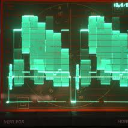
I, too, have the same problem. I just reported it to apple. No reply yet. I have the latest updates on my Macbook Pro (2.4Ghz, 17" Hi-Res, 2GB Ram, 8600m gt). The tearing looks just like the symptoms on a PC game when v-sync is not enabled which, from my understanding, is caused by the refresh rate of the software being higher than that of the monitor. Here is a screen grab, shot and captured in 1080p24.

http://ryanvesely.com/tearing.jpg

This thread has been closed by the system or the community team. You may vote for any posts you find helpful, or search the Community for additional answers.

Screen Tearing in FCP 6

Welcome to Apple Support Community
A forum where Apple customers help each other with their products. Get started with your Apple Account.