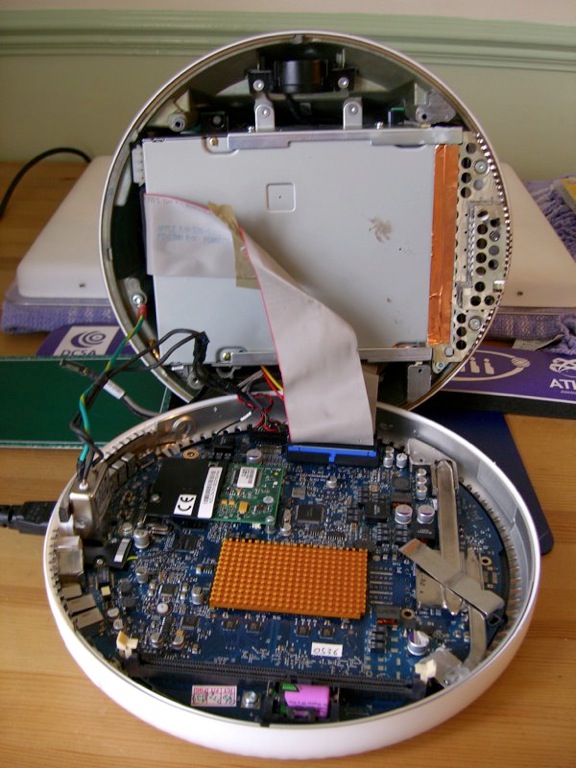
does "imac g4 17 1GHz" have the bluetooth antenna inside already?

I am bidding a "imac g4 17 1GHz" on ebay, while I want to bid a bluetooth at the same time so that they can arrive together to my room. Bellow is the link of bluetooth board, but the seller said it is only a card without antenna and screws. For I never open a imac g4, I do not know does the imac have already a bluetooth antenna and screws inside?

is there any other things I need to install the bluetooth card?

LINK
http://cgi.ebay.co.uk/Apple-Bluetooth-Board-for-PowerMac-G4-G5-iMac-eMac-Mini_W0 QQitemZ190179422650QQihZ009QQcategoryZ44997QQtcZphotoQQcmdZViewItem

MACBOOK & iMac, Mac OS X (10.5), compatible computers

Posted on Dec 6, 2007 6:54 AM

Reply
5 replies

Dec 6, 2007 8:02 AM in response to pangeng

Yes the iMac G4 1GHz 17" has the appropriate slot and aerial for Apple's proprietary Bluetooth card that you link to but I would seriously counsel against performing such an upgrade. It's very complicated and will require you to remove the logic board and obtain and replace several thermal pads (link).


You can get a much higher specification USB Bluetooth dongle (example) for a quarter of the total price.


regards


mrtotes

Dec 6, 2007 1:22 PM in response to pangeng

From reading the Service Manual it appears that removing the logic board removes and damages the thermal pads which are essential for keeping the iMac's logic board cool and running correctly. The Bluetooth card slot is under the logic board:

User uploaded file

Click to enlarge.

The Aerial goes up into the neck and will be sealed off with clear/orange tape at the moment. The fact that the thermal pads cost so much to replace means I don't think this is a sensible upgrade. I say that as one of the few regular here who has actually done any work inside an iMac G4. The USB option is cheaper, will be BT2.0 and have a 100m range. The Apple card is Bluetooth 1 with just 10m range.


If you do go ahead be sure to let us know and take plenty of photos!


cheers


mrtotes

Dec 7, 2007 8:49 PM in response to pangeng

To replace the hard disk you only need to replace two blobs of thermal paste which is widely available and cheap.

The iMac uses a standard desktop PC hard drive. It is 3.5" wide and in the iMac G4 uses the IDE connection. The iMac 17" 1GHz has an ATA100 bus so can use ATA100 or ATA133 drives but not SATA drives. You should buy a 7,200rpm drive with a cache of 8MB or greater as this also increases the speed.

I have one of these Western Digital hard drives in my iMac G4 (1.25GHz) which I bought 2 years ago for twice the price. You can go for a larger capacity if you wish.

320GB (link).


It's pretty fiddly to work inside an iMac G4 so you must be cautious especially around the video cable. Always take anti-static precautions. Here are three options for guiding you through the procedure:

I've also taken a fair few photos which you can find here.


I'd advise reading the reports on the xlr8yourmac's drive database so get other people's experiences first.


You must replace the Thermal Paste when you close the iMac up or it will overheat.


It's probably worth replacing the PRAM Battery whilst you're in there as these have a finite life (once they fail to re-charge you may start to run in to snags - it's only a £6 part).


The hard disk should be set to Master (link).


You might also give consideration to installing an 18x DVD±RW Dual Layer burner (link) whilst you do this update, which will have to be removed during the process.


You must be very careful around the video connector in the iMac; it really is very fragile. In fact there is no need to touch it at all in my experience.


cheers


mrtotes

This thread has been closed by the system or the community team. You may vote for any posts you find helpful, or search the Community for additional answers.

does "imac g4 17 1GHz" have the bluetooth antenna inside already?

Welcome to Apple Support Community
A forum where Apple customers help each other with their products. Get started with your Apple Account.