Strange sounds coming from iphone

Sometimes my iphone makes strange sounds while on stand by mode. The sounds resemble short electrical waves or radio static. It will also occur sometimes when charging. Do I need to take my iphone in for service? I have only had it for two weeks.

imac, Mac OS X (10.5.1)

Posted on Dec 29, 2007 5:25 AM

Reply
9 replies

Dec 29, 2007 6:02 AM in response to tsmithband

this might possibly be some kind of interference sound that happens when your iPhone is near a TV, or other electrical devices.

the same thing happens to mine when i get it near the tv in my bedroom, or the computer in my office (not a mac).

i have not noticed this type of sound otherwise.

When you hear it, try moving it slightly (even if it's just 6 inches away)...the slightest movement when it occurs usually stops it from happening.

Dec 29, 2007 9:05 AM in response to BlingMe

BlingMe,

That is expected, and happens with any GSM phone. It is called GSM or TDMA audio interference. The iPhone's speaker is shielded and shouldn't experience it. However the original poster was not clear, so I was asking for clarification.

Sometimes adding ferrite beads or "Ground Loop" isolators to speaker wires will help when dealing with external speakers.

Hope this helps,

Nathan C.

Dec 31, 2007 2:04 AM in response to tsmithband

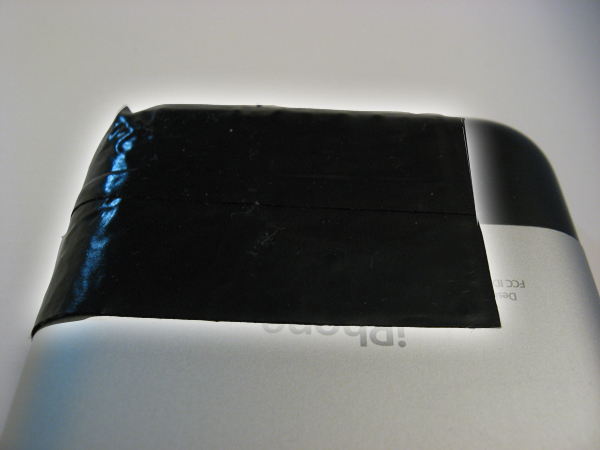
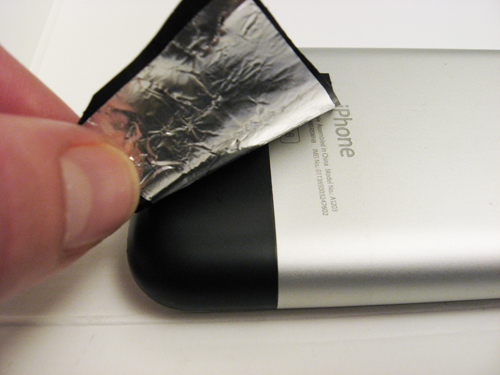
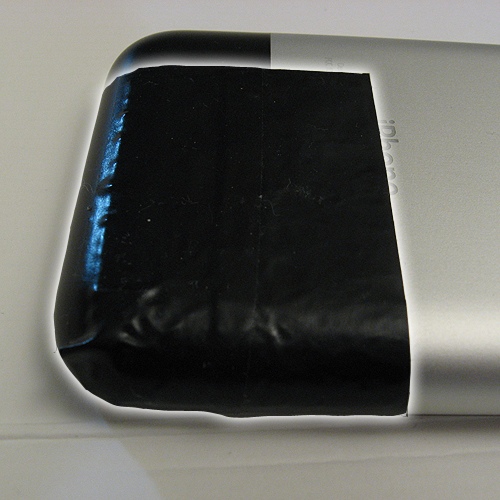
Found a solution!! I set out to find a solution today and to make a long story short, here's what I settled on: taping two small pieces of aluminum foil on the back of the iPhone in a specific location (pic 1):

1) Cut out a 2" x 3" piece of aluminum foil.
2) Fold foil in half horizontally (foil is now 2" x 1.5").
3) Tape foil from the bottom right corner (on the back of the phone) up to the middle of the text "iPhone" (pic 2, pic 3).
4) No more buzz/static/popping sounds coming out of your speakers!

Another solution, to avoid using tape (although electrical tape leave no residue what-so-ever on the iPhone), is simply placing the iphone on a sheet of aluminum foil. This might be a better idea for people experiencing this problem in a static environment rather than a car (i.e. iPhone on office desk with nearby computer speakers). After discovering this solution, I also saw another potential solution online, using aluminum foil wrapped around the audio cable coming out of the phone. I haven't tested that method, but it looks much more obtrusive.

For me, other materials didn't work (at least not perfectly). I also tried various sizes of aluminum foil in various locations - you could probably get by with a smaller amount of foil, but this amount works 100% (so far at least).

I guess it should also be noted this solution could potentially work for other GSM phones with this issue (i.e. blackberries, sidekicks) - you'll just have to experiment with the size of the foil and its location.

Hope this helps!
Brian Cometa

Jan 2, 2008 6:23 AM in response to bcometa

bcometa,

Just to make you aware you are covering part of the iPhone's cellular antenna when you add the aluminum foil over the outside. That black plastic portion is black plastic specifically to allow the cellular, bluetooth and WiFi antenna to work since it wouldn't work through a metal backing.

The similar black portion on the upper corner of the back of iPod Touch is for the WiFi antenna on the iPod Touch.

Hope this helps,

Nathan C.

This thread has been closed by the system or the community team. You may vote for any posts you find helpful, or search the Community for additional answers.

Strange sounds coming from iphone

Welcome to Apple Support Community
A forum where Apple customers help each other with their products. Get started with your Apple Account.