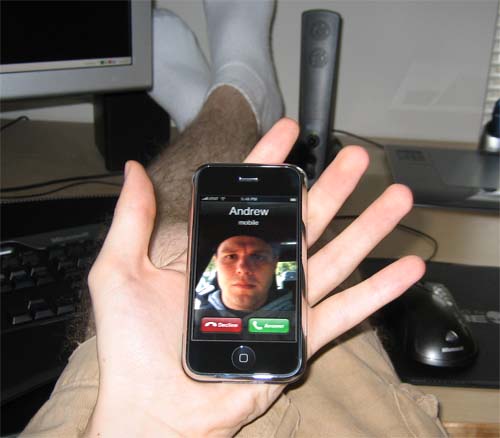
Incoming Call Display, two different styles
So this is strange... Got my iPhone on launch day (1st gen). And have always noticed that the way it displays incoming calls is different than how it shows an incoming call on the commercials.
For me, its always shown a FULL screen image of the contact, with a large NAME bar across the top. On the commercials, its always shown the Wallpaper image, with a smaller banner with name and contact image across the top. like shown here
http://www.last100.com/wp-content/uploads/2007/06/iphone_call.jpg
how mine displays incoming calls (not my image, just googled it)
http://efaller.com/blog/wp-content/uploads/2007/07/call.jpg
Figured it was no big deal, and the ad phone image was just "tv'd" to look pretty...
Then I updated last week (2.0.1 or whatever) and noticed that it displays like it did in the commercial. COOL! Then another call came in, and its back to the old way. So now, ONE contact of my 100+ on my phone shows up how it does on the commercial. ***? anyone know what is going on with this?
For me, its always shown a FULL screen image of the contact, with a large NAME bar across the top. On the commercials, its always shown the Wallpaper image, with a smaller banner with name and contact image across the top. like shown here
http://www.last100.com/wp-content/uploads/2007/06/iphone_call.jpg
how mine displays incoming calls (not my image, just googled it)
http://efaller.com/blog/wp-content/uploads/2007/07/call.jpg
Figured it was no big deal, and the ad phone image was just "tv'd" to look pretty...
Then I updated last week (2.0.1 or whatever) and noticed that it displays like it did in the commercial. COOL! Then another call came in, and its back to the old way. So now, ONE contact of my 100+ on my phone shows up how it does on the commercial. ***? anyone know what is going on with this?
Quad G5, MacBookPro,PowerbookG4, 733G4, MiniG4, dual 23" cinemaHD, iPhone8gig, Mac OS X (10.4.3), Final Cut Studio UB, CS 2 Suite, Death Star