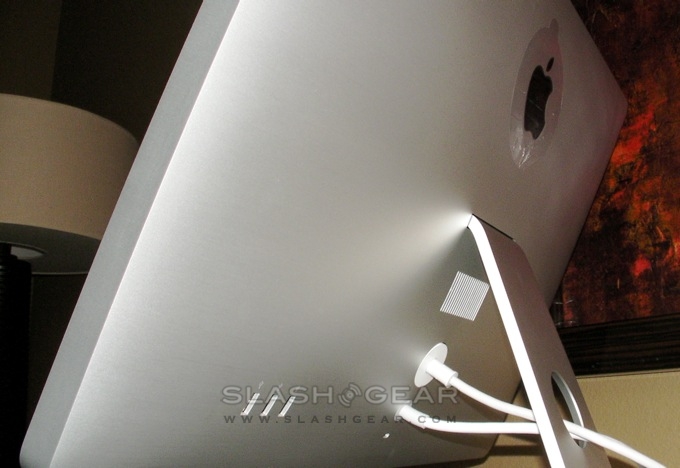
How to remove base stand from the NEW 24" LED Cinema Display

I don't want this to VESA mount. There is slight angle problem - the display is tilted to one side, so I want to remove the base stand and re-align it properly.

There are no screws visible.

Does anyone know how to remove the base stand from the NEW 24" LED Cinema Display ??

Thanks.

24" LED CINEMA DISPLAY, Mac OS X (10.5.6)

Posted on Dec 30, 2008 11:03 PM

Reply
9 replies

Jan 11, 2009 1:26 PM in response to vs_vs

Hi! I bought a VESA adapter kit but apparently the wrong one, as it appears to have been designed for the 20" or 23"/30" HD displays. After a few hours with Apple Care and others, I found this:

http://manuals.info.apple.com/en/iMac24inch_VesaMountAdapterInstallGuide.pdf

There is a drawing of the card you need to disengage the stand and the TORX screw removal tool you will also need.

Please note that I have a 24" LED Cinema Display, not an iMac, and I'm assuming the base stands are the same--in pictures, they look the same to me.

So, I'm not sure how you can get the card (though the manual mentions getting a replacement), but I thought this might start to help.

Jan 21, 2009 2:36 AM in response to sgginc

The correct VESA mount adapter kit to use with the 24" LED Cinema Display is MB902ZM/A. The kit comes with all necessary mounting hardware and tools. It is critical to read the instructions line by line, in order to install the mount properly. Critical steps include removing the aluminum stand properly by using the thin credit card-like tool supplied. You must ensure that you properly lock the mounting flange into position, or else it will retract into the back of the display and might require display disassembly to retrieve it. The other important step is to thoroughly tighten the torx screw that secures the mounting plate to the flange in order to get the flange holes to align with the mounting plate. Otherwise, you will not be able to place the two side mounting screws. I missed this initially, thinking I had the wrong mounting kit, but after re-reading the instructions, it was clear what to do. I was able to successfully mount the monitor using this kit. All parts were used - none left over.

Stu

This thread has been closed by the system or the community team. You may vote for any posts you find helpful, or search the Community for additional answers.

How to remove base stand from the NEW 24" LED Cinema Display

Welcome to Apple Support Community
A forum where Apple customers help each other with their products. Get started with your Apple Account.