There comes a number of 3rd party utility for Mac hard disk drive (HDD) partition management features. Some of them are free while for using other, you need to spend some money. However, before I start, let’s give you some basis introduction about complete Mac Disk Utility and reasons to use Mac partition management tools.
Important Note:- Before using any of the Mac partition management tools, make sure you have proper Mac data backup available. This will helps you in avoiding the Mac data loss problems in case if something goes wrong while performing the Mac drive partitioning operations. Read this Apple guide to know how to take and restore Mac backups via TimeMachine.
Disk Utility in macOS machine enables the end user to do hard-drive management tasks like manage hard drive operations. However, it fails to perform tasks such as enlarging the Mac-boot volume by merging the free space available on HD. In fact, Disk Utility fails to show the free space available or created after deleting a volume.
In addition, Disk utility fails to show the free space left on the hard drive after you created the required number of volumes.
Disadvantages of using Disk Utility for MAC Partition Management Operations:-
Although Mac hard drive partitioning is a complex process when it contains data, it becomes much easier when you are supposed to do it on Mac-based computers. Well, you might know Intel-based Macs do allow repartitioning or resizing the drive partitions whenever required, keeping all the files and folder remains same. However, there is a limit for resizing the Mac hard drive partition, which is to the amount of the free space on it. Anyway, since you do not want to trouble your data, you will memorize it for sure. However, Disk Utility does not list the free space on Mac drive along with other partitions under the Partition tab, and it is just like ‘Lost’.
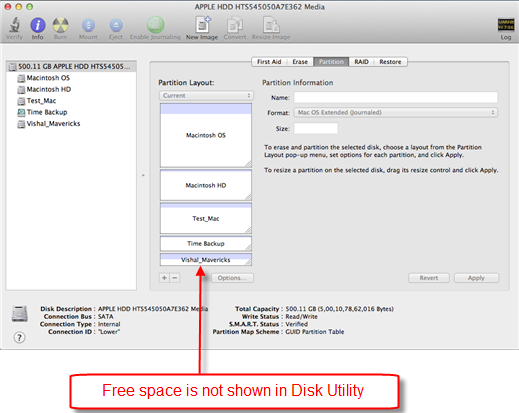
The best way to resolve such kind of scenario using Disk utility is emptying the concerned drive or volume and enlarging the boot volume by dragging it downwards. After the required space is taken, either leave the rest space as a volume or simply delete it to avoid data loss problems. However, it causes wastage of precious Mac hard drive or volume space.
Benefits of Using 3rd Party Mac Hard Drive Partition Management Tools:-
Partitioning the Mac hard drive using the help of some reliable 3rd party Mac Partition Manager involves no risk of data loss. In fact, Mac-drive partitioning using the help of some professional partition manager is nothing more than a child’s play. The Mac partition manager software lists all the drives attached to your Mac to the leftmost pane (the primary drive is selected by default) where in selecting a drive lists its respective volumes in the below section. You can either use this TechSoftwareLogic Mac partition manager software tool or GParted app to create, resize, delete, format, reveal the partition on Apple Mac computer. I have personally used both of these above listed Mac partition applications on my Mac computer and found great success. I hope this will also prove beneficial for you.


