syncing music to ipod nano 7th generation
every time I click the sync option, a message appears that say it cant copy these songs to my ipod because apple music songs cannot be copied to an ipod
every time I click the sync option, a message appears that say it cant copy these songs to my ipod because apple music songs cannot be copied to an ipod
Hey largebiscit,
Welcome to the Apple Support Communities! I see you're confused about an alert you received during the sync process, so I wanted to reach out about that. Basically, Apple Music tracks aren't compatible with the iPod Nano, so any music you've downloaded through the service can't be synced with your iPod. If you're not sure how to remove those songs from the sync, check this out:
Sync or remove content using iTunes
Open iTunes and connect your device to your computer with a USB cable.
Click the device icon in the upper-left corner of the iTunes window. Learn what to do if you don't see the icon.
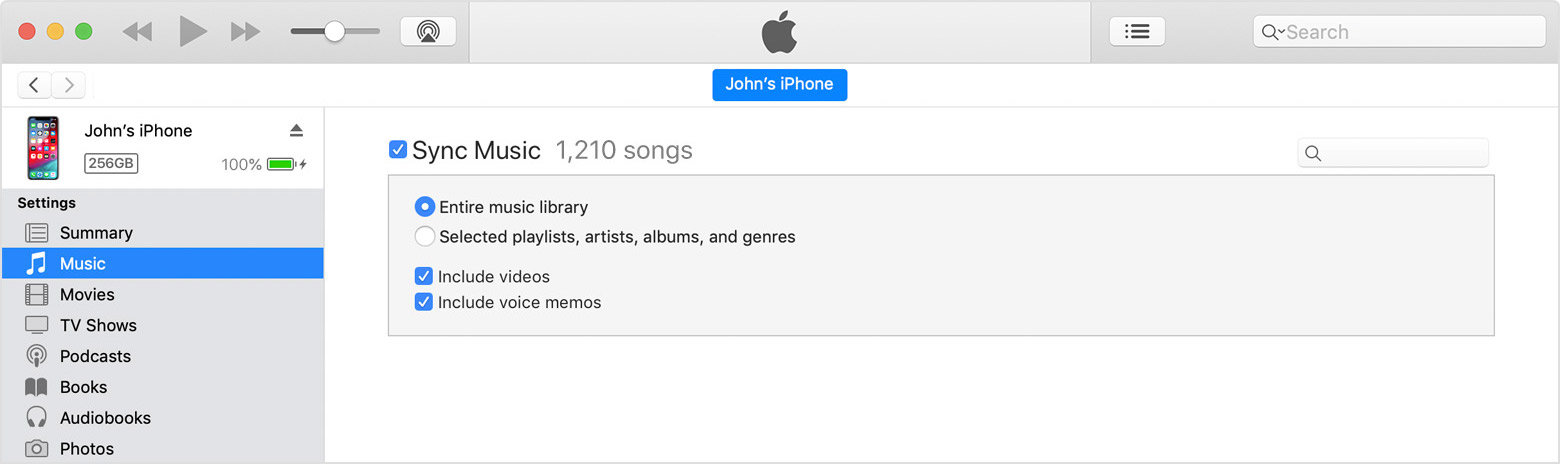
From the list under Settings on the left side of the iTunes window, click the type of content that you want to sync or remove.1 To turn syncing on for a content type, select the checkbox next to Sync.
Select the checkbox next to each item that you want to sync.
Click the Apply button in the lower-right corner of the screen. If syncing doesn't start automatically, click the Sync button.
Sync your iPhone, iPad, or iPod using iTunes on your computer - Apple Support
Once those Apple Music tracks are no longer part of the sync, you should be all set to resume the syncing process. Of course, if that doesn't work, just let me know more about what's happening and we'll keep working it out.
Cheers!
Hey largebiscit,
Welcome to the Apple Support Communities! I see you're confused about an alert you received during the sync process, so I wanted to reach out about that. Basically, Apple Music tracks aren't compatible with the iPod Nano, so any music you've downloaded through the service can't be synced with your iPod. If you're not sure how to remove those songs from the sync, check this out:
Sync or remove content using iTunes
Open iTunes and connect your device to your computer with a USB cable.
Click the device icon in the upper-left corner of the iTunes window. Learn what to do if you don't see the icon.
From the list under Settings on the left side of the iTunes window, click the type of content that you want to sync or remove.1 To turn syncing on for a content type, select the checkbox next to Sync.
Select the checkbox next to each item that you want to sync.
Click the Apply button in the lower-right corner of the screen. If syncing doesn't start automatically, click the Sync button.
Sync your iPhone, iPad, or iPod using iTunes on your computer - Apple Support
Once those Apple Music tracks are no longer part of the sync, you should be all set to resume the syncing process. Of course, if that doesn't work, just let me know more about what's happening and we'll keep working it out.
Cheers!
syncing music to ipod nano 7th generation