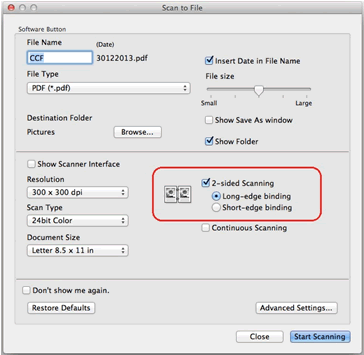
Duplex scanning with Brother MFC-J895DW AIO printer.

No matter what I try, I can't get it to duplex scan. It doesn't show an option for it in any of the dialog boxes that come up with the various apps I tried (Control Center, iPrint&Scan, Presto!PageManager). Brother's online "support" is a joke, and done of what they advise has worked. I'm about to send it back to Amazon. I'm using a 2016 Mac Mini.

Mac mini 2018 or later

Posted on Dec 31, 2018 8:48 AM

Reply

Similar questions

2 replies

Dec 31, 2018 9:00 AM in response to Jaymickdee

Support for the device is entirely up to Brother, but if you are introducing 3rd party applications they my be interfering and you should remove them.


Duplex Scanning is accessible (according to Brother anyway) from the Control Center 2 application.

https://support.brother.com/g/b/faqend.aspx?c=us&lang=en&prod=mfcj6920dw_us_eu_as&faqid=faq00002741_001#UsingCC2


Make sure you are using the correct support software in addition to the driver for the OS and that model printer

for OS X 10.13 or 10.14 use this driver, and delete the drive in there now.

Full Driver & Software Package


If problems persist try resetting your print system in OS X

https://support.apple.com/en-us/HT203343


Past that if Brother is selling you crap then return it.

This thread has been closed by the system or the community team. You may vote for any posts you find helpful, or search the Community for additional answers.

Duplex scanning with Brother MFC-J895DW AIO printer.

Welcome to Apple Support Community
A forum where Apple customers help each other with their products. Get started with your Apple Account.