iTunes - Indicator that Shuffle is on? Can I only "know" by fooling with it?

It's so maddening, why on earth doesn't iTunes tell you (at a glance) "on" or "off?" I almost NEVER shuffle an album, yet I have to do a ridiculous little circus of tests, interrupting my listening pleasure, to determine which it's toggled to. Whereas a SIMPLE on or off would eliminate this.


I've had Apple since the beginning of time and remember when they knew how to design an intuitive interface (it was awhile ago, but not THAT long ago).

Posted on Jan 5, 2019 7:07 PM

Reply
8 replies

Jan 5, 2019 7:56 PM in response to TMSea

OK I found something. In the "controls" pulldown menu at the top, there is a "shuffle" control. Which was "ON".


The "shuffle" control on the iTuners album pane seems to change the state of the shuffle in "controls" ----sometimes. Other times it does not.


Well anyway this is a shoddy user interface, far below the elegant user experience of the old (Apple) days.

Jan 5, 2019 8:25 PM in response to TMSea

Hi Tm Sea,


In iTunes for Mac, the shuffle indicator is pretty clearly highlighted, and changes noticeably if it is clicked directly or through the Controls > Shuffle menu. Are you not seeing that? (BTW, I am running my Mac in Dark Mode, which possibly makes it more visible.)


On the iPhone, your observation is correct, there does not seem to be a way to tell if Shuffle is on. (But when I play the phone through Apple Car Play it is obvious again.)

Jan 6, 2019 7:23 AM in response to TMSea

TM -Yup, you got it.


I can see why it might be a bit confusing, but just keep in mind that the bar at the top is all about the current play status: what's playing, what time is it at, is shuffle on/off, is repeat on/off.


What isn't obvious is that certain things in that bar are clickable. E.g., the shuffle arrows, as you found. Also if you click on the time remaining (-1:55 in your screenshot) it will - surprise! - toggle into the song duration.


Jan 5, 2019 7:44 PM in response to TMSea

OK now,,, using iTunes.

I determine that my iTunes is indeed 'shuffling' which I did not choose when I started this album. Therefore shuffle is "ON" right? So I poke the 'shuffle' button ONCE, now it's "OFF" (and as noted above, no indication is provided by Apple).


It still shuffles.


Why is Apple software becoming so hard to use? I am always afraid to 'update' because usability gets worse and worse.

Jan 5, 2019 8:04 PM in response to ed2345

ed2345 Thanks - I know what the shuffle symbol looks like, I've had Apple (and iPhones) since the beginning of time. But the shuffle symbol does not change in "highlight", it remains unchanged. Either that or the "highlight" is so subtle that I can't see it


And there are no other symbols nearby to discern the highlighted_vs_normal state.


Or maybe the software just doesn't work.

Jan 5, 2019 10:34 PM in response to ed2345

I can see the shuffle indicator at the lower right of the Album artwork. When I "press it" it turns ever so slightly darker in hue while pressing, but when I lift off it returns exactly the same as before and does not "bold". There is no change at all. And the shuffle icon does not change the state displayed in the "controls" pulldown. No box or any indicator appears to confirm it's a will produce an action.
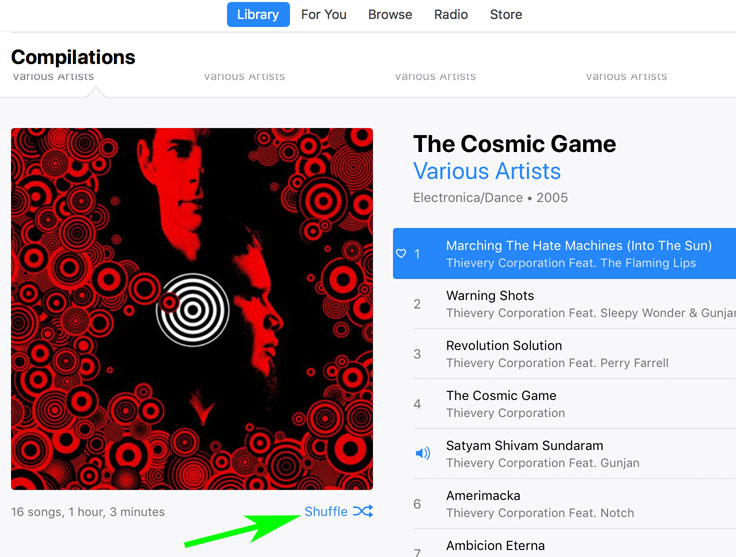


When you think of all the millions of lines of code its a miracle it works at all. I guess that's it. It just doesn't work. But it does jump songs, so it's doing something - incidentally an action I did not ask for. I want it to shuffle or not. I did not poke a "change song" button. The stuff doesn't work, yet they release it anyway.


Thanks ed2345 for your observation that yours 'highlights' and is visible.


But to confirm shuffle is "ON" you still have to cycle the button to observe both states of boldness. Why must I be alert to watch for a change of state? It should clearly inform if shuffle is active or not at a glance, and not have to "remember subtle hints" or search a forum to use the software. Apple was not so sloppy years back. The stuff just worked, the user interface was elegant. No need to ask how to use it. And the forums were not so full of exasperated users wondering why Apple software is getting so hard to use. That shuffle (or NOT) requires a forum query, is a travesty in GUI design. Do they even read the forums?


Yep on the iPhone its even worse. I can't get it off shuffle. And whats worse, songs disappear off the album list. That app is really a lost cause, I'm always afraid to update IOS for the loss of usability thats become inevitable. I used the iPhone podcast apps years ago and really enjoyed it, but the app is so exasperating now I have quit listening to podcasts. But its attractive, minimalist.


Thanks for your help ed, but I think it's another example how Apple has lost their way.

This thread has been closed by the system or the community team. You may vote for any posts you find helpful, or search the Community for additional answers.

iTunes - Indicator that Shuffle is on? Can I only "know" by fooling with it?

Welcome to Apple Support Community
A forum where Apple customers help each other with their products. Get started with your Apple Account.
