Do you need to press reset fitness calibration data before you do 20 minute walk or after

Iwatch 4 not tracking walks I just got back from 48 minute walk at the mall using indoor walk. It showed I only did 3 minutes. I know that 4 times around the mall is 2.76 miles yet it showed I only did 1.85 miles. I have powered watch on/off Question about calibration. Do you need to walk 20 minutes outdoors before pressing reset or after. That is kind of unclear. The way the steps read it is after but I wanted to make sure. There have been some days that it seems to work and give me credit minute for minute but most of the time it is only a couple of minutes even though I have done the exact same thing as before. I have set up appointment with the apple store but when I went they say they can’t help with that issue. I went to a iwatch class there and the guy said he didn’t know and that is something that wasn’t covered in his class

Apple Watch

Posted on Jan 11, 2019 7:02 AM

Reply
Question marked as Top-ranking reply

Posted on Jan 11, 2019 7:57 AM

Calibrating your Apple Watch for improved Workout and Activity accuracy

You can calibrate your Apple Watch to improve the accuracy of your distance, pace, and calorie measurements. Calibrating your watch can also help it learn your fitness level and stride, which improves accuracy when GPS is limited or unavailable.
Check your settings

To make sure that your Apple Watch can get the information it needs, check these settings on your iPhone:

  1. On your iPhone, open the Settings app.
  2. Tap Privacy > Location Services. 
  3. Make sure that Location Services is turned on.
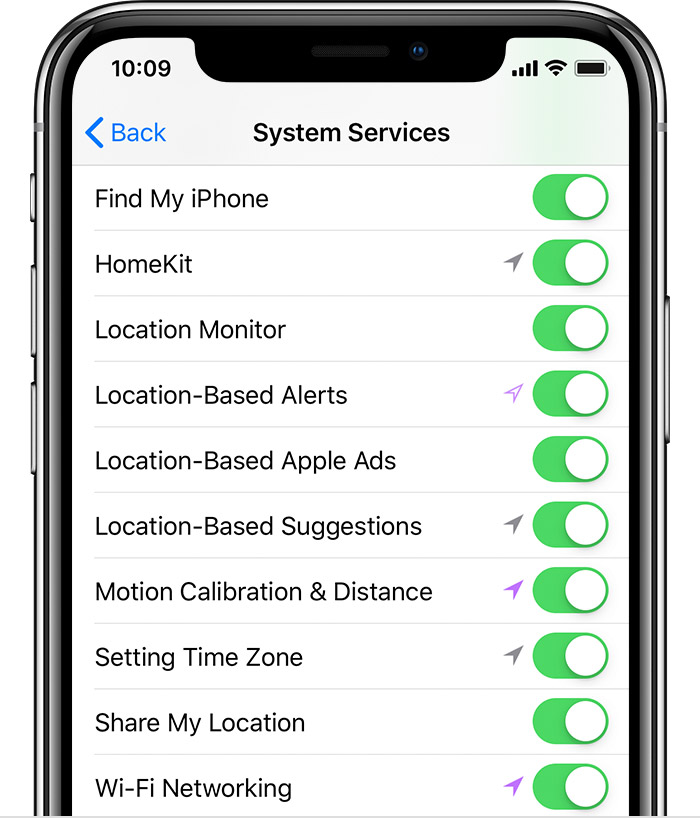
  4. Scroll down, then tap System Services. 
  5. Make sure that Motion Calibration & Distance is turned on.
  6. Continue with the steps below.


Calibrate your Apple Watch

  1. While wearing your Apple Watch, go to a flat, open outdoor area that offers good GPS reception and clear skies. 
  2. If you have Apple Watch Series 2 or later, you just need your Apple Watch. If you have Apple Watch Series 1 or earlier, bring your iPhone for GPS. Hold your iPhone in your hand, or wear it on an armband or waistband.
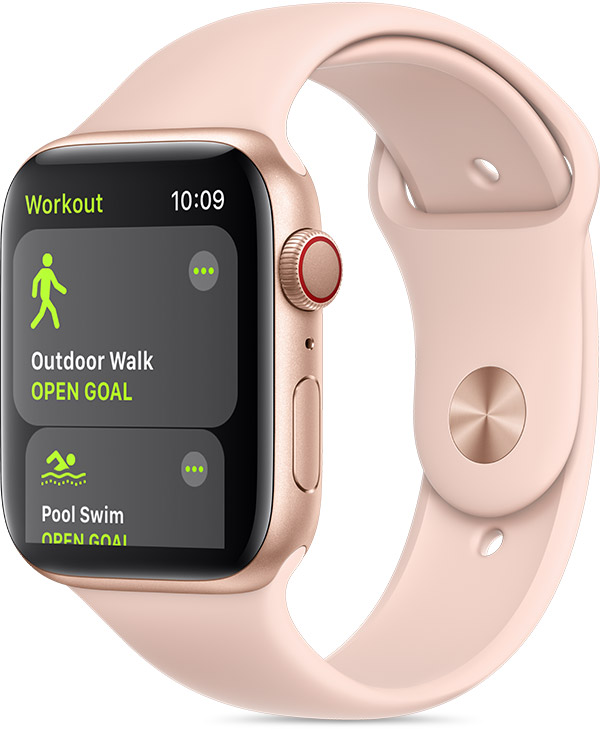
  3. Open the Workout app. To start, tap Outdoor Walk or Outdoor Run. To set a goal before starting, tap .
  4. Walk or run at your normal pace for about 20 minutes.

If you don't have time to finish the workout, you can complete 20 minutes over multiple outdoor Workout sessions. If you work out at different speeds, you should also calibrate for 20 minutes at each of the speeds that you walk or run.

Whenever you walk or run outside using the above steps, your Apple Watch continues to calibrate the accelerometer by learning your stride length at different speeds. Calibration can also improve the accuracy of your calorie calculations in the Workout app, and the calorie, distance, Move, and Exercise calculations in the Activity app. 

Improve your Workout and Activity accuracy

Your personal information, such as your height, weight, gender, and age, is one of the things your Apple Watch uses to calculate how many calories you burn and more. Learn how to update your personal information.
Reset your calibration data

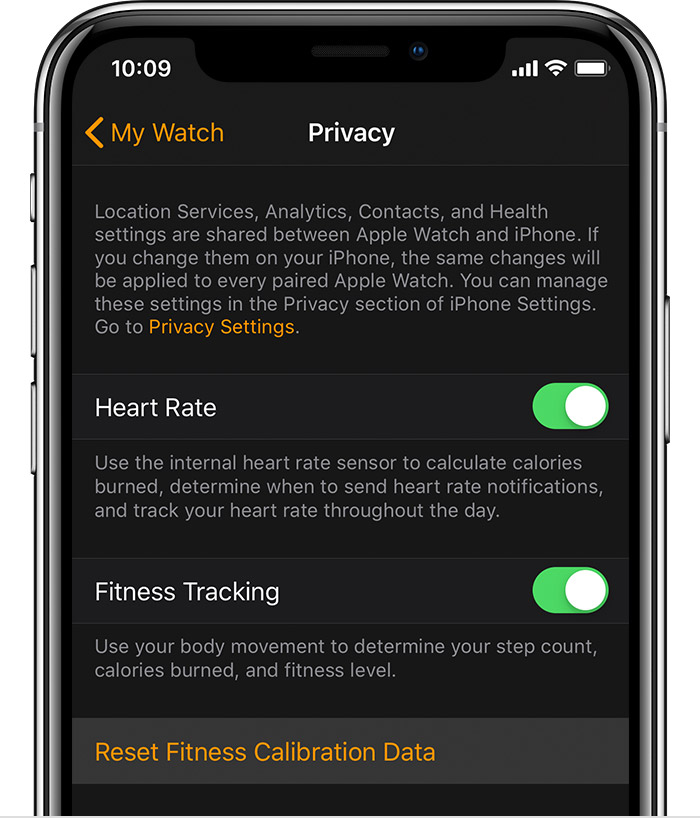
Here's how to reset your calibration data:

  1. On your iPhone, open the Apple Watch app.
  2. Tap the My Watch tab, then tap Privacy > Reset Fitness Calibration Data. 


5 replies
Question marked as Top-ranking reply

Jan 11, 2019 7:57 AM in response to sheriffgirl

Calibrating your Apple Watch for improved Workout and Activity accuracy

You can calibrate your Apple Watch to improve the accuracy of your distance, pace, and calorie measurements. Calibrating your watch can also help it learn your fitness level and stride, which improves accuracy when GPS is limited or unavailable.

Check your settings

To make sure that your Apple Watch can get the information it needs, check these settings on your iPhone:

  1. On your iPhone, open the Settings app.
  2. Tap Privacy > Location Services. 
  3. Make sure that Location Services is turned on.
  4. Scroll down, then tap System Services. 
  5. Make sure that Motion Calibration & Distance is turned on.
  6. Continue with the steps below.


Calibrate your Apple Watch

  1. While wearing your Apple Watch, go to a flat, open outdoor area that offers good GPS reception and clear skies. 
  2. If you have Apple Watch Series 2 or later, you just need your Apple Watch. If you have Apple Watch Series 1 or earlier, bring your iPhone for GPS. Hold your iPhone in your hand, or wear it on an armband or waistband.
  3. Open the Workout app. To start, tap Outdoor Walk or Outdoor Run. To set a goal before starting, tap .
  4. Walk or run at your normal pace for about 20 minutes.

If you don't have time to finish the workout, you can complete 20 minutes over multiple outdoor Workout sessions. If you work out at different speeds, you should also calibrate for 20 minutes at each of the speeds that you walk or run.

Whenever you walk or run outside using the above steps, your Apple Watch continues to calibrate the accelerometer by learning your stride length at different speeds. Calibration can also improve the accuracy of your calorie calculations in the Workout app, and the calorie, distance, Move, and Exercise calculations in the Activity app. 

Improve your Workout and Activity accuracy

Your personal information, such as your height, weight, gender, and age, is one of the things your Apple Watch uses to calculate how many calories you burn and more. Learn how to update your personal information.

Reset your calibration data

Here's how to reset your calibration data:

  1. On your iPhone, open the Apple Watch app.
  2. Tap the My Watch tab, then tap Privacy > Reset Fitness Calibration Data. 


Jan 11, 2019 7:12 AM in response to sheriffgirl

I just did a walk for 20 minutes when it first asked to calibrate it. Then stopped it. Of you mean the green excercise ring only showing 3 minutes that is correct. The excercise Minutes on actively are not the same as timed minutes. Each minute is above normal walking pace. Ie a bit more effort above a brisk walk. As for the distance it is done by gps and you said you where in a mall it might effect it. As for different readings of want you think the distance is and the watch can be different. How did you originally measure the mall to get that 2.76 miles? Ta

Jan 11, 2019 7:52 AM in response to seanfromllanelli

There are times the exercise ring has closed walking the exact same way/route/speed but the majority of the time it doesn’t. On the other hand I can do yoga and it counts pretty much minute for minute with lower heart rate. The mall is set up for walkers. They have measured and have posted that 1 time around is .69 miles. I have had other fitness trackers that have pretty much confirmed the distance. So if I were to try and recalibrate my watch do I walk and then hit reset calibration or do I hit reset calibration and then do a 20 minute walk?


This thread has been closed by the system or the community team. You may vote for any posts you find helpful, or search the Community for additional answers.

Do you need to press reset fitness calibration data before you do 20 minute walk or after

Welcome to Apple Support Community
A forum where Apple customers help each other with their products. Get started with your Apple Account.