How to remove calorie goal

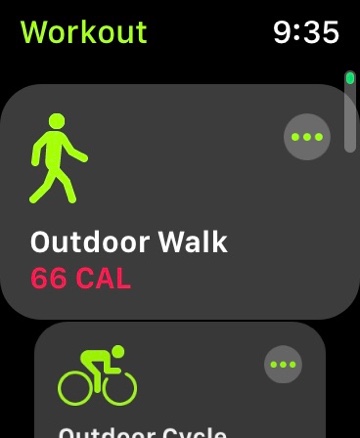
Suddenly with 5.1.3 a calorie goal (“66 CAL” — yikes) has appeared for one of my workouts, despite having never set a goal for any workout — outdoor run or bike or swim; or intervals.


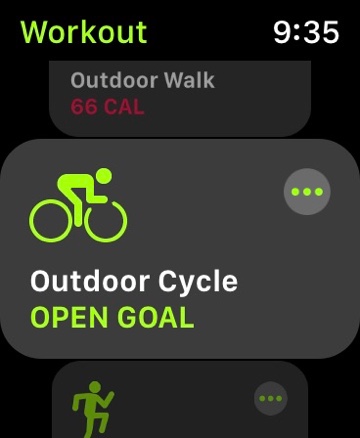
This is NOT a question about changing the goal to amounts lesser or greater, but about reverting back to the green font “open goal”: How to be rid of a ridiculous red font calorie goal that I did not set. It’s a problem raised previously for which an answer was not given, so far as I can see:


https://discussions.apple.com/profile/applerobot1978


Also, the Apple Watch workout article linked in the above URL is useless for this issue.


Thanks.

Apple Watch Sport

Posted on Jan 24, 2019 8:41 PM

Reply

Similar questions

11 replies

Jan 25, 2019 9:14 AM in response to seanfromllanelli

Yes, well, that’s the problem, isn’t it?  I didn’t set the 66 CAL; and, I don’t want the extra step to tap the menu icon and then the “open goal” (#6 above); and, the calorie goal does not adjust anyway — not that that’s what I want to do (#4 above).  I want to be rid of the unwanted red coloured goal that I didn’t enter and revert to the one tap start process that existed as a default.  Thanks for your help, but the information isn’t anything that I hadn’t tried already. Perhaps the answer is that for those with this problem Apple provides no solution.

Jan 25, 2019 8:36 AM in response to seanfromllanelli


Hi!


Attached are screenshots of my workouts, including the walking workout that I do with my fiancée.


Some comments, seriatim: (1) The red coloured font for a specific goal has never appeared for any workout that I have ever done since I left my Ironman for my Apple Watch several years ago; (2) I saw the red coloured goal for the walking workout the day after the afternoon in which I installed 5.1.3 and we then walked in a rainstorm. During the rain the walking app six or seven times stopped and had to be restarted, something that never happened previously. Whether it was a bug or the rain gear touching the haptic screen, I don’t know; (3) The “66 CAL” does not display the last workout total — we went 10K at 16:30 per — nor does it display the calorie goal, which appears via the menu icon and which shows almost 600 CAL (likely the 10K walk); (4) Just to see what happens, through the menu icon I adjusted the calorie goal to 750, but “66 CAL” remains for the walking workout; (5) No specific goal appears for any of my usual workouts, as seen in then screenshots; and, (6) I would like simply to revert back to the green coloured font for when we walk to avoid either the double step of opening the menu and then tapping the green “open” or tapping the walk screen and having the (somewhat less legible) red “66 CAL” goal tell us that we completed our goal after a few hundred meters and accomplished 900% of our goal upon ending the walk.


Thank you.

Jan 25, 2019 9:26 AM in response to drjwr

Aah, that’s interesting. Changing the bogus calorie goal makes no difference on my watch whatsoever. Apple has a bug somewhere, I suspect. I may reset the watch to 5.0 and go from there, since there seems to be no solution to the problem. (As an aside, the open water swim app has long ceased giving anything like an accurate distance. Not a connectivity issue. Others seem to have that problem as well.)

This thread has been closed by the system or the community team. You may vote for any posts you find helpful, or search the Community for additional answers.

How to remove calorie goal

Welcome to Apple Support Community
A forum where Apple customers help each other with their products. Get started with your Apple Account.