Pages won't open iCloud documents

I have written several documents on my iPad Pro, which are stored in iCloud. However I cannot open any of them on my iMac (early 2009). I had no luck updating to a newer IOS version nor iPages. Is there a remedy or has my Mac just become obsolete? And if thats the case, what happens to to billions of documents that I have stored on that?

iMac, 10.11

Posted on Jan 26, 2019 6:29 AM

Reply

Similar questions

2 replies

Jan 26, 2019 6:52 AM in response to NBT102

The issue is that current releases (e.g. Pages for iOS, Pages for iCloud, and Pages for Mac ) include the version of the oldest compatible version of Pages that can open the current document, and unsupported Mac, and iOS hardware platforms that the document cannot be opened on.


So for Pages v7.3, it shows that the oldest version of Pages for Mac that can open its document is Pages v5.6. But is also lists the following hardware as unsupported:
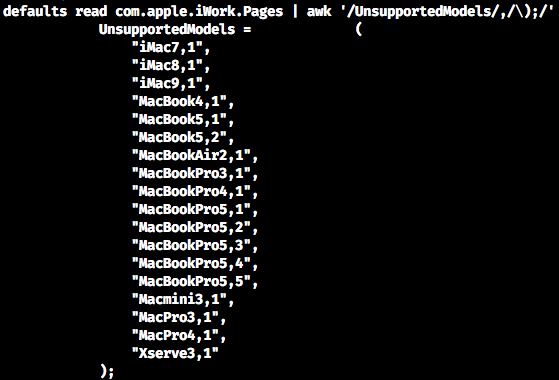

Your iMac is an early-2009 model (iMac9,1), and fails the supported models list above, so even though you might have Pages v5.6 or later on your iMac, it fails the unsupported model test, and Pages won't open the document.


If you were using any other non-Apple, cross-platform, word processing solution (e.g MS Word), then hardware obsolescence of documents would likely not occur.

Feb 3, 2019 3:34 PM in response to VikingOSX

Bummer, I hate the fact that something as simple as a word processor can be rendered obsolete. All I’m trying to do is complete documents that I’ve started on my new iPad Pro on my old iMac and vice versa. Had I know this was going to happen I would have kept my old iPad since documents and mail is all I use it for. Thanx for the response ViKingOXS.

This thread has been closed by the system or the community team. You may vote for any posts you find helpful, or search the Community for additional answers.

Pages won't open iCloud documents

Welcome to Apple Support Community
A forum where Apple customers help each other with their products. Get started with your Apple Account.