iPhone 7 and two factor authentication

I want to add an extra layer of security to my new iPhone 7. I have read that an iPhone 7 with this Operating system may be able to have the two factor authentication happen in the background of the iPhone, and not need to be verified with a second device. Is this correct or do I need to find another way to use the two factor authentication on my iPhone 7? When I sign into an e-mail on my desktop, I am sent a code to my cell phone to complete the sign in process. How do I use two factor authentication on my iPhone?

iPhone 7, 12

Posted on Feb 1, 2019 9:54 AM

Reply
Question marked as Top-ranking reply

Posted on Feb 1, 2019 9:57 AM

Set up two-factor authentication for your Apple ID

Two-factor authentication is available to iCloud and iTunes users with at least one device that's using the latest iOS or macOSLearn more.

You can follow these steps on your iPhone, iPad, or iPod touch to turn on two-factor authentication.

Turn on two-factor authentication in Settings


If you're using iOS 10.3 or later:

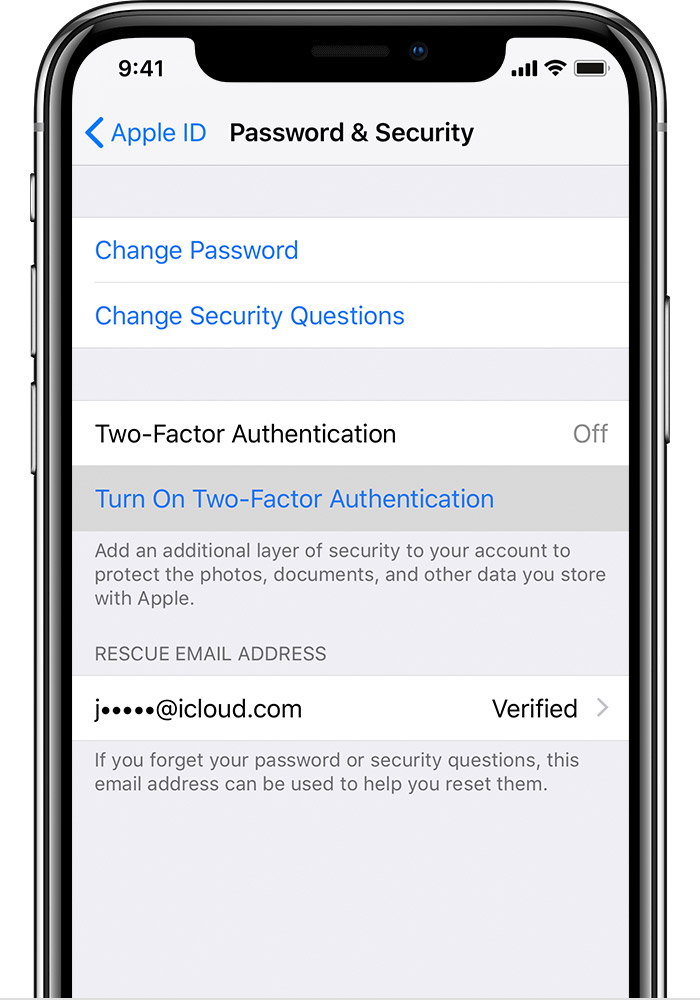
  1. Go to Settings > [your name] > Password & Security. 
  2. Tap Turn On Two-Factor Authentication.
  3. Tap Continue.

If you're using iOS 10.2 or earlier:

  1. Go to Settings > iCloud. 
  2. Tap your Apple ID > Password & Security. 
  3. Tap Turn On Two-Factor Authentication.
  4. Tap Continue.

You might be asked to answer your Apple ID security questions.

Enter and verify your trusted phone number

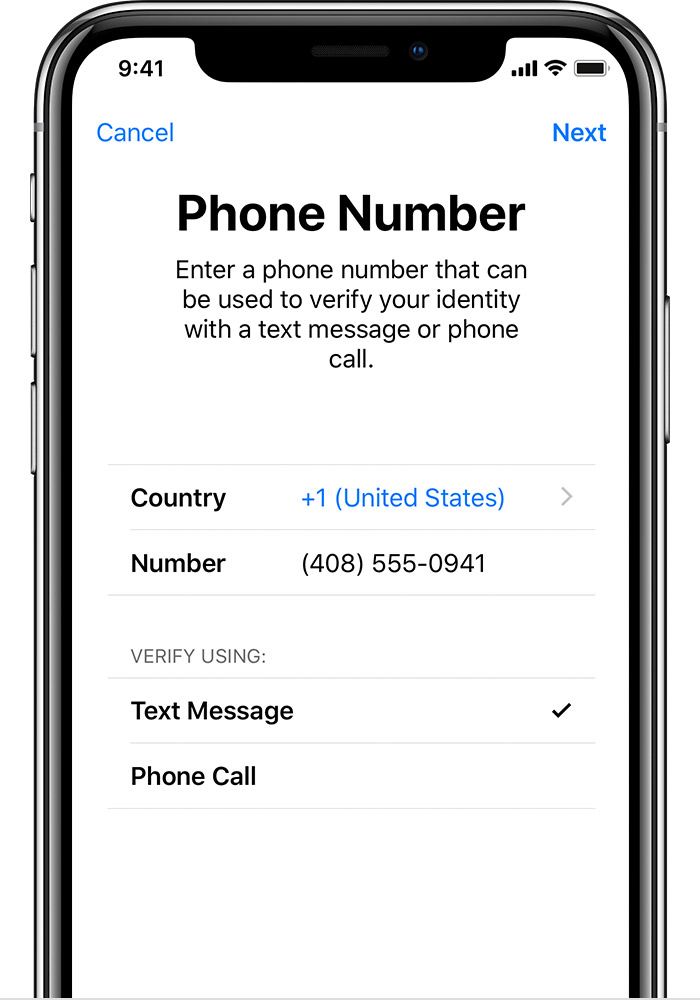
Enter the phone number where you want to receive verification codes when you sign in. You can choose to receive the codes b


Two-factor authentication for Apple ID - Apple Support

https://support.apple.com/en-in/HT204915

8 replies
Question marked as Top-ranking reply

Feb 1, 2019 9:57 AM in response to karlssongunvor

Set up two-factor authentication for your Apple ID

Two-factor authentication is available to iCloud and iTunes users with at least one device that's using the latest iOS or macOSLearn more.

You can follow these steps on your iPhone, iPad, or iPod touch to turn on two-factor authentication.

Turn on two-factor authentication in Settings


If you're using iOS 10.3 or later:

  1. Go to Settings > [your name] > Password & Security. 
  2. Tap Turn On Two-Factor Authentication.
  3. Tap Continue.

If you're using iOS 10.2 or earlier:

  1. Go to Settings > iCloud. 
  2. Tap your Apple ID > Password & Security. 
  3. Tap Turn On Two-Factor Authentication.
  4. Tap Continue.

You might be asked to answer your Apple ID security questions.

Enter and verify your trusted phone number

Enter the phone number where you want to receive verification codes when you sign in. You can choose to receive the codes b


Two-factor authentication for Apple ID - Apple Support

https://support.apple.com/en-in/HT204915

Feb 1, 2019 9:57 AM in response to karlssongunvor

Two-Factor Authentication does not protect your phone. It protects your Apple ID. While you don't need to have more than one device as the code can be sent to your phone, you certainly should have an additional trusted device or number in the event something happens to that phone.


Two-factor authentication for Apple ID - Apple Support


One the phone, you only need 2FA when you're signing into an Apple ID. Once you've done that, you won't need it again. To protect the information on your phone, use a passcode.

Feb 1, 2019 2:30 PM in response to IdrisSeabright

Thanks for very useful correction.....I will use it!.....when I first asked this question, my interest was to find a way to keep my iPhone 7 secure. I do have a passcode......and TouchID enabled.....but when I sing in it only asks me for the passcode.....which is only one security device for the iPhone . I would like to have two procedures for singing in, to be sure the iPhone is safe. Can the Touch ID be used with the passcode to sing into the iPhone 7? How do you do this?


Or, if I should choose to use Touch ID only to sign in, rather than the passcode, which is asked for, how do I do this?

Feb 2, 2019 10:12 AM in response to karlssongunvor

I would like to have two procedures for singing in, to be sure the iPhone is safe. Can the Touch ID be used with the passcode to sing into the iPhone 7? How do you do this?

Or, if I should choose to use Touch ID only to sign in, rather than the passcode, which is asked for, how do I do this?

If you're going to enable TouchID on your phone, you are required to enable the passcode first. TouchID will not unlock your phone when you restart it or if you haven't unlocked for twenty four hours. So, if you have TouchID enabled, you will always have the option of using it or the passcode.


You can certainly set a more complex passcode than the six digit passcode. But, you will never be asked for more than one thing to unlock your iPhone.

This thread has been closed by the system or the community team. You may vote for any posts you find helpful, or search the Community for additional answers.

iPhone 7 and two factor authentication

Welcome to Apple Support Community
A forum where Apple customers help each other with their products. Get started with your Apple Account.