If you performed a Hard Reset on the AirPort Express, then you will need to set it up again.
You should not have needed to download and install AirPort Utility for your Mac, it should have already been installed as part of the Mac operating system. That may be another issue to work on, so for now try to use your iPhone to set up the AirPort Express.
Perform a Hard Reset again just as a double check by powering up the Express for a minute or two, then holding in the reset button on the side of the Express for 7-8 seconds. Release the reset button after the hold period and give the Express a full minute to restart to a slow, blinking amber light status.

Go to the Home Screen on the iPhone
Tap on Settings
Tap on WiFi
Look for a listing of Set Up a New AirPort Base Station
Tap on AirPort Express under that listing and follow the prompts to set up the Express to "join" the wireless network
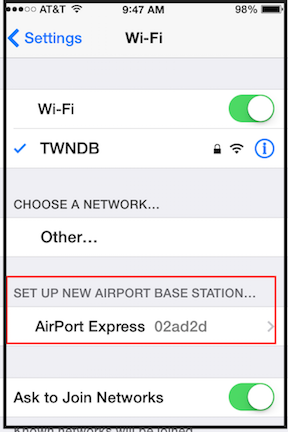
You may need to select the particular network that you want the Express to join and then enter the password for the WiFi network
Once you have the AirPort Express set up and working.......then.....you will be able to "see" the Express when you open AirPort Utility
Keep in mind that Apple is very serious about the "Air" in "AirPrint", so you will not be able to print from the iPhone once the Express has been set up, since AirPrint is not supported over the USB port. Try a utility like Printopia to see if that might allow printing from the iPhone. There is a free trial.
https://www.decisivetactics.com/products/printopia/

