Printing a repeating label from Contacts

I am trying to make pages of labels with a single address. I am a longtime pc user who recently switched to Apple products and Ive had a generally wonderful experience. However, I can't seem to translate my wonderful experience to making labels. Any advice on printing full pages of labels both with a group of contacts per page and a single contact repeating for a full page would be appreciated. The last posts I can find are from 2010. Thanks in advance


MacBook Pro 15”, 10.14

Posted on Feb 12, 2019 12:53 PM

Reply
Question marked as Top-ranking reply

Posted on Feb 12, 2019 2:56 PM

Pages v7.3 does not support Mail or Data merge from Contacts. Although the Contacts application itself has label awareness in its print panel, it apparently only offers the selected address as a single label and not a full sheet of the same label.


If you are in the U.S., Avery has begun providing templates in Pages v7 format (yellow icon). So for instance, I download the Address Label Template 8160 from this page, click the Download link for it, and then sign into my Avery account — which triggers the download. These templates are in Layout, not word processing mode.


I open this 8160 label template in Pages v7.3 and if I know that I will always want the content of the 30 text boxes aligned in the upper left corner, it is better to do this now by pressing (⌘) while selecting all 30 text boxes. Then on the Format : Text panel, I set their alignment left, and their text box contents to the top:


Now, all 30 text boxes have this setting. From the File menu, Save As Template.


Now, open this template in a new document. In the first visual text box in the upper left corner, enter the address that you want repeated on the other 29 labels.


Copy and paste the following AppleScript into Dock : Launchpad : Other : Script Editor. Click the hammer icon. Then run. This script will replicate your initial address content to the other 29 text boxes — provided that the Pages document is open with this address template, and the first visual cell has your address entered to be duplicated. Before you save the finished list of labels, you may want to visit the View menu : Guides : Hide Guides. Now you can save a plain sheet of labels, and/or print them on your corresponding label sheets in the printer.


-- labelmaker.pages

-- Automatically populates a sheet of labels based on the content of a first
-- label text box. Expects each label as a Text box, because this is the format that
-- Avery uses in the U.S. with their Pages v7 templates in Layout mode.
-- See https://discussions.apple.com/thread/250160211 for more detail.
--
-- VikingOSX, 2019-02-12, Apple Support Communities, No warranties at all.

tell application "Pages"
	tell front document
		set labelLst to every text item of it
		repeat with i from 1 to (count of labelLst)
			-- finds the text item index that contains your label text (not in logical order)
			if object text of item i of labelLst does not contain "Place Text Here" then
				set itemPtr to i
				exit repeat
			end if
		end repeat
		repeat with i from 1 to (count of labelLst)
			if not i is itemPtr then
				set (text item i)'s object text to the (object text of text item itemPtr) as text
			end if
		end repeat
	end tell
end tell


For the 30 labels in the Avery 8160 template, the script takes under 3 seconds to finish.


From:
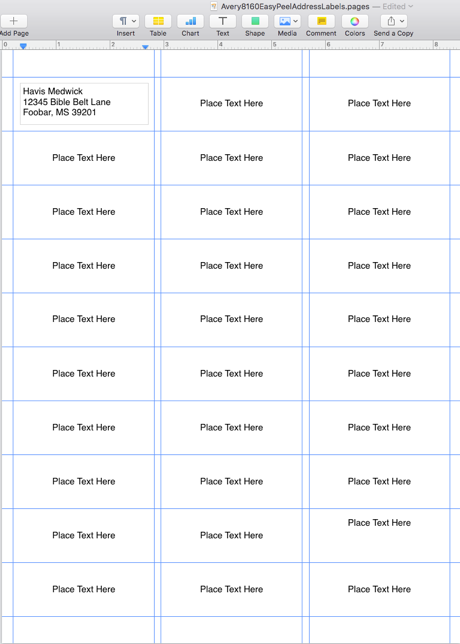


To:
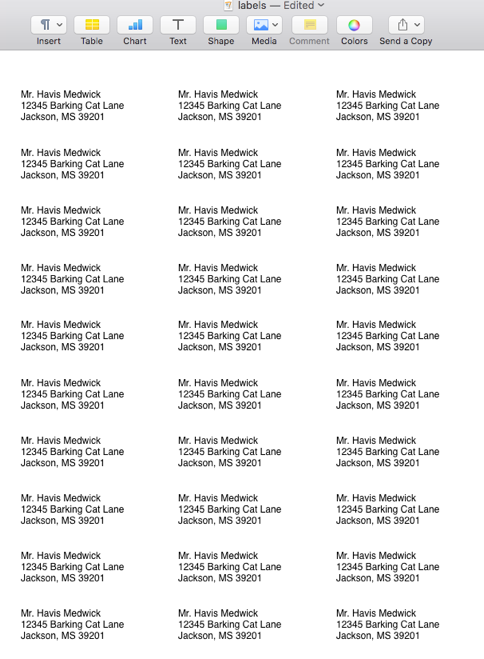

2 replies
Question marked as Top-ranking reply

Feb 12, 2019 2:56 PM in response to RudyKazooty

Pages v7.3 does not support Mail or Data merge from Contacts. Although the Contacts application itself has label awareness in its print panel, it apparently only offers the selected address as a single label and not a full sheet of the same label.


If you are in the U.S., Avery has begun providing templates in Pages v7 format (yellow icon). So for instance, I download the Address Label Template 8160 from this page, click the Download link for it, and then sign into my Avery account — which triggers the download. These templates are in Layout, not word processing mode.


I open this 8160 label template in Pages v7.3 and if I know that I will always want the content of the 30 text boxes aligned in the upper left corner, it is better to do this now by pressing (⌘) while selecting all 30 text boxes. Then on the Format : Text panel, I set their alignment left, and their text box contents to the top:


Now, all 30 text boxes have this setting. From the File menu, Save As Template.


Now, open this template in a new document. In the first visual text box in the upper left corner, enter the address that you want repeated on the other 29 labels.


Copy and paste the following AppleScript into Dock : Launchpad : Other : Script Editor. Click the hammer icon. Then run. This script will replicate your initial address content to the other 29 text boxes — provided that the Pages document is open with this address template, and the first visual cell has your address entered to be duplicated. Before you save the finished list of labels, you may want to visit the View menu : Guides : Hide Guides. Now you can save a plain sheet of labels, and/or print them on your corresponding label sheets in the printer.


-- labelmaker.pages

-- Automatically populates a sheet of labels based on the content of a first
-- label text box. Expects each label as a Text box, because this is the format that
-- Avery uses in the U.S. with their Pages v7 templates in Layout mode.
-- See https://discussions.apple.com/thread/250160211 for more detail.
--
-- VikingOSX, 2019-02-12, Apple Support Communities, No warranties at all.

tell application "Pages"
	tell front document
		set labelLst to every text item of it
		repeat with i from 1 to (count of labelLst)
			-- finds the text item index that contains your label text (not in logical order)
			if object text of item i of labelLst does not contain "Place Text Here" then
				set itemPtr to i
				exit repeat
			end if
		end repeat
		repeat with i from 1 to (count of labelLst)
			if not i is itemPtr then
				set (text item i)'s object text to the (object text of text item itemPtr) as text
			end if
		end repeat
	end tell
end tell


For the 30 labels in the Avery 8160 template, the script takes under 3 seconds to finish.


From:


To:


This thread has been closed by the system or the community team. You may vote for any posts you find helpful, or search the Community for additional answers.

Printing a repeating label from Contacts

Welcome to Apple Support Community
A forum where Apple customers help each other with their products. Get started with your Apple Account.
