
How to remove colours from touch bar swatch
I've added like 500 colours to my color swatch and I cannot for the life of me figure out how to delete them, why is this so difficult?
MacBook Pro
I've added like 500 colours to my color swatch and I cannot for the life of me figure out how to delete them, why is this so difficult?
MacBook Pro
I've added like 500 colours to my color swatch and I cannot for the life of me figure out how to delete them, why is this so difficult?
Move the cursor down into the Touch Bar and select a tool to remove it from the Control Strip.
You will notice that, as you move your cursor above the tools, they light up.

You can either drag the tool into the Trash can on the far left of
the Touch Bar, or drag it upward, back into the tool panel on the screen
to remove it.

See if this is any better:
Colors
In apps where you can change the color of text or objects, you can use the Touch Bar to select a color and adjust color values such as hue, saturation, and brightness.

 , then slide your finger to the color you want to use. To see darker and lighter shades, keep your finger on the color.
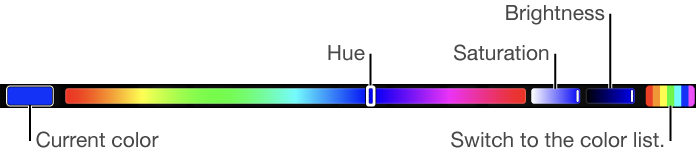
 in the Touch Bar.
Touch Bar - Color Swatches
https://discussions.apple.com/thread/8541241
How to remove colours from touch bar swatch
