Can't find a strikethrough for Text Edit

Why is Text Edit not native to my new MacBook Pro? Is it some kind of Apple violation to move it to my new MacBook Pro from my old one. If I were to do this, how would I find a strikethrough function?


Thank you,


Victoria

MacBook Pro 15", 10.13

Posted on Mar 9, 2019 6:57 AM

Reply
Question marked as Top-ranking reply

Posted on Mar 9, 2019 8:34 AM

TextEdit is in the /Applications folder on both High Sierra and Mojave. What is different is the former shows TextEdit among other applications in the Launchpad display, and hidden away in the Other folder on Launchpad on Mojave.


TextEdit will allow you to roll your own features such as Strike-through. Here's mine:
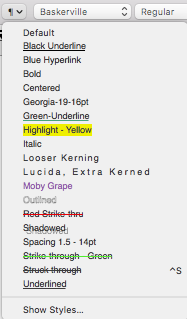

It begins with you entering some text. Then press ⌘-T to bring up the Show Fonts panel. On the toolbar of that Fonts panel, there are icon select buttons, and the one controlling strike-through is obvious. If you want a default strike-through, the just select Single, and the selected text in TextEdit will get a strike-through. If you want a strike-through with color, then on that Show Fonts : Strike-through menu, select color first from the color wheel, and then select Single. Select the text in TextEdit.


Now, on the Paragraph Styles menu that I provided above. choose Show Styles… , and a sheet will drop down as in the following:


Click Add To Favorites, and another sheet will replace it:


Give your new strike-through paragraph style a meaningful name. You can see some of my naming conventions above. I leave the two checkboxes unselected, as I do not want to impose any font information on future selections. Click Add, and you are done.


The next time that you want a strike-through, select the target text and select the appropriate strike-through from the paragraph styles menu.


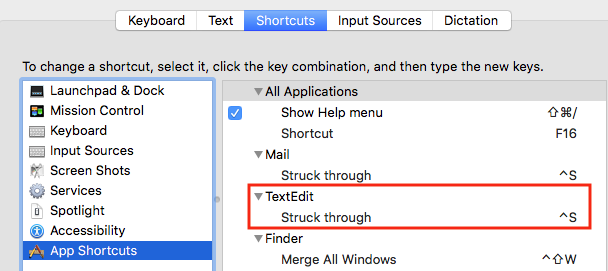
Wondering how to assign a keyboard shortcut to your new strike-through style? Use System Preferences : Keyboard : Shortcuts per the following screen capture, by adding + TextEdit, and the exact name that you gave your strike-through style:

9 replies
Question marked as Top-ranking reply

Mar 9, 2019 8:34 AM in response to vjl20

TextEdit is in the /Applications folder on both High Sierra and Mojave. What is different is the former shows TextEdit among other applications in the Launchpad display, and hidden away in the Other folder on Launchpad on Mojave.


TextEdit will allow you to roll your own features such as Strike-through. Here's mine:


It begins with you entering some text. Then press ⌘-T to bring up the Show Fonts panel. On the toolbar of that Fonts panel, there are icon select buttons, and the one controlling strike-through is obvious. If you want a default strike-through, the just select Single, and the selected text in TextEdit will get a strike-through. If you want a strike-through with color, then on that Show Fonts : Strike-through menu, select color first from the color wheel, and then select Single. Select the text in TextEdit.


Now, on the Paragraph Styles menu that I provided above. choose Show Styles… , and a sheet will drop down as in the following:


Click Add To Favorites, and another sheet will replace it:


Give your new strike-through paragraph style a meaningful name. You can see some of my naming conventions above. I leave the two checkboxes unselected, as I do not want to impose any font information on future selections. Click Add, and you are done.


The next time that you want a strike-through, select the target text and select the appropriate strike-through from the paragraph styles menu.


Wondering how to assign a keyboard shortcut to your new strike-through style? Use System Preferences : Keyboard : Shortcuts per the following screen capture, by adding + TextEdit, and the exact name that you gave your strike-through style:


Mar 10, 2019 10:39 AM in response to VikingOSX

Thanks very much, VikingOSX! I'm printing this to save for installation since my document is finished. You are an excellent explainer (reflected in your credentials). I'd be interested in knowing how often you use Text Edit. I usually reply to Word documents in Word, but use Text Edit for everything else. Word used to be so pushy that it drove me crazy. Maybe that has changed.

Mar 10, 2019 1:14 PM in response to vjl20

Personally, I rarely use TextEdit any more, as I use programmer's editors for plain text, and either LibreOffice, or Pages v7.3 for other things word processing oriented. I simply cannot justify installing Microsoft products at this time, as I no longer have a need for them. If I were regularly exchanging documents with others that were using MS Office, then Office 2019 for Mac would be my first choice in the preservation of accurate document interchange.

This thread has been closed by the system or the community team. You may vote for any posts you find helpful, or search the Community for additional answers.

Can't find a strikethrough for Text Edit

Welcome to Apple Support Community
A forum where Apple customers help each other with their products. Get started with your Apple Account.