I been having double some time triple charges

I been having double some time triple charges. That is coming out of my account multiple times a month.


Need to to know how I stop them from happening and get credit these charges back into my account


[Re-Titled by Host]

iPhone X, iOS 12

Posted on Mar 12, 2019 10:16 PM

Reply
Question marked as Top-ranking reply

Posted on Mar 13, 2019 12:14 AM

Request a refund for an App Store or iTunes Store purchase

Some recent App Store and iTunes Store purchases might be eligible for a refund if the item doesn't work as expected or can't be used.


You can request a refund on certain App Store or iTunes Store purchases within 90 days of the purchase date through your purchase history. Limitations apply. See the Apple Media Services Terms and Conditionsfor details.

You can't request refunds for recurring charges, but you can cancel a subscription or downgrade your iCloud storage.

To request a refund, visit reportaproblem.apple.com or follow the steps below.


View your purchase history

To open your purchase history, tap or click this link: View your purchase history.

You can see your purchase history in Settings on your iPhone, iPad, iPod touch, or in iTunes on a Mac or PC. You can also go to reportaproblem.apple.com using any web browser.

Learn more about viewing your purchase history in the App Store or iTunes Store.
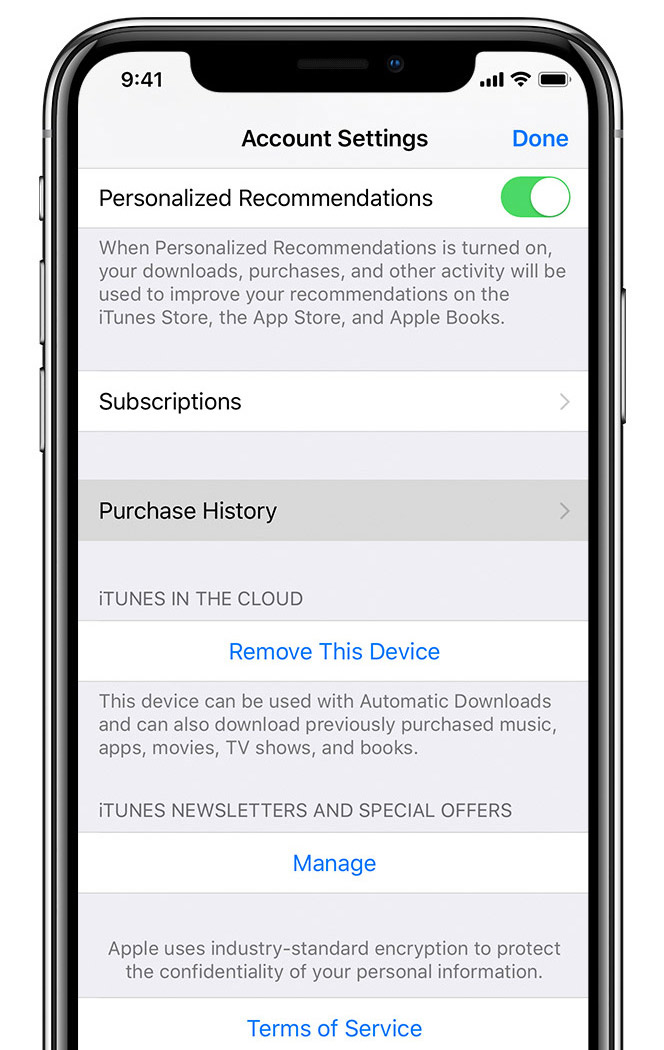


Locate the order in your purchase history

Find the order with the item that you want to request a refund for, then follow the directions for the device that you're using.

On your iPhone, iPad, or iPod touch: Tap Total Billed at the bottom of the order, then tap the specific item.

On your Mac or PC: Click More below the price of the item.

On the Report a Problem website: Find the item on the Purchases tab.
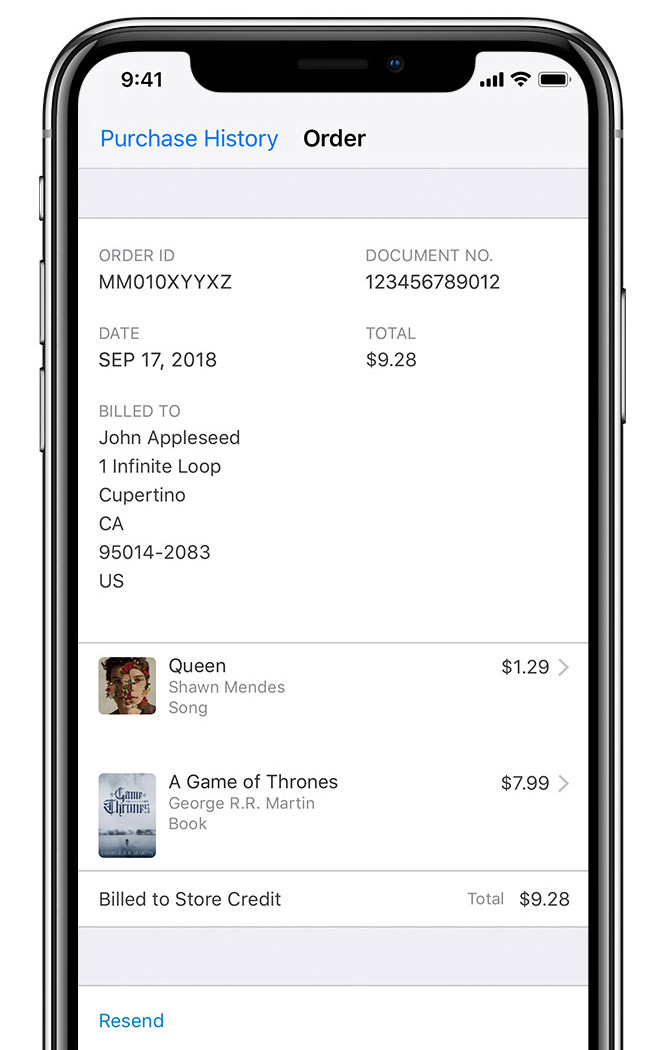


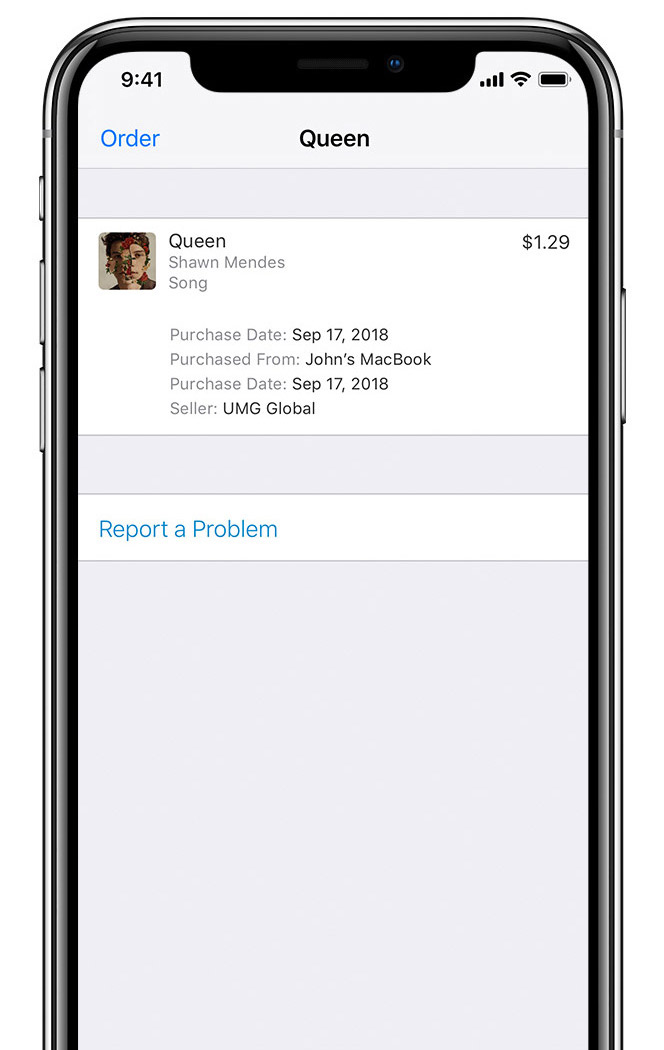
Report a problem

On your iPhone, iPad, iPod touch, Mac or PC: Tap or click Report a Problem below the item's details. A browser window opens to the Report a Problem website.

On the Report a Problem website: Tap or click Report a Problem to the right of the item.

If you don't see an option to Report a Problem, then the item isn't eligible for a refund request.


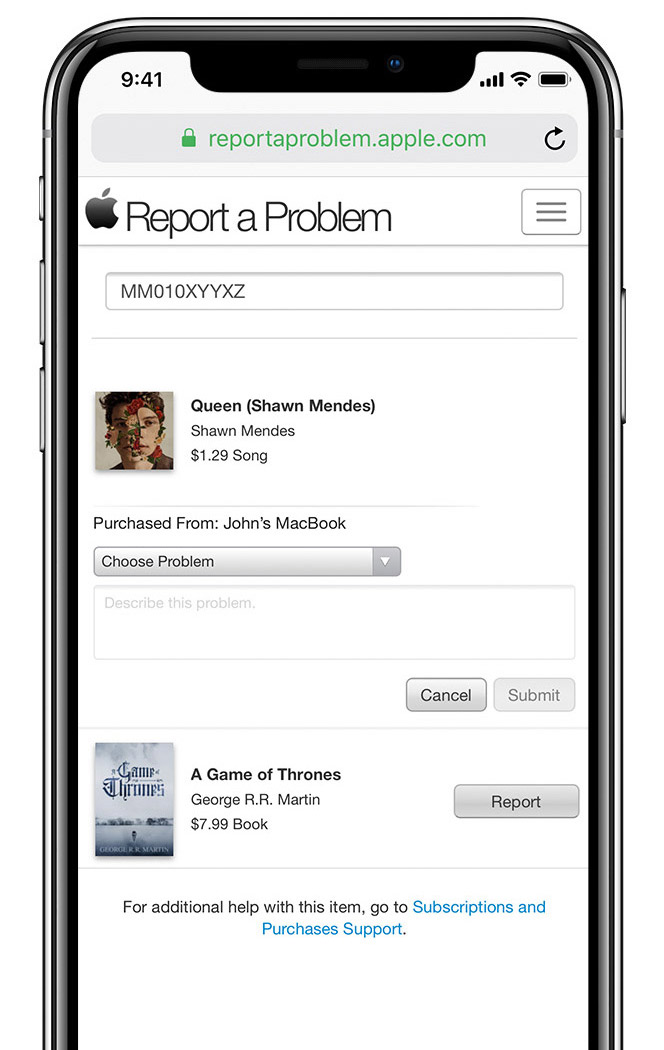
Describe your issue

Choose a reason for the problem, describe your issue, then tap or click Submit.

Based on the information that you provide, Apple might provide a refund directly, refer you to the developer, require additional information, or might deny the refund request based on refund eligibility.

For more information about refund requests, contact Apple Support.

If you can't find the item

If you can't find an item in your purchase history, learn what to do. Make sure that you're signed in with the same Apple ID that you used to make the purchase. Also make sure that it's not a family member's purchase charged to your payment method.

Some items and purchases older than 90 days aren't eligible for refunds. See the terms and conditions for more information

If you get an email about a charge to your account that you don't remember authorizing, learn how to identify legitimate App Store or iTunes Store emails.


https://support.apple.com/en-in/HT204084


1 reply
Question marked as Top-ranking reply

Mar 13, 2019 12:14 AM in response to lamares

Request a refund for an App Store or iTunes Store purchase

Some recent App Store and iTunes Store purchases might be eligible for a refund if the item doesn't work as expected or can't be used.


You can request a refund on certain App Store or iTunes Store purchases within 90 days of the purchase date through your purchase history. Limitations apply. See the Apple Media Services Terms and Conditionsfor details.

You can't request refunds for recurring charges, but you can cancel a subscription or downgrade your iCloud storage.

To request a refund, visit reportaproblem.apple.com or follow the steps below.


View your purchase history

To open your purchase history, tap or click this link: View your purchase history.

You can see your purchase history in Settings on your iPhone, iPad, iPod touch, or in iTunes on a Mac or PC. You can also go to reportaproblem.apple.com using any web browser.

Learn more about viewing your purchase history in the App Store or iTunes Store.


Locate the order in your purchase history

Find the order with the item that you want to request a refund for, then follow the directions for the device that you're using.

On your iPhone, iPad, or iPod touch: Tap Total Billed at the bottom of the order, then tap the specific item.

On your Mac or PC: Click More below the price of the item.

On the Report a Problem website: Find the item on the Purchases tab.


Report a problem

On your iPhone, iPad, iPod touch, Mac or PC: Tap or click Report a Problem below the item's details. A browser window opens to the Report a Problem website.

On the Report a Problem website: Tap or click Report a Problem to the right of the item.

If you don't see an option to Report a Problem, then the item isn't eligible for a refund request.


Describe your issue

Choose a reason for the problem, describe your issue, then tap or click Submit.

Based on the information that you provide, Apple might provide a refund directly, refer you to the developer, require additional information, or might deny the refund request based on refund eligibility.

For more information about refund requests, contact Apple Support.


If you can't find the item

If you can't find an item in your purchase history, learn what to do. Make sure that you're signed in with the same Apple ID that you used to make the purchase. Also make sure that it's not a family member's purchase charged to your payment method.

Some items and purchases older than 90 days aren't eligible for refunds. See the terms and conditions for more information

If you get an email about a charge to your account that you don't remember authorizing, learn how to identify legitimate App Store or iTunes Store emails.



https://support.apple.com/en-in/HT204084


This thread has been closed by the system or the community team. You may vote for any posts you find helpful, or search the Community for additional answers.

I been having double some time triple charges

Welcome to Apple Support Community
A forum where Apple customers help each other with their products. Get started with your Apple Account.
