Having inherit/permissions problems on Server 5.3.1 on High Sierra 10.12.6

Considering moving to Mojave as I am ONLY looking for simple file service.

If you chose to stay with the current config, what is the easiest way to make the inherit permissions brand new after utterly being FUBAR?

Posted on Mar 19, 2019 8:05 AM

Reply
Question marked as Top-ranking reply

Posted on Mar 21, 2019 7:28 AM

If you feel that your permissions are a wreck, the recommended action is to remove all ACLs and then apply a fresh set. To do this, let's build a simple scenario.


Shared Folder Path: /Volumes/Data/Shares/YourShare - obviously your production path is different


To remove all ACLs from the path above, do the following:


1: Stop FileSharing

2: Using Terminal, enter this command to remove all ACLs from your share (requires admin password)


sudo chmod -N -R /Volumes/Data/Shares/YourShare


3: Open Server.app > FileSharing

4: Select your shared folder and press the Pencil icon to edit it

5: Press the + button to add an entry - in that entry enter the name of the group that should have access to the share

6: Set the group's permission, presumably read/write

7: Click OK - Server.app will pause as it cascades the new ACL through the share's children and descendants

8: Start file services

9: Confirm proper permissions function from a client device


This is an example of a simple permissions model in which one group is used. Do not add users to the ACL table as it is too rigid a construct. Create groups and always add groups. This allows editing of the group, not the permissions. POSIX permissions (the three permissions shown by default) are not inherited and can largely be left as standard umask. If you want to restrict view access, you can alter the Everyone Else access right and set it to none. Likewise, the POSIX group can be set to the primary group added to the ACL.


Hope this helps. Also, note that older versions of Server.app (5.3.1 included) have a Storage tab that provides advanced access to permission modification (under the gear icon). If you move to Mojave, the Storage tab is gone and complex permission models needs to be maintained using command line.


Hope this is helpful,


Reid Bundonis

Carbon Technologies, LLC

Member, Apple Consultants Network

8 replies
Question marked as Top-ranking reply

Mar 21, 2019 7:28 AM in response to Mrgimme

If you feel that your permissions are a wreck, the recommended action is to remove all ACLs and then apply a fresh set. To do this, let's build a simple scenario.


Shared Folder Path: /Volumes/Data/Shares/YourShare - obviously your production path is different


To remove all ACLs from the path above, do the following:


1: Stop FileSharing

2: Using Terminal, enter this command to remove all ACLs from your share (requires admin password)


sudo chmod -N -R /Volumes/Data/Shares/YourShare


3: Open Server.app > FileSharing

4: Select your shared folder and press the Pencil icon to edit it

5: Press the + button to add an entry - in that entry enter the name of the group that should have access to the share

6: Set the group's permission, presumably read/write

7: Click OK - Server.app will pause as it cascades the new ACL through the share's children and descendants

8: Start file services

9: Confirm proper permissions function from a client device


This is an example of a simple permissions model in which one group is used. Do not add users to the ACL table as it is too rigid a construct. Create groups and always add groups. This allows editing of the group, not the permissions. POSIX permissions (the three permissions shown by default) are not inherited and can largely be left as standard umask. If you want to restrict view access, you can alter the Everyone Else access right and set it to none. Likewise, the POSIX group can be set to the primary group added to the ACL.


Hope this helps. Also, note that older versions of Server.app (5.3.1 included) have a Storage tab that provides advanced access to permission modification (under the gear icon). If you move to Mojave, the Storage tab is gone and complex permission models needs to be maintained using command line.


Hope this is helpful,


Reid Bundonis

Carbon Technologies, LLC

Member, Apple Consultants Network

Mar 25, 2019 12:56 PM in response to Strontium90

Continued..


-rw-r--r--@ 1 reid  group1  63922 Mar 25 15:17 File.png
 0: user:_spotlight inherited allow read,execute
 1: group:group1 inherited allow read,write,execute,append,readattr,writeattr,readextattr,writeextattr,readsecurity
 2: group:group2 inherited allow read,execute,readattr,readextattr,readsecurity
 3: group:group3 inherited allow read,execute,readattr,readextattr,readsecurity

drwxr-xr-x+ 2 reid  group1     68 Mar 25 15:21 Folder
 0: user:_spotlight inherited allow list,search,file_inherit,directory_inherit
 1: group:group1 inherited allow list,add_file,search,add_subdirectory,delete_child,readattr,writeattr,readextattr,writeextattr,readsecurity,file_inherit,directory_inherit
 2: group:group2 inherited allow list,search,readattr,readextattr,readsecurity,file_inherit,directory_inherit
 3: group:group3 inherited allow list,search,readattr,readextattr,readsecurity,file_inherit,directory_inherit


Note that the ACL table inherited to both the file and the folder. But pay attention to the primary POSIX group permissions as well as the primary owner of the file and folder.


The folder permission is back to drwxr-xr-x (which is standard umask and not the POSIX permissions of the parent - remember, POSIX does not inherit) and the file is -rw-r--r--. Now, how does this cause a problem with software that is not paying attention to the ACL?


In our example, there are three groups and let's say two users. There is the Reid user and the Mrgimme user. Both belong to Group 1. The Reid user uses Photoshop and created a file on the share. Reid is the POSIX owner and is a member of the POSIX primary group, group1. He is also a member of the ACE Group 1. The Mrgimme user is NOT the POSIX owner, is a member of the POSIX primary group, and is a member of the ACE Group 1. So how should permissions be evaluated? Ideally, Mrgimme would ask the system, am I a member of the ACL? Yes, what are my permissions? Read/write. Great. Ah, but what happens when an application fails to read the ACL? (This is what I believe you are experiencing if you are indeed still on Adobe CS)


The second user, Mrgimme connects and opens the file. The application is not reading the ACL so it falls back to POSIX rights. The question is now, is Mrgimme the owner of the file? No, read is = no access via owner. Is Mrgimme a member of the primary POSIX group? Yes. What access does he get? Read only... Remember, POSIX does not inherit so the POSIX group is r-x


This is my belief as to why you are getting the permissions issues. It is the failure of the legacy applications to properly read ACL tables.


You can troubleshoot this yourself in a few ways.


1: Log in as user 1

2: Create a file using Photoshop and save it

3: Disconnect as user 1

4: Connect as user 2 and open the file created by user 1

5: My guess is that it will report as read only, preventing modification by user 2

6: Close the document.

7: Control the server and find the file

8: Get info on the file and change the POSIX group permission on just the file to read/write

9: Open the file as user 2 again and try to commit a save - it should work

10: Close the file

11: Open as user 1 and now user 1 should be locked out of the file


Having fun yet?


There are two possible ways to overcome this. You can alter umask on all your workstations to go from 022 to 002 or your can create a script attached to a launch daemon that monitors your share point via a watchedPaths directive, effectively changing permissions each time something is created. Or you can upgrade to CC which might be cost prohibitive.


See this article for more details: https://support.apple.com/en-us/HT201684


Reid

Mar 26, 2019 12:16 PM in response to Mrgimme

Get Info has been broken since inception. Don't trust Get Info for anything when it comes to complex permissions. I hate to say it. Especially from the client. I know it is un-Mac-like, but use Terminal to get the best view of your permissions. These commands are very helpful. Run them on the server for best information. Replace /path/to/folder by dragging and dropping the folder you want to inspect into the Terminal window after you type the command.


ls -la /path/to/folder # Lists long and all


ls -lae /path/to/folder # Lists long, all, and ACLs


ls -laeO /path/to/folder # Lists long, all, ACLs, and flags (like locks and hidden)


ls -laeO@ /path/to/folder # Lists long, all, ACLs, flags, and extended attributes


You can use in any combination and read man ls for more options.


I've setup the following in my lab. I have a 10.12.6 Server running AFP and SMB. My client machine is 10.14.3 (no update applied yet) and CC 2019 (InDesign 14.0.1). I have two users on the server, aaaa and bbbb. They both belong to the read write group.


I am able to connect to the server as aaaa and save an initial file. I can disconnect from the server, connected as bbbb, and open and save the file. I can disconnect and reconnect as aaaa and save the file. If looped this a number of times on both AFP connections and SMB connections. I am unable to reproduce your issue.


Please note, what you describe is very common with Adobe CS (Creative Suite) and the very earliest versions of CC (which were basically CS with a new licensing engine and a hefty price tag). If you are on any of the recent CC releases, you should be operating well. As a aside, if you were reporting Photoshop issues I would point you toward the Quicklook Daemon but since you called out InDesign, I believe you should be able to achieve success in collaborative work.


In CC 2018 there was a case in which the InDesign client would not release "closed" documents until the App was quit. Perhaps you are running into that based on what you described.


1: Korryn creates file and closes it out

2: Kathy opens the document, makes no edits, and closes the document but does not quit InDesign

3: Korryn opens the file but it is reported as read only


In this is the sequence, repeat your test but have Kathy quit InDesign completely, ensuring a release of the file. Then have Korryn try to open it.


You are not crazy. There are issues with working on servers with Adobe products but many can be overcome.


Hope this is helping and not confusing.


Mar 25, 2019 12:56 PM in response to Mrgimme

I think the key issue that you are having is summarized in this statement:


...but most every document in question is Adobe CS.


But first, let's make sure you have a foundation on permissions and the setup of the share. In your note, you mention that there are three groups that have access to the share. Does your share look something like this:
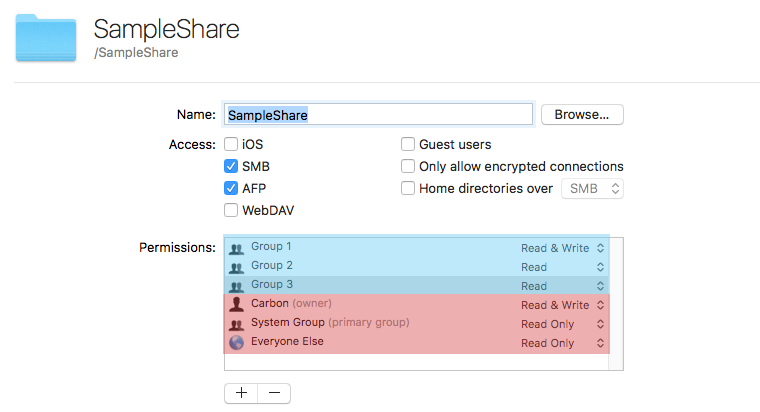


Note that I've color highlighted the permissions to show the Posix permissions and the ACL.


In red, starting from the bottom and working my way up, Everyone is read only, the default group (wheel) is read only, the owner (carbon) is read and write. When viewing from Terminal, this would be the equivalent of using the ls -l command to list the contents in long form:


drwxr-xr-x+  2 carbon  wheel       68 Mar 25 14:55 SampleShare


Starting from the left, the d means this is a directory. The next 9 characters can be broken into three columns, one for the owner (rwx), one for the group (r-x), and the final for everyone (r-x). Note the + at the end. That signifies that the folder also has an ACL applied.


Using ls -le will reveal the ACL and show a complete view of the permissions for the parent folder (this is the folder that is your shared folder):


drwxr-xr-x+  2 carbon  wheel    68 Mar 25 14:55 SampleShare
 0: user:_spotlight inherited allow list,search,file_inherit,directory_inherit
 1: group:group1 allow list,add_file,search,add_subdirectory,delete_child,readattr,writeattr,readextattr,writeextattr,readsecurity,file_inherit,directory_inherit
 2: group:group2 allow list,search,readattr,readextattr,readsecurity,file_inherit,directory_inherit
 3: group:group3 allow list,search,readattr,readextattr,readsecurity,file_inherit,directory_inherit


In addition to seeing the POSIX permissions, I also can see the ACL that contains the three groups defined when setting up the share (group1, group2, and group3). Group 1 has the greatest of rights, being able to read and write while group 2 and 3 only have read access.


Once this is set on the parent folder, child folder and descendants will inherit the ACL permissions from the parent. This is represented by the following attribute within each ACE:


file_inherit,directory_inherit


However, and I believe this is the key issue that you are experiencing because of the age of your Adobe stack, POSIX permissions do not support inheritance. It was removed in 10.4 or 10.5 (sorry, memory of those versions is getting a little fuzzy). That means that if you do the following on your parent share:
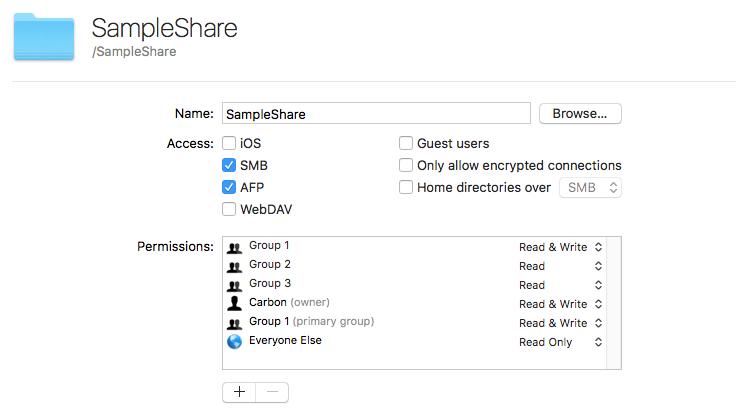


Note the change was to set the Group 1 (group with Read and Write access in the ACL to the primary POSIX group (POSIX can only support one group)) and set the permissions to read and write, then my view of the share is now:


drwxrwxr-x+  2 carbon  group1    68 Mar 25 14:55 SampleShare
 0: user:_spotlight inherited allow list,search,file_inherit,directory_inherit
 1: group:group1 allow list,add_file,search,add_subdirectory,delete_child,readattr,writeattr,readextattr,writeextattr,readsecurity,file_inherit,directory_inherit
 2: group:group2 allow list,search,readattr,readextattr,readsecurity,file_inherit,directory_inherit
 3: group:group3 allow list,search,readattr,readextattr,readsecurity,file_inherit,directory_inherit


Note the POSIX is now drwxrwxr-x and the primary group is listed as group1. This all looks great on the parent folder.


Ah, but now I log in as a user to the share and I create a file and a folder at the root level. I've logged in with a user who is a member of Group 1 so I can create this content (members of groups 2 and 3 can only read based on the ACL). Looking at the permission of the file and the folder I find:





Mar 25, 2019 8:49 AM in response to Strontium90

Hey Reid,


Thanks for the in depth response. So I followed your instructions EXACTLY and felt confident things were better. Now this week it seems when certain someones (not all) in the main group opens a file it will appear as read only to others! Rather than do what I used to and do command - I on the enclosing folder I went to the Storage command and propagated permissions (with all boxes checked) which seemed to help but not completely resolve the issues. I have three groups and the other two only have read only access they are fine but the primary group keeps getting READ ONLY messages especially at the file level but very often the folder level as well.


I have heard certain versions of Word can muck things up but most every document in question is Adobe CS. Is this why Apple stopped making this? It seems my permissions are "drifting into a mess" every time I turn around. Is there a third party permissions inspector I should know about? It seems inheriting is not right. Is this something that can be fixed remotely? I am trying to manage about 15TB.

Mar 25, 2019 1:38 PM in response to Strontium90

Oops I meant Adobe CC and don't think all you wrote was for naught because they are essential groundwork in fixing this.

Which I have printed out and plan on memorizing by the morning!


New Example: Korryn creates a folder called test with an Indesign file inside at the root level of the share, she is a member of the Main Group. Kathy is also a member of the Main Group. After Korryn closes the file Kathy opens it no problem and then she does not save just closes out.

Now when Korryn opens it... it is READ ONLY!


Another interesting thing is this screen shot is doing Command-I on the folder mentioned above. The users do not have the same level of detail. But back to my primary issue. Someone creates a file, someone else opens it and now its read only!

This thread has been closed by the system or the community team. You may vote for any posts you find helpful, or search the Community for additional answers.

Having inherit/permissions problems on Server 5.3.1 on High Sierra 10.12.6

Welcome to Apple Support Community
A forum where Apple customers help each other with their products. Get started with your Apple Account.