
My phone does not ring during a coming call, what’s wrong?
I just bought a refurbished iPhone 7, but during a coming call, it doesn’t ring.
iPhone 7, iOS 12
I just bought a refurbished iPhone 7, but during a coming call, it doesn’t ring.
iPhone 7, iOS 12
Turned on the "silent" switch
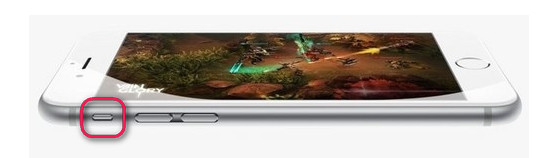
The new iPhone 6/6 Plus and iPhone 6s/6s Plus delivers user-friendly design and inherit the "mute button" located on the side from iPhone 5/4. You are able to switch to "silent mode" by turn off the mute button. Once on, you are no longer able to hear any sounds while receiving calls and messages. Make sure it is not turned on as shown in the picture below:
2. Turned off the "DND" mode
With almost certain guarantee, the reason an iPhone is not ringing or making alert sounds apparently out of the blue is because of the Do Not Disturb feature. It can be unintentionally turned on and lead to all sorts of confusion and missed calls or seemingly ignored text messages. If the silent switch was already off, you want to make sure the "Do Not Disturb" feature isn't active. To turn it off, go to Settings > Do Not Disturb. Make sure "Manual" and "Scheduled" are off.
Alternatively, flip up from the bottom of the screen and tap the moon icon again so that it’s not highlighted to switch off the DND mode.
3. Make sure the "ringer and alerts" volume is not muted
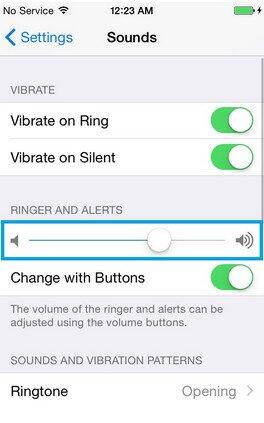
Go to Settings > Sounds and make sure the "ringer and alerts" volume is not muted. Also, you can trun up the volume by clicking the volume button on left side. Usually, we just ignore the small things that makes iPhone 6s no sound but vibrate.
4. Turn on "Allow Notifications" on iOS 11 device.
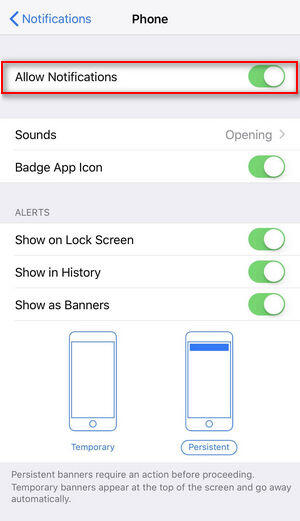
If you also have a problem that everytime a new phone call or messages come in you get no alerts even if you have set the ringtone. Go to Settings > Notifications > Phone(or messages) and enable the "Allow Notifications" button.
If you can't hear a person on a call or voicemail or if the sound isn't ...
Turned on the "silent" switch
The new iPhone 6/6 Plus and iPhone 6s/6s Plus delivers user-friendly design and inherit the "mute button" located on the side from iPhone 5/4. You are able to switch to "silent mode" by turn off the mute button. Once on, you are no longer able to hear any sounds while receiving calls and messages. Make sure it is not turned on as shown in the picture below:
2. Turned off the "DND" mode
With almost certain guarantee, the reason an iPhone is not ringing or making alert sounds apparently out of the blue is because of the Do Not Disturb feature. It can be unintentionally turned on and lead to all sorts of confusion and missed calls or seemingly ignored text messages. If the silent switch was already off, you want to make sure the "Do Not Disturb" feature isn't active. To turn it off, go to Settings > Do Not Disturb. Make sure "Manual" and "Scheduled" are off.
Alternatively, flip up from the bottom of the screen and tap the moon icon again so that it’s not highlighted to switch off the DND mode.
3. Make sure the "ringer and alerts" volume is not muted
Go to Settings > Sounds and make sure the "ringer and alerts" volume is not muted. Also, you can trun up the volume by clicking the volume button on left side. Usually, we just ignore the small things that makes iPhone 6s no sound but vibrate.
4. Turn on "Allow Notifications" on iOS 11 device.
If you also have a problem that everytime a new phone call or messages come in you get no alerts even if you have set the ringtone. Go to Settings > Notifications > Phone(or messages) and enable the "Allow Notifications" button.
If you can't hear a person on a call or voicemail or if the sound isn't ...
My phone does not ring during a coming call, what’s wrong?
