Shuffling all songs on iPod touch

Hi, I recently started using an iPod Touch after years with an iPod Classic.


The Touch is very user friendly but there’s one thing I’ve been unable to work out.


It’s easy to shuffle all songs simply by hitting shuffle on the Touch, but there's one thing I could do on the IPod Classic which I haven’t yet worked out how to do on the iPod Touch. On the iPod Touch, you could go to any song you liked in the list of songs and choose that as your first song and then everything else would be shuffled after it.


But on the Touch, if I choose a song and hit it, it then just plays all the songs in order from that song rather than shuffling everything.


So in a nutshell, what I want to be able to do is choose a song as the first song and then have them play as random through the entire library. Easy on a Classic. Would love someone to tell me how to do it in a Touch.


Thanks


Paul


iPod, iOS 12

Posted on Apr 15, 2019 1:12 PM

Reply
Question marked as Top-ranking reply

Posted on Apr 19, 2019 9:48 AM

Even easier on the iPod Touch.


Note that there are two separate places where you can turn on Shuffle Songs*, but they work differently from one another.


To do what you want; i.e. start a song of your choice playing - and then for it to shuffle from the end of that song, do not use the Shuffle button at the top of the Songs menu.


Instead:

  1. on the Songs menu, choose the song you want and start it playing
  2. you will see the song you've chosen at the bottom of the screen, as indicated by the Now Playing ribbon
  3. tap the Now Playing ribbon to bring up the full-size Now Playing screen
  4. drag the Now Playing screen upwards, to reveal additional controls below the transport controls (Shuffle and Repeat)
  5. Tap the Shuffle button that you will see on the left hand side of the Now Playing screen, so that the button turns red:
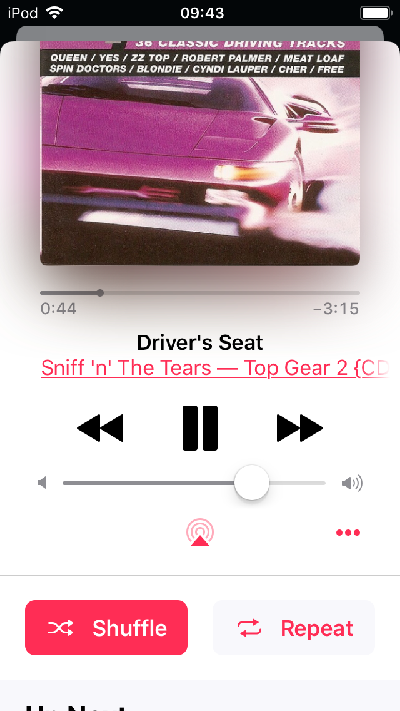


In the screenshot above, the iPod is in Shuffle mode (which we know because the Shuffle button is in red with white text. Your Shuffle button will be in light grey with red text (like the Repeat button, which is currently off). Tap the Shuffle button to turn on Shuffle and the button turns red. The song you've chosen will play the the end and then the iPod will begin shuffle play.


While you're here, here's a couple of tips. First, a word about the Repeat button. Similarly to your iPod Classic, Repeat cycles between:

Off - once the current list of songs finishes, the player will stop

Repeat - once the current list finishes, the player will repeat the same list

Repeat 1 - the player will play the same song over and over, until you tap Next button or stop the player.

Off - (again)

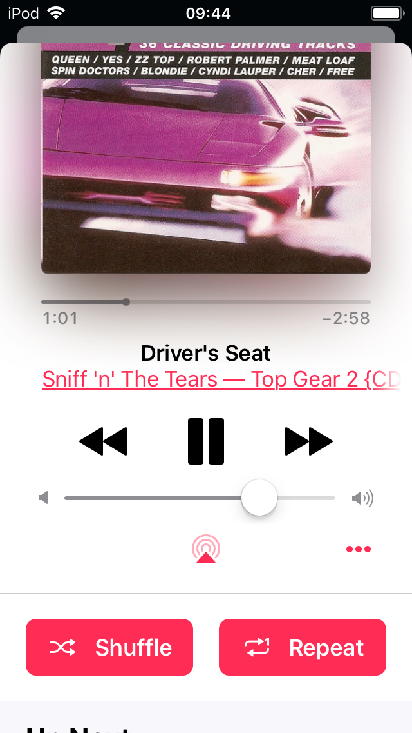
In the screenshot below, notice the small 1 in the Repeat arrows button. This indicates that the iPod is in Repeat 1 mode, not simply Repeat:


Second tip: drag the Now Playing screen up even further to reveal the Up Next list. If you are in Shuffle mode, the list is already in the shuffled order that it will be using. (There are various things you can do with the Up Next list too, but I'll leave at that for now. That's for another day.)


* Edited by author after initial posting, for clarity

Similar questions

11 replies
Question marked as Top-ranking reply

Apr 19, 2019 9:48 AM in response to Paulggg

Even easier on the iPod Touch.


Note that there are two separate places where you can turn on Shuffle Songs*, but they work differently from one another.


To do what you want; i.e. start a song of your choice playing - and then for it to shuffle from the end of that song, do not use the Shuffle button at the top of the Songs menu.


Instead:

  1. on the Songs menu, choose the song you want and start it playing
  2. you will see the song you've chosen at the bottom of the screen, as indicated by the Now Playing ribbon
  3. tap the Now Playing ribbon to bring up the full-size Now Playing screen
  4. drag the Now Playing screen upwards, to reveal additional controls below the transport controls (Shuffle and Repeat)
  5. Tap the Shuffle button that you will see on the left hand side of the Now Playing screen, so that the button turns red:


In the screenshot above, the iPod is in Shuffle mode (which we know because the Shuffle button is in red with white text. Your Shuffle button will be in light grey with red text (like the Repeat button, which is currently off). Tap the Shuffle button to turn on Shuffle and the button turns red. The song you've chosen will play the the end and then the iPod will begin shuffle play.


While you're here, here's a couple of tips. First, a word about the Repeat button. Similarly to your iPod Classic, Repeat cycles between:

Off - once the current list of songs finishes, the player will stop

Repeat - once the current list finishes, the player will repeat the same list

Repeat 1 - the player will play the same song over and over, until you tap Next button or stop the player.

Off - (again)

In the screenshot below, notice the small 1 in the Repeat arrows button. This indicates that the iPod is in Repeat 1 mode, not simply Repeat:


Second tip: drag the Now Playing screen up even further to reveal the Up Next list. If you are in Shuffle mode, the list is already in the shuffled order that it will be using. (There are various things you can do with the Up Next list too, but I'll leave at that for now. That's for another day.)


* Edited by author after initial posting, for clarity

Apr 19, 2019 7:46 AM in response to turingtest2

I’m sorry if I’m not being clear and I appreciate you trying to help.


If I hit shuffle, it then just interrupts the song I’ve played and starts playing the library from scratch.


Let me choose a song as an example; say I want to start shuffling all the songs on my iPod Touch, but beginning with The Who’s Won’t Get Fooled Again.


I want to start with Won’t Get Fooled Again and then have it move at random to another song rather than the next song in alphabetical order in my music library. If I hit shuffle, all it does is interrupt Won’t Get Fooled Again and starts again.


What I want to know is this: how do I get it to go from the song I’ve chosen when that song finishes and KEEP ON playing at random, NOT INTERRUPT the song I’ve chosen and start again?


This is easy to do on an an iPod classic.


Thanks for your patience.

This thread has been closed by the system or the community team. You may vote for any posts you find helpful, or search the Community for additional answers.

Shuffling all songs on iPod touch

Welcome to Apple Support Community
A forum where Apple customers help each other with their products. Get started with your Apple Account.
