On macOS 10.14.4, and using Pages v8.0, I get the following with drastically simplified version of your outline:
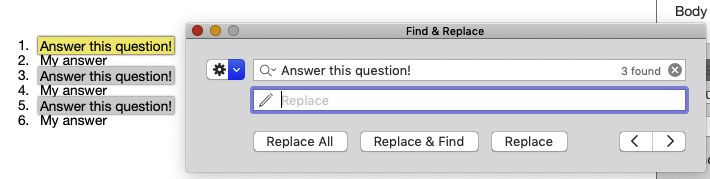
The image may not show it clearly, but those Replace buttons are active with my test.
Save your document, and quit Pages. Click on your Desktop to get Finder's attention, and then press shift+command+G to bring up the Finder's Go To Folder dialog:
~/Library/Caches
Copy and paste that path into the Go To Folder dialog and then press GO. This will put you in your local Library's Caches folder. Look for any item that has the yellow Pages v8.0 icon, and drag/drop that item (if it exists) into your Trash, and then empty the Trash. This is not a file that Pages needs, and when it feels like it, the item will be recreated by Pages. Click on the red close button on that Finder window.
Open your outline document again, and perform the Find ritual, to see if your Replace buttons are now active.

