Get GIMP into Applications Folder

Very, very new to MacBook Pro. Have downloaded latest Gimp image manipulation program / application. Expected it to appear in Applications folder, but it's in a folder named Devices. How do I relocate it to the Applications folder?


Posted on May 3, 2019 8:48 PM

Reply
13 replies

May 4, 2019 3:28 AM in response to Sisklogw

By default, when you download GIMP, it will go into your Downloads folder (provided you have not changed this destination).


Open a new Finder window before you double-click the GIMP installer, because it does not include a link target to your Applications folder. From the sidebar in the new Finder Window, click on Applications. Scroll to the bottom of that window, then drag and drop the GIMP-2.10 application icon from within the installer into the Applications folder.


Because GIMP is not installed from the Mac App Store, you first need to right-click on it and choose Open from the secondary menu. There will be a brief pause, and then you will see a progress bar where Apple's Gatekeeper is verifying GIMP. Then, another dialog will appear:
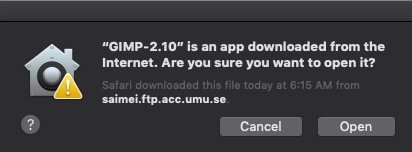

Click the Open button, and GIMP will then launch. From this point forward, GIMP will launch like any normal Mac application, and this was just a one-time ritual that one must perform to validate applications not obtained from the Mac App Store. Eject the GIMP installer from your Desktop.

May 4, 2019 10:57 PM in response to BDAqua

I hope this message goes to BDAqua who replied to my request for help regarding getting my GIMP program into my Applications folder. In my Downloads folder there is a file named gimp-2.10.10-x86_64.dmg. There is no "Install" in the name. As I said, I'm infantile in the Mac realm. I had to search on-line to learn what a DMG is and I'm not sure what "mounted" means, though I assume it means selected. When I mount/select the file, it does not show a file extension of ".app". Sorry to be so agonizingly slow, but I'm in a whole new world here. I have years of MicroSoft experience; zero Mac.


This thread has been closed by the system or the community team. You may vote for any posts you find helpful, or search the Community for additional answers.

Get GIMP into Applications Folder

Welcome to Apple Support Community
A forum where Apple customers help each other with their products. Get started with your Apple Account.
