AirPort Extreme A1521

My Airport A1521 has a blinking amber light and does not show up on Airport Utility. I have tried all the resets fram soft to hard to factory reset without any success. Is there any other way to connect to the AirPort Extreme to check what is wrong?

When I do the factory reset it blinks green once and the goes amber. After a minute it starts to flash amber.

Posted on May 19, 2019 11:36 AM

Reply
Question marked as Top-ranking reply

Posted on May 20, 2019 2:35 AM

If you have performed a Hard Reset or a Factory Default Reset, the AirPort Extreme will not show up in the main AirPort Utility window because it has not yet been configured to work on your network


Disconnect the Ethernet cable if it is still connected between your Mac and the AirPort Extreme and make sure that the WiFi is turned on at your Mac


Click on the WiFi menu at the top of the Macs screen

Look for a listing of New AirPort Base Station

Just under that listing, click on AirPort Extreme
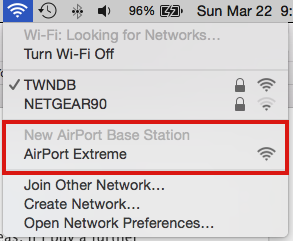


When you click on AirPort Extreme, the AirPort Utility setup "wizard" will open up and take a few seconds to analyze the network, then suggest the correct setup for the AirPort Extreme.


Follow the prompts to set up the AirPort Extreme again


Alternately, if you don't want to use WiFi to set up the AirPort Extreme, you must turn off the WiFi on the Mac

Then, connect an Ethernet cable from your Mac to the WAN "O" port on the AirPort Extreme

Open AirPort Utility

Click on the Other WiFi Devices button in the upper left corner of the window

Click on AirPort Extreme and the setup "wizard" will open up, analyze the network, then suggest the correct setup


Follow the prompts to reconfigure the AirPort Extreme


Once the AirPort Extreme has been set up, you can disconnect the Ethernet cable and turn the WiFi back on at your Mac if you want to connect to the AirPort Extreme using WiFi






4 replies
Question marked as Top-ranking reply

May 20, 2019 2:35 AM in response to jostein64

If you have performed a Hard Reset or a Factory Default Reset, the AirPort Extreme will not show up in the main AirPort Utility window because it has not yet been configured to work on your network


Disconnect the Ethernet cable if it is still connected between your Mac and the AirPort Extreme and make sure that the WiFi is turned on at your Mac


Click on the WiFi menu at the top of the Macs screen

Look for a listing of New AirPort Base Station

Just under that listing, click on AirPort Extreme


When you click on AirPort Extreme, the AirPort Utility setup "wizard" will open up and take a few seconds to analyze the network, then suggest the correct setup for the AirPort Extreme.


Follow the prompts to set up the AirPort Extreme again


Alternately, if you don't want to use WiFi to set up the AirPort Extreme, you must turn off the WiFi on the Mac

Then, connect an Ethernet cable from your Mac to the WAN "O" port on the AirPort Extreme

Open AirPort Utility

Click on the Other WiFi Devices button in the upper left corner of the window

Click on AirPort Extreme and the setup "wizard" will open up, analyze the network, then suggest the correct setup


Follow the prompts to reconfigure the AirPort Extreme


Once the AirPort Extreme has been set up, you can disconnect the Ethernet cable and turn the WiFi back on at your Mac if you want to connect to the AirPort Extreme using WiFi


May 19, 2019 11:49 AM in response to jostein64

You can connect your Mac directly to the AirPort Extreme by Ethernet and use the AirPort Utility to access it to find out the potential reason for the flashing amber LED.


A persistent, flashing amber light indicates that any of the these potential conditions may require your attention:

1. The base station has not yet been configured because it is new, or it has been reset.

2. You have selected a security configuration that is not recommended.

3. A new firmware update is available for the base station.

4. One of several other conditions, such as a disconnected Ethernet cable or invalid IP address has been detected.


To find out why your base station's status LED is flashing amber:

• Open AirPort Utility

• Click on the AirPort base station

• Look for a Status setting in the small window that appears. Note: Status only appears if there is an issue or notification.

• Click on the small amber dot there and another window will open to explain what the "issue" might be.


May 20, 2019 2:34 AM in response to jostein64

Are you still connected to the main network by wifi?


That could well prevent the Airport utility from working.


Anyway it sounds like the Airport is behaving correctly..


Turn off wifi in your computer.

Make sure the ethernet light on the Airport is on.. when you connect from a LAN port of the airport to the computer.


Ensure the Ethernet has a connection and is getting the IP address 10.0.1.2 which it always will after you reset the airport.


Just open the ethernet setup in the preferences.. and you will see.. if it has not obtained an IP something is wrong.


Make sure it is set to DHCP not a static IP.


Still no luck open a terminal and ping the Airport by IP..


Type ping 10.0.1.1


You must get a response.. use Control + C key to stop.


No response there is something else wrong.


This thread has been closed by the system or the community team. You may vote for any posts you find helpful, or search the Community for additional answers.

AirPort Extreme A1521

Welcome to Apple Support Community
A forum where Apple customers help each other with their products. Get started with your Apple Account.