Max Capacity in AirPort Time Capsule 802.11n (4th Generation), flat, square

Hi, I`ve the 4th Generation white Time Capsule delivered with 3TB and would like to update it with a bigger internal drive...


Which drive is the biggest in capacity the 4th generation Time capsule can address?


Pls only post drives which definitely work in the capsule... I would prefer something from hgst if possible


Time Capsule

Posted on Jun 16, 2019 10:55 AM

Reply
Question marked as Top-ranking reply

Posted on Jun 24, 2019 2:55 PM

Just so we get this clear..

My comment in the first post was yes to 8TB.. I did state I do not know about 10TB.


So any drive up to 8TB is fine.. I am not sure about the newer 10TB etc..


Your original question was not about 10TB drives.

Which drive is the biggest in capacity the 4th generation Time capsule can address?


I stated 8TB.. and I did not know 10TB would work since I have never tried one.

Thats why I asked, if someone runs a 10 TB Drive in the 4th gen. TC...


I put a 8TB Toshiba Enterprise drive (almost identical to the HGST) into a TC. This is not one I would normally use being a higher idle current drive.


So here are the steps.

Put the drive into the TC and restart.. You get disk error because it is not formatted.. naturally.


Go to the disk tab and select quick erase.. since it does not need low level format.


The TC now shows two errors.. as it is busy formatting.


And success.


Since I also have some low level access..


sd0 at scsibus0 target 0 lun 0: <TOSHIBA, MG05ACA800E, GX0R> disk fixed


sd0: fabricating a geometry


sd0: 7452 GB, 7630885 cyl, 64 head, 32 sec, 512 bytes/sect x 15628053168 sectors


sd0: fabricating a geometry


sd0: async, 8-bit transfers, tagged queueing


boot device: <unknown>


root on md0a dumps on md0b


root file system type: ffs


WARNING: clock gained 30 days


WARNING: CHECK AND RESET THE DATE!


mgi_init: ifp=0xc252c03c, sc=0xc252c000


mgi_init: ifp=0xc25d303c, sc=0xc25d3000


mgi_init: ifp=0xc252c03c, sc=0xc252c000


dk0 at sd0: APconfig


dk0: 2097152 512-byte sectors at 40, type: hfs


dk1 at sd0: APswap


dk1: 2097152 512-byte sectors at 2097192, type: hfs


dk2 at sd0: APdata


dk2: 15623858784 512-byte sectors at 4194344, type: hfs


hfs: Initializing the journal (joffset 0xa000 sz 0x800000)...


hfs: Initializing the journal (joffset 0xa000 sz 0x800000)...


hfs: Initializing the journal (joffset 0xe8d3000 sz 0x20000000)...


jnl: journal start/end pointers reset! (jnl 0xc28c2c00; s 0x200 e 0x200)


You might have success with the 10TB if you partition it before you use it in the TC. Although you will have a disk error forevermore if you do this. I have not been successful partitioning from inside the TC firmware.


4 replies
Question marked as Top-ranking reply

Jun 24, 2019 2:55 PM in response to Papaya-Pok-Pok

Just so we get this clear..

My comment in the first post was yes to 8TB.. I did state I do not know about 10TB.


So any drive up to 8TB is fine.. I am not sure about the newer 10TB etc..


Your original question was not about 10TB drives.

Which drive is the biggest in capacity the 4th generation Time capsule can address?


I stated 8TB.. and I did not know 10TB would work since I have never tried one.

Thats why I asked, if someone runs a 10 TB Drive in the 4th gen. TC...


I put a 8TB Toshiba Enterprise drive (almost identical to the HGST) into a TC. This is not one I would normally use being a higher idle current drive.


So here are the steps.

Put the drive into the TC and restart.. You get disk error because it is not formatted.. naturally.


Go to the disk tab and select quick erase.. since it does not need low level format.


The TC now shows two errors.. as it is busy formatting.


And success.
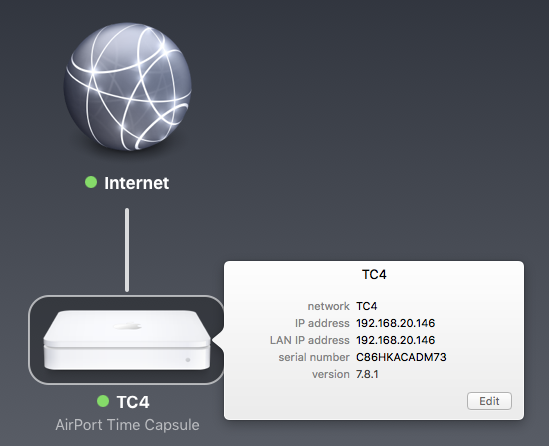


Since I also have some low level access..


sd0 at scsibus0 target 0 lun 0: <TOSHIBA, MG05ACA800E, GX0R> disk fixed


sd0: fabricating a geometry


sd0: 7452 GB, 7630885 cyl, 64 head, 32 sec, 512 bytes/sect x 15628053168 sectors


sd0: fabricating a geometry


sd0: async, 8-bit transfers, tagged queueing


boot device: <unknown>


root on md0a dumps on md0b


root file system type: ffs


WARNING: clock gained 30 days


WARNING: CHECK AND RESET THE DATE!


mgi_init: ifp=0xc252c03c, sc=0xc252c000


mgi_init: ifp=0xc25d303c, sc=0xc25d3000


mgi_init: ifp=0xc252c03c, sc=0xc252c000


dk0 at sd0: APconfig


dk0: 2097152 512-byte sectors at 40, type: hfs


dk1 at sd0: APswap


dk1: 2097152 512-byte sectors at 2097192, type: hfs


dk2 at sd0: APdata


dk2: 15623858784 512-byte sectors at 4194344, type: hfs


hfs: Initializing the journal (joffset 0xa000 sz 0x800000)...


hfs: Initializing the journal (joffset 0xa000 sz 0x800000)...


hfs: Initializing the journal (joffset 0xe8d3000 sz 0x20000000)...


jnl: journal start/end pointers reset! (jnl 0xc28c2c00; s 0x200 e 0x200)


You might have success with the 10TB if you partition it before you use it in the TC. Although you will have a disk error forevermore if you do this. I have not been successful partitioning from inside the TC firmware.



Jun 16, 2019 3:09 PM in response to Papaya-Pok-Pok

Apple build the firmware of the Airport range.. or I should say built.. on NetBSD and so it is very happy with basically any disk with a few qualifications.


NOT SMR type drives. These are also called Archive drives. They get larger capacity through overlapping tracks. Never buy them for use outside of exactly that use... archive USB drive. In Seagate range most of their larger disks in USB drives over 4TB are SMR type. Laptop drives over 2TB will also tend to use this technology.


Power and heat.. Your Gen4 TC is 6 years old min.. and could be up to 8. Basically it is living on borrowed time.

Apple managed to fix the major power issues of the Gen1 & 2 TC by using Delta brand supplies instead of Flextronics which were poorly designed. Some are dying from bad soldering. But you cannot expect a supply running 24/7 for 6 years to keep going forever.. if you get a year or two I think you should be happy. Note I really like the Gen4.. it is hugely superior design cf the Gen5. So I keep them myself. I replace the internal power supply with external and remove the bottom rubber mat and put them on feet.

Heat is your big killer. So you want Green Drives.. that does not mean a huge amount these days. Apple used WD Green drive in the TC.. yours will be 3TB. They have actually turned out to be reasonable drives. The successor is WD Red which is very similar design and particularly for NAS use. Pick drives with lower speed 5400 or 5900RPM as they tend to be designed for lower consumption. There is nothing wrong with using 7200RPM drives as long as you keep up ventilation.. but you will get no better performance.. the TC is processor bound.

So any drive up to 8TB is fine.. I am not sure about the newer 10TB etc..


Almost forgot SpinDown.. This is where NAS drives tend to be better. The TC does not handle spindown particularly well.. remember this is NOT a NAS.. and using it as a NAS which I suspect you intend to do is not a great idea. If you want a single disk NAS buy one.

Even if a particular brand and model spindown work it is no guarantee the same model spindown will work in another.. firmware on hard disks change and some work well and others are terrible. This is a big bugbear to me as I prefer spindown to work.. the problem is you have no controls.

Most NAS drives tend to have good spin down. It is built into the firmware.


HGST are great. The original supplier is now split between WD and Toshiba. Both of them sell drives derived from the original Hitachi design.

Jun 24, 2019 11:31 AM in response to LaPastenague

Thx for the long answer....


however, I´ve tried a 10TB hgst Ultrastar HUH721010ALN600 in the TC... and it was unable to set it them in the TC 4th gen. using the actual Airport Util under 10.13. After accessing the drive and doing something for a short time, it ended with an error message, saying that it was unable to finish the setup...


I guess, the Drive could be a bit to big for the TC... Thats why I asked, if someone runs a 10 TB Drive in the 4th gen. TC...


The TC is planned to run as a backup device in the way as it was designed. Here several Macs should write their Backups to the TC whereas I plan to use a 2nd TC of a bigger capacity for backups for odd and even backups...


However, I tried the drive also in my MacPro 5.1 (an 4.1 update to 5.1) running 2 x5690 Xeon Cpu, but the Mac (10.13) was unable to format it also, so I was digging a bit deeper into that topic. I read a lot of articles, that it looks like many of hgst`s bigger drives, (starting with the 6TB and bigger ones) have some problems, if the machine is rebooting by a softreset, but work fine, if the Mac was started with a cold boot...


some users tape a pin (pin 3 or so) on the drive and such things I read... I think, that could be the solution for me because I just want a drive I could pop in and than do its job without spending days and weeks finding a solution...


So...

which big data drives are working definitely in a Mac 5.1 and in the Time Capsule, 4th generation? As bigger capacity the drive, as better it is....


This thread has been closed by the system or the community team. You may vote for any posts you find helpful, or search the Community for additional answers.

Max Capacity in AirPort Time Capsule 802.11n (4th Generation), flat, square

Welcome to Apple Support Community
A forum where Apple customers help each other with their products. Get started with your Apple Account.