Cannot verify card after restoring new iPhone from backup

I’ve just got a new iPhone XR and after restoring it from a current backup, I am not able to re verify my Debit card. When I go to verify my card it shows the last 4 digits of the card which are from an older card, so I do not have the correct security number for that card. I have tried ‘adding a different card’ which is the most up to date version of the older card but this fails every time saying ‘cannot add this card. It has let me verify my other bank card which was up to date.

iPhone XR, iOS 12

Posted on Jun 18, 2019 8:58 AM

Reply
2 replies

Jun 18, 2019 9:06 AM in response to Cna1406

If you use Family Sharing and you see a message about a billing problem with a previous purchase, the family organizer must update their billing information.


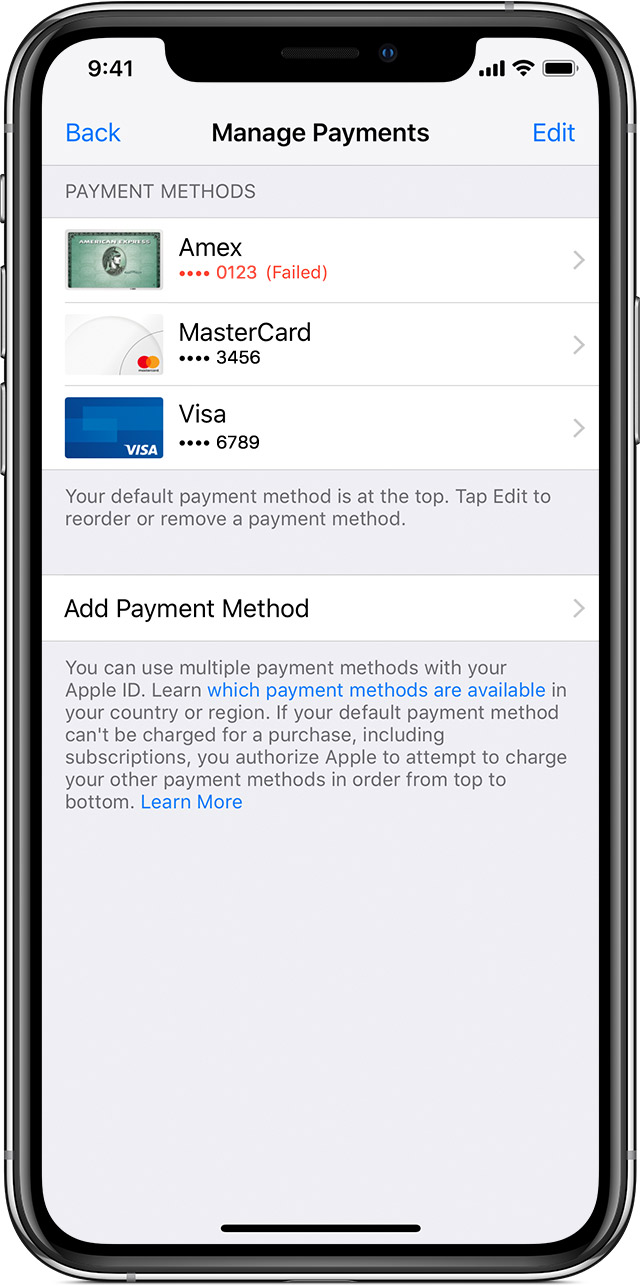
You can update your billing information or add a payment method in Settings on your iPhone, iPad, or iPod touch, or in iTunes on your Mac or PC. If there's an issue with the billing address or expiration date, tap or click the payment method, then update the payment information.


Tap "Edit" to reorder payment method. (See the pic below)


If your payment method is declined in the App Store or iTunes Store ...

https://support.apple.com/en-us/HT203005

This thread has been closed by the system or the community team. You may vote for any posts you find helpful, or search the Community for additional answers.

Cannot verify card after restoring new iPhone from backup

Welcome to Apple Support Community
A forum where Apple customers help each other with their products. Get started with your Apple Account.