
Filter Unknown Senders not working
I keep receiving many many spam messages from unknown numbers after turning on "filter Unknown Senders"; the only two to go to the Unknown Sender tab are real people. Any suggestions?
Thanks
iPhone SE, iOS 12
I keep receiving many many spam messages from unknown numbers after turning on "filter Unknown Senders"; the only two to go to the Unknown Sender tab are real people. Any suggestions?
Thanks
iPhone SE, iOS 12
Filer unknown messages are only for iMessages, not for SMS.
If the sender is not in your contact list or some times if their phone numbers are not in the correct format will at times end up in Unknown sender.
Filter iMessages from unknown senders
You can filter iMessages from people who aren't saved in your Contacts.
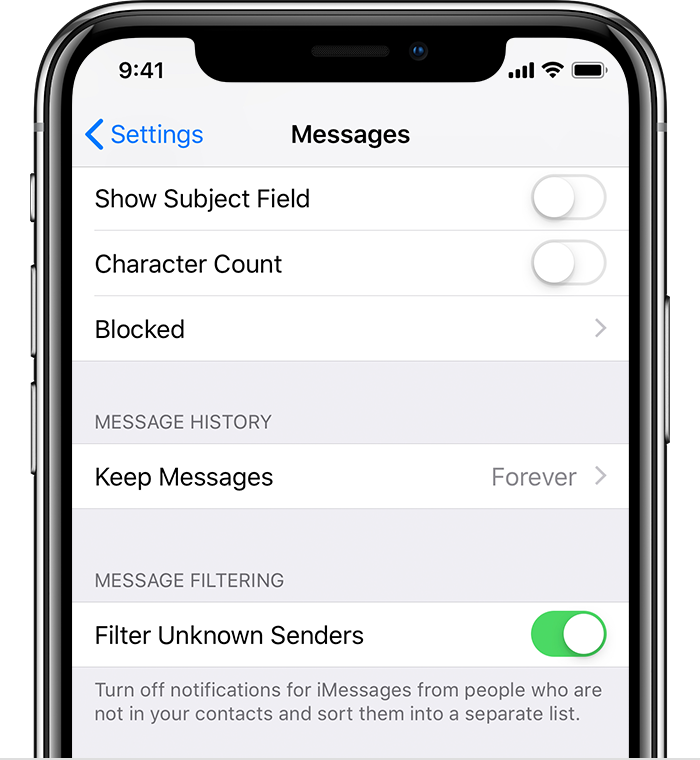
To filter iMessages, go to Settings > Messages and turn on Filter Unknown Senders.
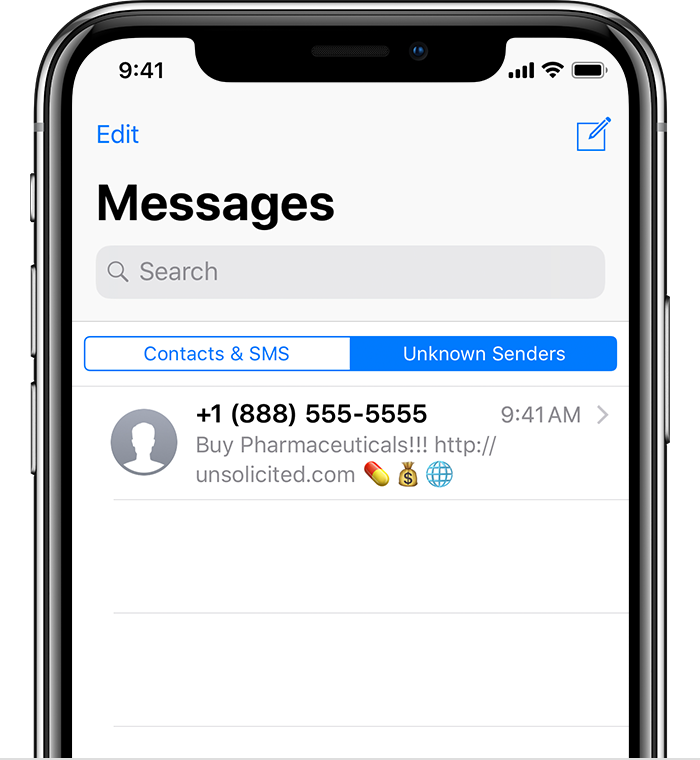
In Messages, you'll see a new tab for Unknown Senders but you won't get notifications for these iMessages.

Block phone numbers and contacts on your iPhone, iPad, or iPod ...
Filer unknown messages are only for iMessages, not for SMS.
If the sender is not in your contact list or some times if their phone numbers are not in the correct format will at times end up in Unknown sender.
Filter iMessages from unknown senders
You can filter iMessages from people who aren't saved in your Contacts.
To filter iMessages, go to Settings > Messages and turn on Filter Unknown Senders.
In Messages, you'll see a new tab for Unknown Senders but you won't get notifications for these iMessages.
Block phone numbers and contacts on your iPhone, iPad, or iPod ...
Filter Unknown Senders not working
